Turns out that is not exactly true.
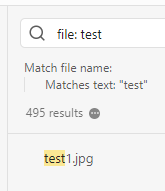
If you search without any qualifiers, it is true, but the minute you search for file: xxx or path: xxx then the excluded files display.
Steps to reproduce
paste a jpg or png file into any sandbox page and rename the image “test1”.
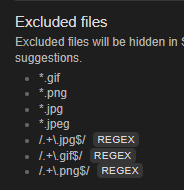
go to Settings > Files and links > Excluded files > Manage and add *.png or *.jpg depending on the filetype you inserted.
I expect the results to exclude the files regardless of extra search filters, if only because filters are often required when searching for common words, or in a large database.
Recommendation/feature request:
Perhaps the excluded files can be displayed in the search results when the search explicitly includes the excluded extension: test1.png or file: test1.png
Environment
SYSTEM INFO:
Obsidian version: v1.9.12
Installer version: v1.7.6
Operating system: Windows 11 Home 10.0.26100
Login status: logged in
Language: en
Catalyst license: vip
Insider build toggle: on
Live preview: on
Base theme: adapt to system
Community theme: none
Snippets enabled: 0
Restricted mode: on
The exclusion rule *.jpg only excludes a single file named “*.jpg”. You need to use a regular expression: /.+\.jpg$/. (Various ones will work; this one matches one or more of any character, followed by .jpg at the end".
Sorry, I don’t understand. The rule *.jpg works fine in that it hides all files with the .jpg extension when searching (except for when filtering the search). Are you saying that if I used the regex instead all .jpg files would be excluded EVEN WHEN I searched using file: search or path: search?
That is what I’m saying. I tested just now to make sure.
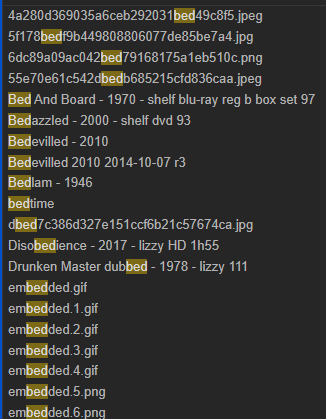
The placeholder text in the box where you add filters only says path or "/regex/", which is why I said *.jpg shouldn’t work. I tested that too and found the behavior you described. But try it without that filter, and you’ll find the same thing. Search seems to not search in attachment filenames (but does search in note filenames). I don’t know if that’s intentional. And I’m not sure now if *.jpg is intended to work or not. I’m guessing no, but it would be convenient if it did since it’s a common convention. Unfortunately the Excluded Files setting isn’t documented in Help; the only info is what’s given in the UI. "Excluded files" setting is undocumented · Issue #956 · obsidianmd/obsidian-help · GitHub
I’ve been and still am working on a strict deadline. Just wanted you to know that I read your response (thank you by the way) and I will get back to you in the next couple of weeks when I will finally have some free space in my head!