Before opening a new bug report, please search the forum for duplicates and follow the Troubleshooting Guide.
- We only consider bugs that are reproducible in the sandbox vault or a vault with no third-party plugins/no css snippets/default theme.
- For Linux, we only accept bug reports that are reproducible with our AppImage or Snap package under Gnome or KDE.
- Developer issues with the API should go here
- Themes and Custom CSS issues should go here
- Translations issues/improvements should be posted here
- Obsidian Clipper Bugs should be posted here
- Obsidian Importer Bugs should be posted here
Once you’ve done the above, delete everything above this line.
Steps to reproduce
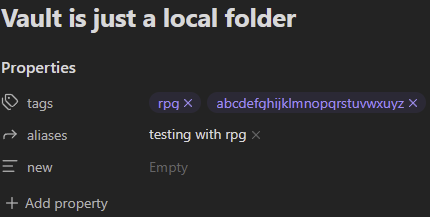
- Open a vault
- Show file properties
- Add tags property
- Fill tags with text with descenders (e.g. gjpqy)
Did you follow the troubleshooting guide? [Y/N]
Y
Expected result
Tags text properly legible.
Actual result
Tags text was cut off.
Environment
SYSTEM INFO:
Obsidian version: v1.11.2
Installer version: v1.10.6
Operating system: Windows 11 Home 10.0.26200
Login status: logged in
Language: en
Catalyst license: supporter
Insider build toggle: on
Live preview: on
Base theme: adapt to system
Community theme: none
Snippets enabled: 0
Restricted mode: on
RECOMMENDATIONS:
none