Disclaimer
Is this plugin open source? Yes
Is this plugin completely free? Yes
Is this plugin vibe-coded beyond the author’s ability to comprehend how it works? No
Community Directory: https://community.obsidian.md/plugins/feuillets
I write a lot, but not always the same kind of thing.
I write novels and articles. I prepare courses for my students and make presentations. I collect research, sources and notes. And sometimes I start writing before I even know what form the text will eventually take.
For years, that meant moving between several very good tools.
I wrote two novels in Scrivener, and I still have a lot of respect for it. It taught me the value of a modular manuscript: a book can be made of parts, chapters and scenes without becoming one enormous document.
I also spent a lot of time studying and using Ulysses. I loved much of its ergonomics — the visual calm, the focus on writing, the feeling that the interface could almost disappear behind the text. But its subscription model did not fit what I wanted from a writing tool I might depend on for many years.
Articles and courses often ended up in Word.
Presentations in PowerPoint.
Notes and research increasingly lived in Obsidian.
None of these applications was really the problem.
The problem was that my writing was scattered between all of them.
And eventually another question became more important than convenience.
I wanted the software to be replaceable
Some of what I write may stay with me for decades.
I did not want its future to depend on a particular application, subscription, database or proprietary project format.
I wanted the software to be replaceable.
The writing should not be.
That is why plain Markdown became fundamental for me.
A chapter should remain a file.
A scene should remain a file.
A research note should remain a file.
If the software around them disappears, changes direction, or simply no longer suits me, the writing should still be there.
By then, Obsidian was already where much of my thinking, research and note-taking happened.
So instead of asking whether I could replace Scrivener, Word or PowerPoint, I started asking a different question:
Could the place where I think and research also become the place where I actually write and finish my work?
A novel.
An article.
A course.
A presentation.
A book.
And could I do it while keeping the underlying writing as ordinary local files?
That question became Feuillets.
Building a writing environment around the files
The idea was never to reproduce another application inside Obsidian.
I wanted to keep what I had learned from dedicated writing software while leaving the texts themselves independent from the tool.
Scrivener had shown me the usefulness of structure.
Ulysses had shown me the importance of a calm and fluid writing experience.
And my work as both a writer and a teacher had shown me that the same material can have very different destinations.
So Feuillets gradually grew around three basic needs.
Organize
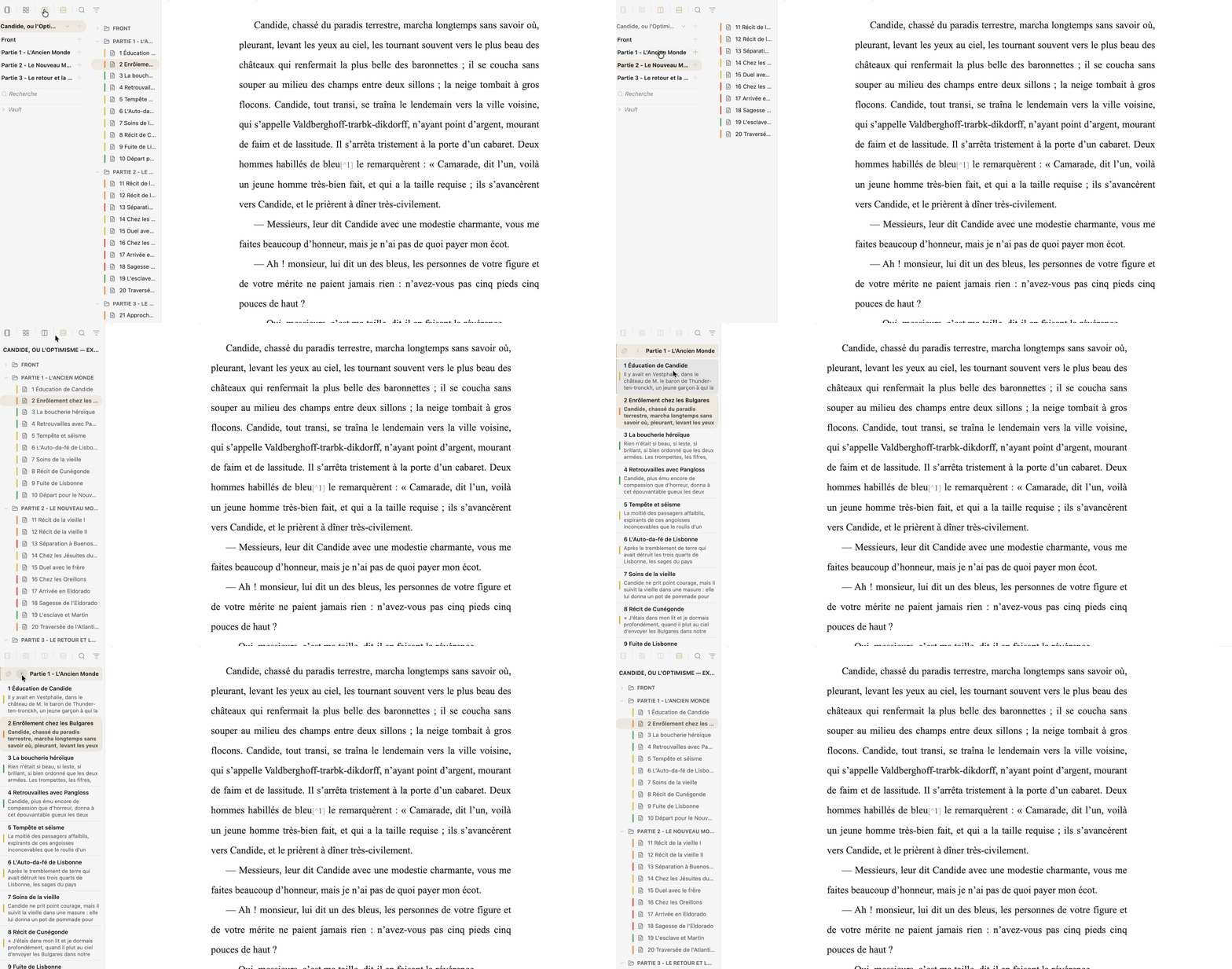
The Binder lets separate Markdown files become a structured writing project.
Parts, chapters, scenes and sections can remain independent files in the vault while Feuillets lets me work with them as a whole.
Write continuously
This was probably the feature I needed most.
I like keeping a manuscript modular, but I do not want to feel those file boundaries while I am writing.
Continuous mode lets me open a chapter, a folder or a group of files as one editable text.
The writing experience is continuous, but the changes are saved back into the original Markdown files.
many Markdown files → one continuous editor → the same Markdown files
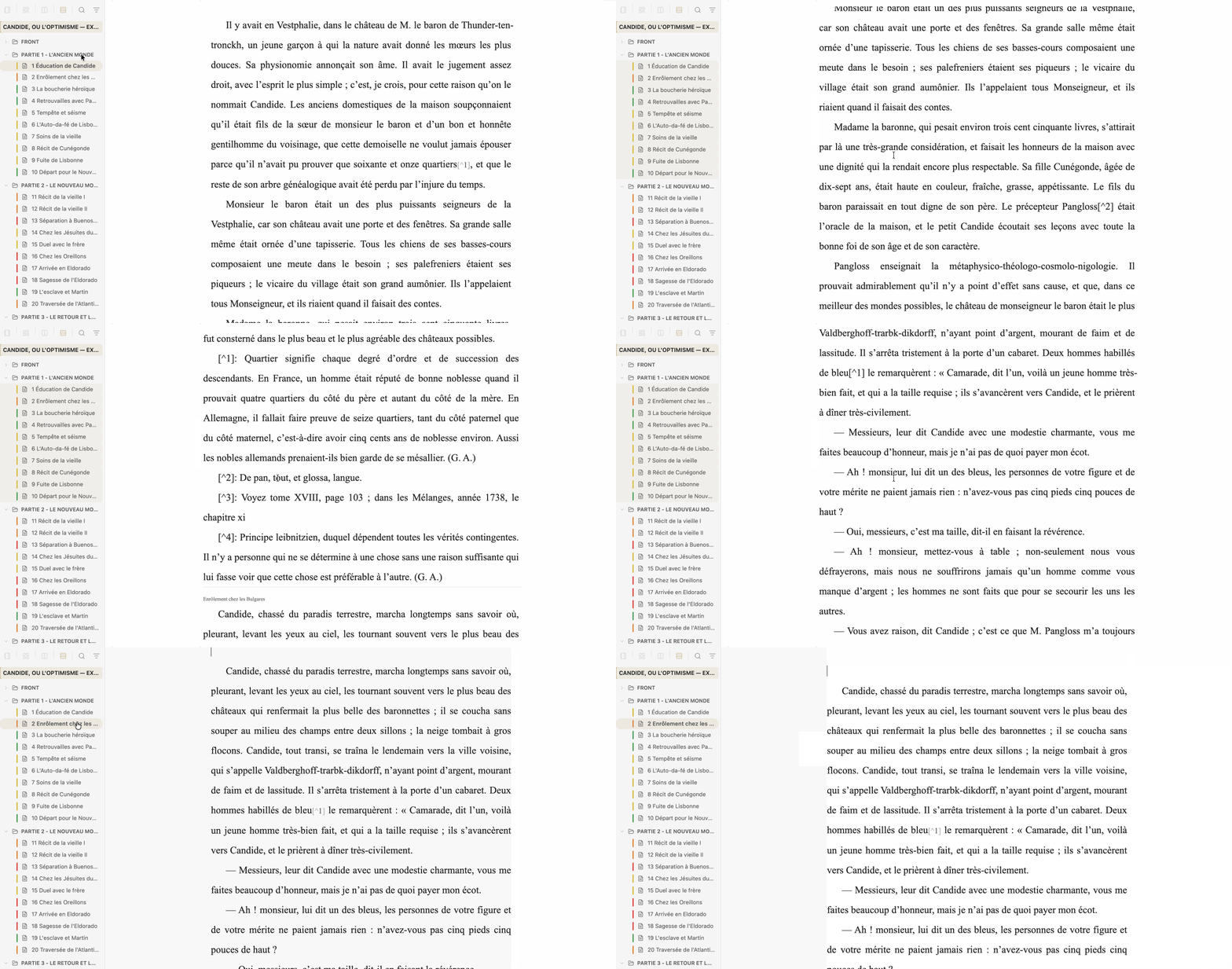
For me, this solved a tension I had lived with for a long time: I no longer had to choose between modular files and continuous writing.
I could have both.
Finish
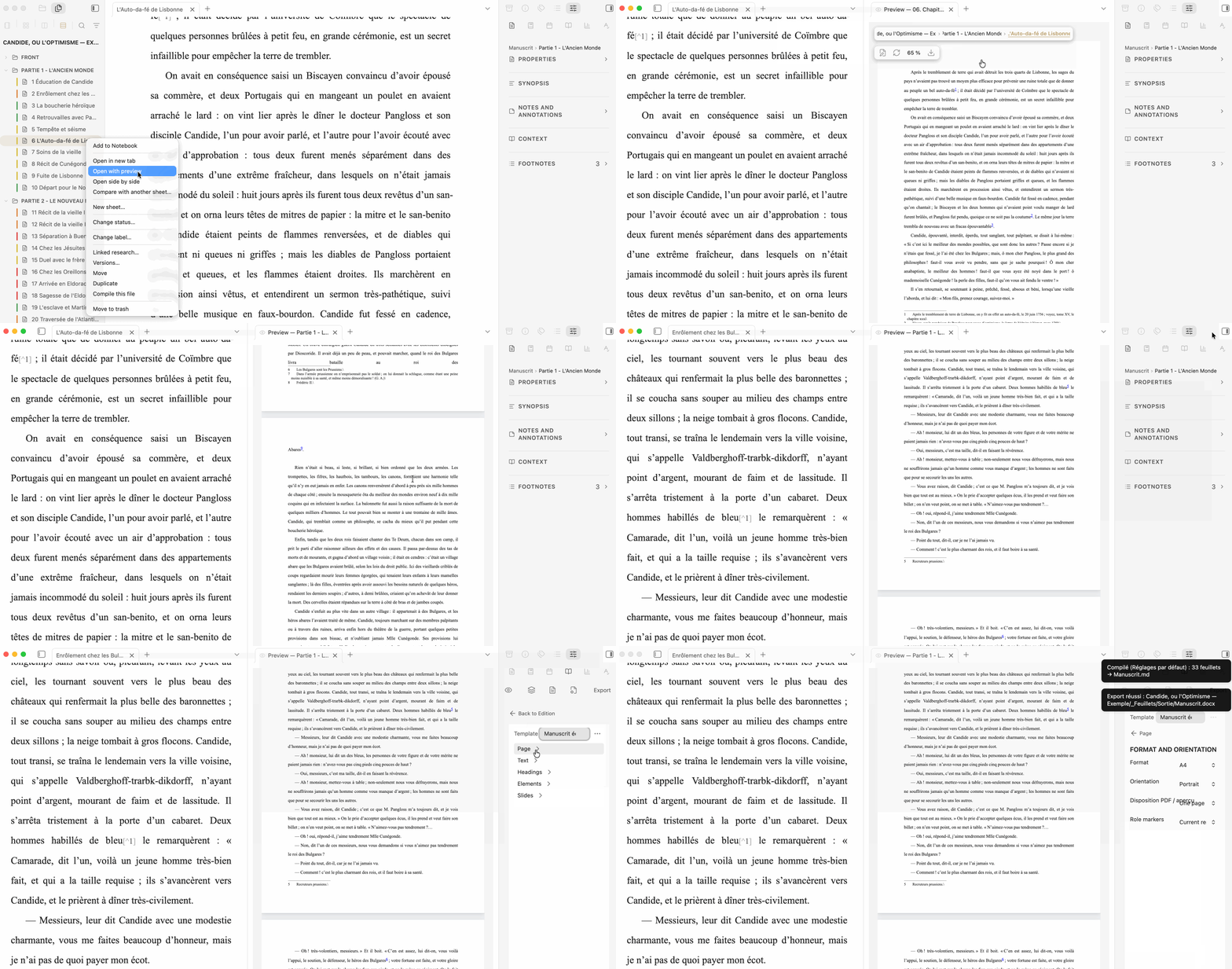
Eventually I need to stop looking at the structure and see the work as a composed document.
I need to revise it, compare versions, preview it, and eventually produce something that can leave my vault.
So Feuillets also provides revision and comparison tools, composed preview, compilation and export.
The principle underneath all of this is simple:
Feuillets works around the files. It does not take them over.
Not only novels
Feuillets began with long-form writing, but my own work quickly pushed it beyond novels.
An article does not need the same structure as a book. A course may need research, notes and organization but very little else. A presentation has another destination entirely.
And projects can change form.
A note can become an article. An article can feed a course. Research collected for a course can later find its way into a book.
Sometimes I do not know what a text will become when I start writing it.
I wanted the underlying material to remain in the same place instead of moving from application to application every time its destination changed.
That is why Feuillets does not impose one mandatory workflow.
A short article may use almost none of its organizational tools. A novel may grow into a Binder containing dozens or hundreds of files, with research, cards, chronology and narrative threads. A course may use a completely different combination.
Use what the project needs. Ignore the rest.
No writing tool is perfect
I do not think a perfect writing application exists.
Scrivener is not perfect. Ulysses is not perfect. Word and PowerPoint are not perfect. Obsidian is not perfect.
And Feuillets certainly is not either.
Every writing tool embodies choices about how writing should be organized and worked with. Something that feels completely natural to one person may be completely wrong for another.
Feuillets reflects my own needs very strongly.
I am a writer and a teacher, and this is the tool that gradually emerged from the way I actually work.
It works for me.
What I hope now is simply that it may also be useful to other people.
Feuillets is currently at version 2.8.2 and is available in the Community Plugins directory.
It is free and open source.
Local Markdown · No account · No telemetry · No lock-in · GPL-3.0
And if one day I stop using Feuillets, the important part remains:
the writing.
I would be very interested to hear from people using Obsidian for novels, nonfiction, academic writing, essays, teaching, translation, presentations, research-heavy projects, or other long-form work.
You may use Feuillets very differently from the way I do.
That is precisely what I am curious to discover.
Website: https://sargon01.github.io/feuillets-site/
GitHub: https://github.com/Sargon01/Feuillets