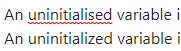
The British spelling “uninitialised” should be accepted.
Actual result
Obsidian allows the American spelling “uninitialized” but marks the British spelling “uninitialised” as incorrect despite the selected language being “English (GB)”.
Environment
SYSTEM INFO:
Obsidian version: v1.7.7
Installer version: v1.4.16
Operating system: Windows 10 Home 10.0.22631
Login status: not logged in
Language: en
Insider build toggle: off
Live preview: on
Base theme: adapt to system
Community theme: none
Snippets enabled: 0
Restricted mode: on
RECOMMENDATIONS:
none
Additional information
(I’m aware I can add this to my personal dictionary but this is more for the future.)
I was getting the same problem,British English spellings being recognised as incorrect while using the English (GB) spell check language.
I was able to fix it by installing the Windows Language Pack for English (United Kingdom) where as I had previously been using English (Ireland). When I switched to English (United Kingdom) it stopped recognising the British English spellings as incorrect.
I have now switched back to the English (Ireland) Windows Language Pack while keeping the other installed, and it is still recognising the British English spellings as correct.
I have not tried uninstalling the English (United Kingdom) Windows Language Pack to see if it switches back.
In General settings keep language as English not English (GB), then go to Editor, scroll down under Behavior, set spellcheck languages to English (Australia) or (UK).
Thank you! Followed your steps (it allows for multiple languages at once so I have both EN UK + US on and a few others) and restarted Obsidian. All the bothersome red lines are gone now