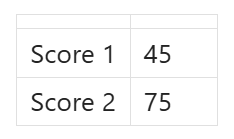
Headerless tables are a common vertical data representation similar to Obsidian properties. However, they are rendered with an empty row above them which looks like the table is missing data:
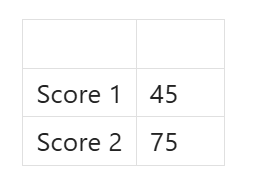
But using HTML tables the same headerless table is rendered corectly with a collapsed/minimized header which avoids the confusion:
Steps to reproduce
| |
|--|--|
|Score 1|45|
|Score 2|75|
Did you follow the troubleshooting guide?
Yes
Expected result
| Score 1 | 45 |
| Score 2 | 75 |
Actual result
| Score 1 | 45 |
| Score 2 | 75 |
Environment
SYSTEM INFO:Obsidian version: 1.12.4
Installer version: 1.12.4
Operating system: Windows 11 Pro 10.0.26200
Login status: not logged in
Language: en
Insider build toggle: off
Live preview: on
Base theme: adapt to system
Community theme: none
Snippets enabled: 1
Restricted mode: on
RECOMMENDATIONS:
Custom theme and snippets: for cosmetic issues, please first try updating your theme and disabling your snippets. If still not fixed, please try to make the issue happen in the Sandbox Vault or disable community theme and snippets.
Additional information
I have snippets enabled to debug and workaround this issue. It doesn’t affect the repro.
The greatest problem is, it’s impossible to write a CSS selector because of the lingering <br> tag. There is nothing to differentiate empty table headers.
The best approach would be to render empty headers with a class name like .headerless, but I’m also okay with the minimized default browser rendering without the <br> tag. That also would let people to write selectors agains th:empty.