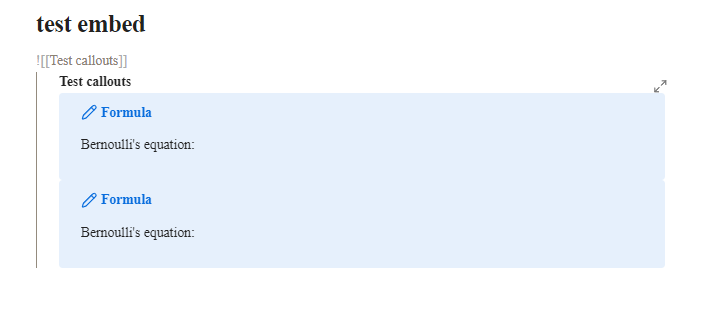
Gaps between callouts disappears when embedding. This looks similar to bug reports I’ve seen earlier that was supposed to have been fixed in version 1.8.
Steps to reproduce
Create a document with callouts.
- Create a document with callouts
- Embed that document into another document
- View the document in live preview mode
Did you follow the troubleshooting guide? [Y/N]
Yes, ran on default theme in restricted mode with all CSS snippets disabled.
Expected result
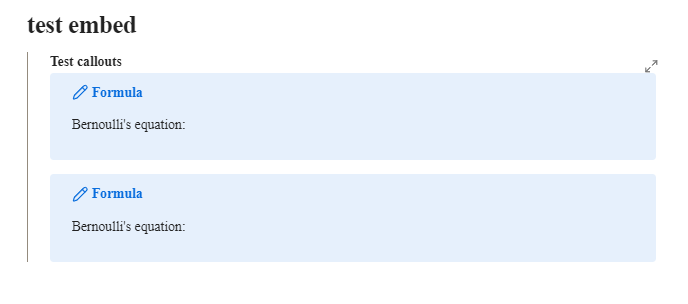
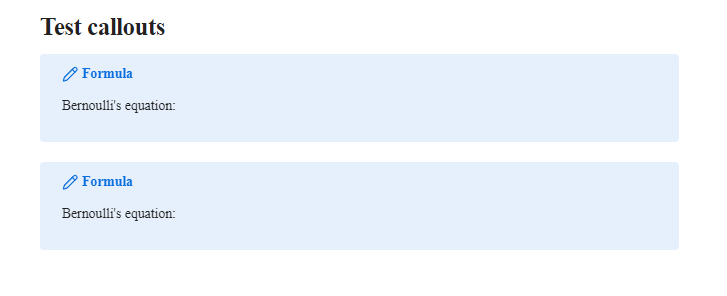
Callouts should have a gap between them, like in non-embedded live preview view and reading view.
reading view:
live preview non-embedded:
Actual result
The gap between callouts disappears when callouts are present in embedded documents in live preview view. This can cause callouts to look like they merge into one.
live preview embedded:
Environment
SYSTEM INFO:
Obsidian version: v1.9.14
Installer version: v1.7.7
Operating system: Windows 11 Pro 10.0.26100
Login status: not logged in
Language: en
Insider build toggle: off
Live preview: on
Base theme: light
Community theme: none
Snippets enabled: 0
Restricted mode: on
RECOMMENDATIONS:
none