Display Grid CSS doesn't work on PDF export

What I’m trying to do

I have made my own CSS with which I can create a simple grid within a callout (which you can find on my GitHub: obsidian-snippets/callout-grid.css at main · lajawi/obsidian-snippets · GitHub). I expected the custom styled callouts to export correctly, but all grid styling is lost (aka display: grid; doesn’t seem to work for PDF exports).

Things I have tried

I have tried other’s grid solutions too, like for example this one: Obsidian Grid Callouts · joschua.io, but even then no luck.

I tried other exporters beside the default one too, for example: GitHub - l1xnan/obsidian-better-export-pdf: Obsidian PDF export enhancement plugin · GitHub

Source mode

Live preview

Reading view

Exported PDF

Goal

Exporting a PDF that has the same layout as in live preview and reading view.

Reading view is going to be closest to the PDF. If it’s not matching when exported you’ll likely need a CSS export snippet (@media print, .print).

Last I checked efemkay’s MCL multi column layout carried over to the pdf export. You could have a look at that css to see if they didn’t anything special for export.

Where can I find that one?

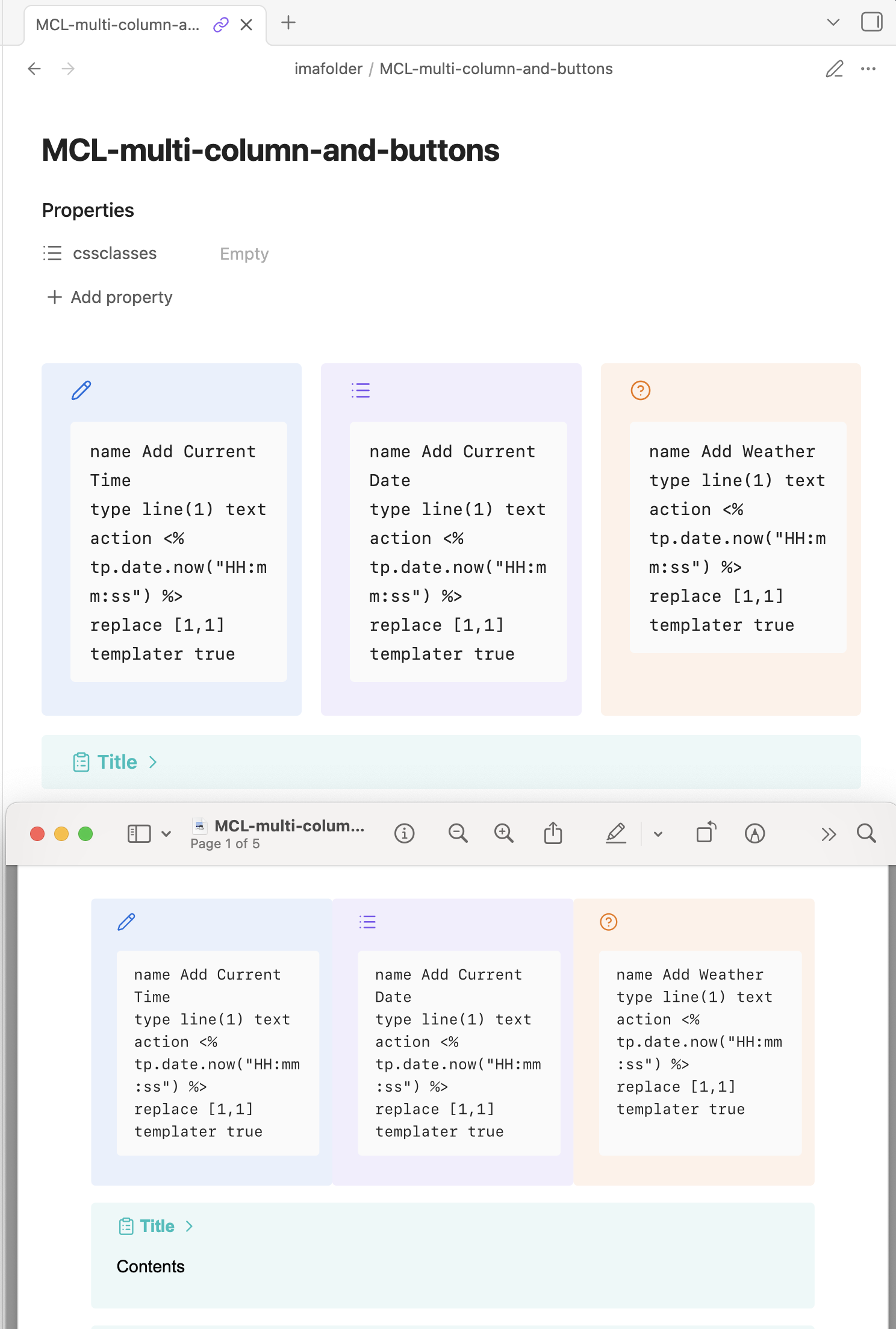
efemkay’s solution doesn’t work completely as expected in exports either (left is live preview, right is exported PDF):

What I did notice however, is that they use display: flex; instead of display: grid;, except if you set a specific column count with provided metadata “classes”. If you do that, the exact same behaviour can be observed as in my OP.

Interesting.

I don’t use the snippet myself and the export could use some padding/margins, but it looks more-or-less working on my end in a pdf.

And this is the multi-column type? Because that one works mostly too on my end, but it’s based on display: flex; instead of display: grid;.

Should I report it as a Bug reports ?

Ah, pardon. I just looked at my MCL test note quickly. It is using the > [!multi-column] callout only.


With the exception of something broken with a default theme variable, custom CSS isn’t usually accepted in bug reports.

1 Like

As ariehen pointed out already,
You’ve to create extra rules for printing.

@media print {

.print .your-rule {
 /* declaration */
}

}

I guess efemkay’s code snippet was not optimized for printing.
Did you resolve meanwhile? If you need some help, let me know.

1 Like

I did try just duplicating all the rules and encasing it in the @media print selector, to no avail.

I see you’re using the cssclass print. I suppose it’s not trivial to inspect the printed structure?

Most of the time you can re-use same rules, but not always. Don’t forget to precede any of your rules under @media print with .print

You’ve to go back and forth, like

  1. write your css rules/declarations
  2. Do a PDF export
  3. Adjust your css rules/declarations
  4. Print as PDF
  5. Etc.
1 Like

I’ll try this, but the lack of inspecting will definitely make it tedious, especially if I don’t even know display: grid; is supported at all by Obsidian for PDF export.

You say it… it is indeed tedious but the only way to make the default print settings more useable.
I didn’t give you more info till now because I’m busy. I’ll check your code but can’t guarantee a quick feedback.

One of these days the devs of Obsidian should care to update/curate existing features instead to add new features in short development cycles. Please.


1 Like

Why should this be necessary? This only makes the selector more specific, which may exclude elements if anything, no?

Okay, I had another chat in the Discord server, and turns out you just need to add !important to display: grid;: display: grid !important;.

I’ll let this stay here for anyone else in the future confused! :+1:

This topic was automatically closed 7 days after the last reply. New replies are no longer allowed.