I’m starting to notice some discrepancies between the syntax highlight in Obsidian’s code blocks, and Prismjs test page.
For example, in the Kotlin language, when rendering this code:
var nothing = null
var text: String = "nothing is $nothing"
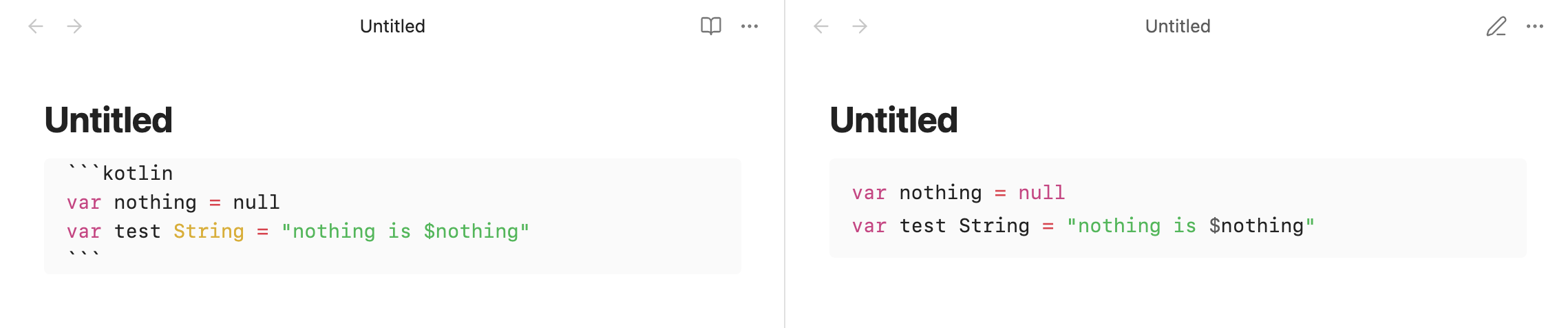
This is how it gets rendered in Obsidian:
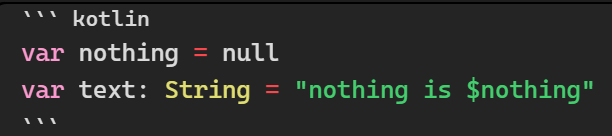
And this is how it gets rendered in Prismjs test page:

Apart from the obvious difference in color, you can notice that Obsidian does not differentiate the variable cited inside the string ($nothing) and it highlights null as a name, instead of as a keyword. And it renders NULL (uppercase) as a keyword, even though it is incorrect in Kotlin (smallcase is used).
While Prismjs renders both cases correctly.
This is just a specific example with Kotlin ofc, but I’ve also noticed other missing syntax highlights in the past.
At the time of writing, Obsidian already uses the latest version of Prismjs (1.30) so that’s not the issue.
Dunno if this should be reported as a bug. Probably Obsidian’s Prismjs theme just overlooks some details like these. Nevertheless, the native implementation of Prismjs highlights the code in a more correct way, so I thought I’d report this.
—
I’m using no theme.
All CSS and community plugins were disabled when testing.