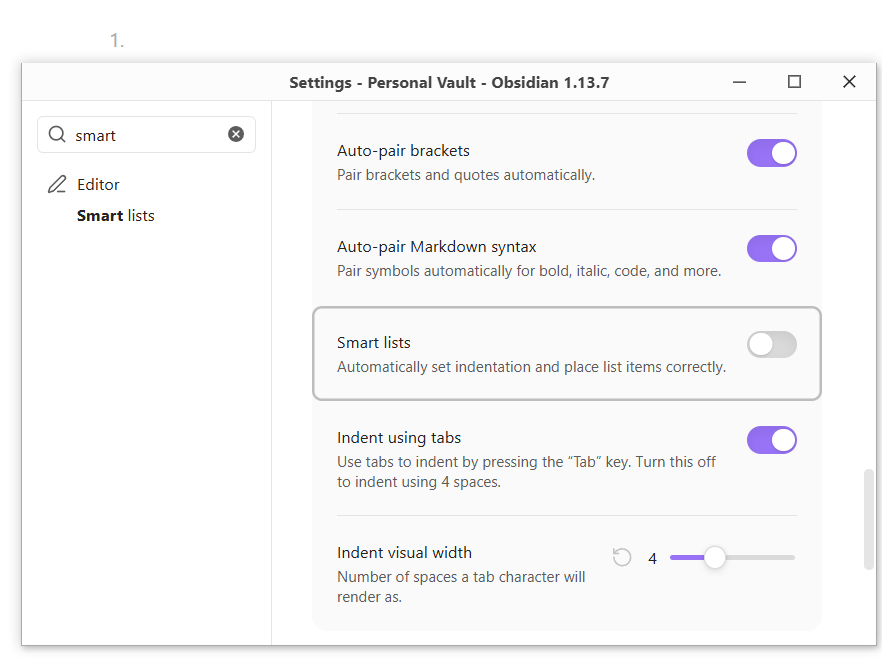
Disable automatic list enumeration, list numbers grey style and indentation

When I type 1. at the start of a line, Obsidian automatically (for some unknown reason) starts a list: it indents the line, it makes 1. grey and then on top of it when I press enter to end the line, it inserts 2., all without me asking it to do any of it.

I disabled Smart lists in the settings, yet it still does indent the numbers and still marks them grey as shown on the screenshot here:

Obsidian is a Markdown editor, so when you type 1.<space> it starts an ordered list.

You can cancel, “escape”, that behavior with a \. e.g.

1\. one
2\. two
3\. three

Right after I asked my question, I found an answer to this problem. I needed to add CSS rules to not indent the numbers:

/* Show list markers (1. / - / *) in normal text color instead of faint grey */
body {
  --list-marker-color: var(--text-normal);
}
.markdown-source-view.mod-cm6 .cm-formatting-list,
.markdown-source-view.mod-cm6 .cm-formatting-list-ol,
.markdown-source-view.mod-cm6 .cm-formatting-list-ul,
.markdown-source-view.mod-cm6 .list-number,
.markdown-source-view.mod-cm6 .list-bullet {
  color: var(--text-normal);
}

/* Remove the left padding before list markers so "1." lines up with normal text */
.markdown-source-view.mod-cm6 {
  --list-indent-editing: 0;
  --list-indent-source: 0;
}

The problem now is that it not just not indents “not list numbers” but it also doesn’t indent “proper list numbers” and it doesn’t look like the would be a way to distinguish those 2.

There should be a way to indent and grey out one but not the other, depending on what the user wants. In my case, thank God, I don’t like list indentation, so not greying out and not indenting both works for me.

Also, this reminds me of one thing I noticed long time ago: people are trying to make software too smart for its own good. Software should do what it’s explicitly told, not do the things I don’t want it to do implicitly where I then need to go and fight the system and apply CSS hacks to disable features I don’t like.

“Smart” lists, sure, add them but let people actually disable them with a single checkbox, so I can actually write 1. at the start of the line without triggering an entire list feature: automatic new item insertion, automatic list html generation, automatic styles for them.

They happened in quick succession, so I want to draw attention to ariehen’s reply above yours, in case you missed it.

Discussing your second post…

The problem now is that it not just not indents “not list numbers” but it also doesn’t indent “proper list numbers” and it doesn’t look like the would be a way to distinguish those 2.

In markdown, the way to distinguish between those two is with the backslash ariehen explained.

Obsidian tries to follow (CommonMark Spec) which, like other markdown specs, essentially ordains a numbered list when it encounters numbered-list syntax. The backslash is its provision to “invisibly” escapes a bunch of its rules.

Software should do what it’s explicitly told

I agree with that frustration in so many ways! In this case, though, that syntax is an explicit instruction to create a list.

If Obsidian didn’t do something to let us know when we’ve instructed a list, then I think a lot of people would be very unhappy finding out after exporting or publishing or using a rendered view. Obsidian’s indicators inform us on the spot.

I then need to go and fight the system and apply CSS hacks to disable features I don’t like

Talking again about just this situation, no need to hack it. An escape is provided.

And a final hot take on:

“Smart” lists, sure, add them but let people actually disable them with a single checkbox, so I can actually write 1. at the start of the line without triggering an entire list feature

I think the Smart lists setting has a confusing description. It says, “Automatically set indentation and place list items correctly.” The main change it actually effects is forcing vs allowing arbitrary numbers in our source text. That might be what’s meant by “place list items correctly”, but it’s unclear.

Turning off Smart lists lets you retain:

1. a
4. b
15. c
5. d

in your source text. Turning it on changes your source text to:

1. a
2. b
3. c
4. d

But no matter the setting, Obsidian renders list indentation and markdown-proscribed lists and numbering.