Hi!
I’m an engineering student who just started learning about Zettelkasten & using Obsidian. Unfortunately most of my coursework has diagrams and drawings taking up 60% of my notes. That being said, a lot of the topics between these diagrams would heavily benefit from being able to be linked or tagged. For example, an engine diagram might have a link towards [[sine curves]] and [[spring dampener systems]] within the diagram, or in a caption-style text of sorts. Perhaps a more easily implementable idea could be having a “diagram link” feature which opens another window with the full diagram instead of a page; this would also pair nicely with page preview, as you could quickly scroll over a word to remind you of what it looks like with a picture.
I would never be able to understand what a toroidal solenoid ↓ looks like without drawing it myself in the margin.
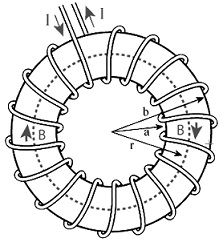
But having it break text disconnects the diagram from the explanation of what all the bits n pieces inside it mean, especially in topics where 5-10 diagrams & pictures might be needed on a page.
I still use obsidian for all my other research interests, but this feature would be immeasurable for finally moving away from tablet notes for engineering coursework.