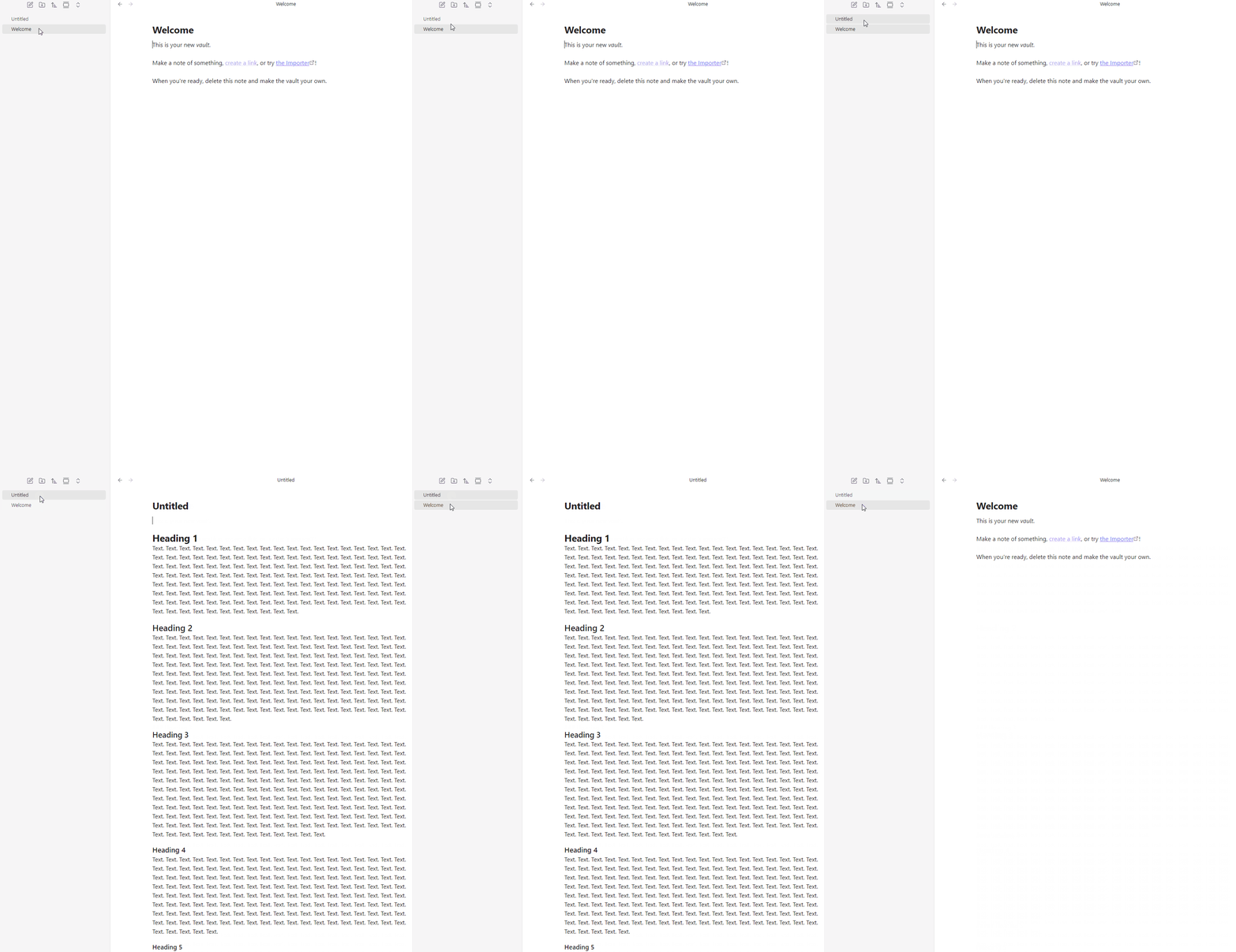
Issue in live preview mode where a portion of a note’s raw markdown syntax displays when clicking into the note and then renders a second later. This doesn’t happen for small notes. It happens to the latter portion of longer notes.
Steps to reproduce
Create new vault. Create new note. Copy and paste below text into new note. Close graph view. Click back and forth between the two notes in the vault.
# Heading 1
Text. Text. Text. Text. Text. Text. Text. Text. Text. Text. Text. Text. Text. Text. Text. Text. Text. Text. Text. Text. Text. Text. Text. Text. Text. Text. Text. Text. Text. Text. Text. Text. Text. Text. Text. Text. Text. Text. Text. Text. Text. Text. Text. Text. Text. Text. Text. Text. Text. Text. Text. Text. Text. Text. Text. Text. Text. Text. Text. Text. Text. Text. Text. Text. Text. Text. Text. Text. Text. Text. Text. Text. Text. Text. Text. Text. Text. Text. Text. Text. Text. Text. Text. Text. Text. Text. Text. Text. Text. Text. Text. Text. Text. Text. Text. Text. Text. Text. Text. Text. Text. Text. Text. Text. Text. Text. Text. Text. Text. Text. Text. Text. Text. Text. Text. Text. Text. Text. Text. Text. Text. Text. Text. Text. Text. Text. Text. Text. Text. Text. Text. Text. Text. Text. Text. Text. Text. Text. Text. Text. Text. Text. Text. Text.
## Heading 2
Text. Text. Text. Text. Text. Text. Text. Text. Text. Text. Text. Text. Text. Text. Text. Text. Text. Text. Text. Text. Text. Text. Text. Text. Text. Text. Text. Text. Text. Text. Text. Text. Text. Text. Text. Text. Text. Text. Text. Text. Text. Text. Text. Text. Text. Text. Text. Text. Text. Text. Text. Text. Text. Text. Text. Text. Text. Text. Text. Text. Text. Text. Text. Text. Text. Text. Text. Text. Text. Text. Text. Text. Text. Text. Text. Text. Text. Text. Text. Text. Text. Text. Text. Text. Text. Text. Text. Text. Text. Text. Text. Text. Text. Text. Text. Text. Text. Text. Text. Text. Text. Text. Text. Text. Text. Text. Text. Text. Text. Text. Text. Text. Text. Text. Text. Text. Text. Text. Text. Text. Text. Text. Text. Text. Text. Text. Text. Text. Text. Text. Text. Text. Text. Text. Text. Text. Text. Text. Text. Text. Text. Text. Text. Text. Text. Text. Text. Text. Text. Text. Text. Text. Text. Text. Text. Text. Text. Text. Text. Text. Text. Text. Text. Text. Text. Text. Text. Text. Text. Text. Text. Text. Text. Text. Text. Text. Text.
### Heading 3
Text. Text. Text. Text. Text. Text. Text. Text. Text. Text. Text. Text. Text. Text. Text. Text. Text. Text. Text. Text. Text. Text. Text. Text. Text. Text. Text. Text. Text. Text. Text. Text. Text. Text. Text. Text. Text. Text. Text. Text. Text. Text. Text. Text. Text. Text. Text. Text. Text. Text. Text. Text. Text. Text. Text. Text. Text. Text. Text. Text. Text. Text. Text. Text. Text. Text. Text. Text. Text. Text. Text. Text. Text. Text. Text. Text. Text. Text. Text. Text. Text. Text. Text. Text. Text. Text. Text. Text. Text. Text. Text. Text. Text. Text. Text. Text. Text. Text. Text. Text. Text. Text. Text. Text. Text. Text. Text. Text. Text. Text. Text. Text. Text. Text. Text. Text. Text. Text. Text. Text. Text. Text. Text. Text. Text. Text. Text. Text. Text. Text. Text. Text. Text. Text. Text. Text. Text. Text. Text. Text. Text. Text. Text. Text. Text. Text. Text. Text. Text. Text. Text. Text. Text. Text. Text. Text. Text. Text. Text. Text. Text. Text. Text. Text. Text. Text. Text. Text. Text. Text. Text. Text. Text. Text. Text. Text. Text. Text. Text. Text. Text. Text. Text. Text. Text. Text. Text. Text. Text. Text. Text. Text. Text. Text. Text. Text. Text. Text. Text. Text. Text. Text. Text.
#### Heading 4
Text. Text. Text. Text. Text. Text. Text. Text. Text. Text. Text. Text. Text. Text. Text. Text. Text. Text. Text. Text. Text. Text. Text. Text. Text. Text. Text. Text. Text. Text. Text. Text. Text. Text. Text. Text. Text. Text. Text. Text. Text. Text. Text. Text. Text. Text. Text. Text. Text. Text. Text. Text. Text. Text. Text. Text. Text. Text. Text. Text. Text. Text. Text. Text. Text. Text. Text. Text. Text. Text. Text. Text. Text. Text. Text. Text. Text. Text. Text. Text. Text. Text. Text. Text. Text. Text. Text. Text. Text. Text. Text. Text. Text. Text. Text. Text. Text. Text. Text. Text. Text. Text. Text. Text. Text. Text. Text. Text. Text. Text. Text. Text. Text. Text. Text. Text. Text. Text. Text. Text. Text. Text. Text. Text. Text. Text. Text. Text. Text. Text. Text. Text. Text. Text. Text. Text. Text. Text. Text. Text. Text. Text. Text. Text. Text. Text. Text. Text. Text. Text. Text. Text. Text. Text. Text. Text. Text.
##### Heading 5
Text. Text. Text. Text. Text. Text. Text. Text. Text. Text. Text. Text. Text. Text. Text. Text. Text. Text. Text. Text. Text. Text. Text. Text. Text. Text. Text. Text. Text. Text. Text. Text. Text. Text. Text. Text. Text. Text. Text. Text. Text. Text. Text. Text. Text. Text. Text. Text. Text. Text. Text. Text. Text. Text. Text. Text. Text. Text. Text. Text.
###### Heading 6
Text. Text. Text. Text. Text. Text. Text. Text. Text. Text. Text. Text. Text. Text. Text. Text. Text. Text. Text. Text. Text. Text. Text. Text. Text. Text. Text. Text.
Did you follow the troubleshooting guide? [Y/N]
Y
Also tried uninstalling and reinstalling. Been experiencing this for over 6 months, not due to a recent version. Because I have a high end PC I don’t see it being my hardware either.
Expected result
All text to render without displaying raw text first.
Actual result
Flash of unstyled text then text reflow.
Environment
SYSTEM INFO:
Obsidian version: v1.10.3
Installer version: v1.8.10
Operating system: Windows 11 Pro 10.0.26200
Login status: logged in
Language: en
Catalyst license: insider
Insider build toggle: on
Live preview: on
Base theme: adapt to system
Community theme: none
Snippets enabled: 0
Restricted mode: on
RECOMMENDATIONS:
none
Additional information
Screen recording. Headings 1 and 2 render instantly. Headings 3 and below render a second later. Applying styling like bold or italics under Heading 3 make the issue more apparent.