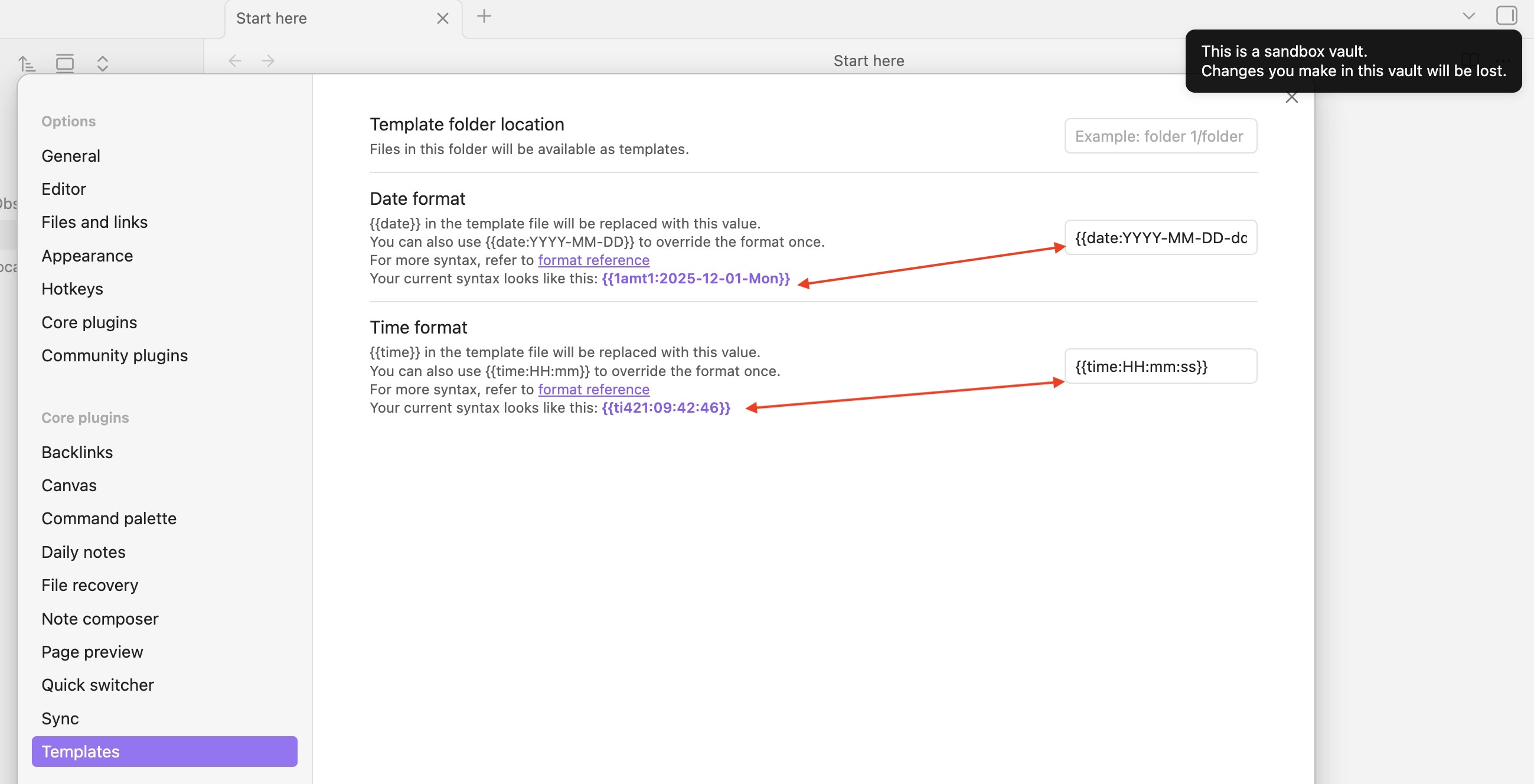
I expect this is a PEBKAC error. Trying to customize date and time templates in my vault, but they aren’t working as expected.
{{date:YYYY-MM-DD-ddd}}
{{time:HH:mm:ss}}
This is a screenshot of the same error in the Sandbox vault. When inserted into a note, I get the garbled text shown in settings, such as: {{1amt0:252025-12-01-Mon}} and {{ti500:09:50:12}}:
SYSTEM INFO:
Obsidian version: v1.10.6
Installer version: v1.10.6
Operating system: Darwin Kernel Version 25.2.0: Thu Nov 13 23:34:20 PST 2025; root:xnu-12377.61.11~7/RELEASE_ARM64_T8122 25.2.0
Login status: not logged in
Language: en
Insider build toggle: on
Live preview: on
Base theme: adapt to system
Community theme: none
Snippets enabled: 0
Restricted mode: on
RECOMMENDATIONS:
none
The same error carries over to my iPhone running iOS 26.1 and Obsidian 1.10.6.
AFAIK, you’re not supposed to put the whole placeholder ({{date:....}}) in these fields, just the moment format corresponding to the one you would like to have when using {{date}} and/or {{time}} in your template …
After checking on MomentJS, the tokens d, a, e (from {{date:...}}) and m, e (bis) from {{time: ...}} all have a corresponding output leading to something looking like: {{1amt1:...}} when the template is applied…
So, if you want to customize the default format corresponding to the output of the {{date}} placeholder in your template, you should just write in the date format field:
YYYY-MM-DD-ddd
and the same goes for the {{time}} placeholder in the time format field:
HH:mm:ss
Then, in your template, when you’ll use {{date}} or {{time}} they should be replaced by the value of now (I think) formatted following the format you chose in those 2 fields .
{{date}} should output something like 2025-12-01-Mon
{{time}} should output something like: 11:12:45
If you want to bypass these formats in your template, you can still use a placeholder such as {{date:YYYY-MM-DD}} (for example) instead of {{date}} to have the date in a different format than the ones you chose as “default” in the settings …
… Unless I misunderstood something (which could happen as I’m not really caffeinated yet )
Oh, I really must have drunk far too much extra-strength stupidity juice this morning. ¿Yowl, do I feel dim, or do I feel dim? Thank you for the detailed and extraordinarily patient explanation.
I have gone back to look at the help docs, and even if I had spent the rest of the year reading them, I still wouldn’t have clued in to not using the whole {{placeholder}}.
Shame that time-zone labels (z or zz) have been deprecated, but it seems to be possible to work around that using ‘Z’ and by escaping typed labels in Obsidian ‘HH:mm \U\T\C Z’
My pleasure … and you were probably just distracted … which just happen !
As you mention escaping, MomentJS has its own way to escape characters in format strings: square brackets (as in: YYYY-MM-DD [stuff I want to escape here] dddd) .
What’s inside the square brackets isn’t read/parse by moment when the template runs/is applied .
So, for example, you could use a placeholder in your template (instead of the default {{time}}) such as {{time:HH:mm[ UTC ]Z}} and when the template runs, it should return something 11:51 UTC +04:00
It’s barely one sentence under the tokens table in MomentJS documentation which can be very very very easily overlooked … So, IMHO, distraction it still is !
(I just knew it’s there somewhere as I’ve gone through MomentJS doc more times than I can count, over the years )
 …
… (which could happen as I’m not really caffeinated yet
  )
)


 … and you were probably just distracted
  … which just happen

