Dataview sort exclude empty values

When sorting numerically it places results with empty fields (frontmatter properties) first.
Is there a way to exclude files with empty fields from the results table?

I want to sort by 1 first followed by 2 then 3 etc.
This is my current sort code:

“SORT priority, Order ASC”

make sure to include WHERE priority in your query to filter out items without priority

Thank you. After trying your suggestion I realised I don’t want to exclude those results (as it’s a multi sort) but instead want them to appear last (I will edit the question now for clarity)
(seems I can’t edit the question after it’s been replied to!)

Question edit: as it’s a multi sort I don’t want to actually exclude those results - only place them last after numbered values

you can use choice() to act like an if:

SORT choice(priority,priority,0), Order ASC

this means if priority exists, use it, otherwise, use 0

Doesn’t seem to work - I guess it’s sorting 0 before 1

Here is all the code:

TABLE Priority, Order
FROM “-Obsidian/Test/Sort Test”
WHERE contains(Location, “Computer”) AND Completed = false
SORT choice(Priority,Priority,0), Order ASC
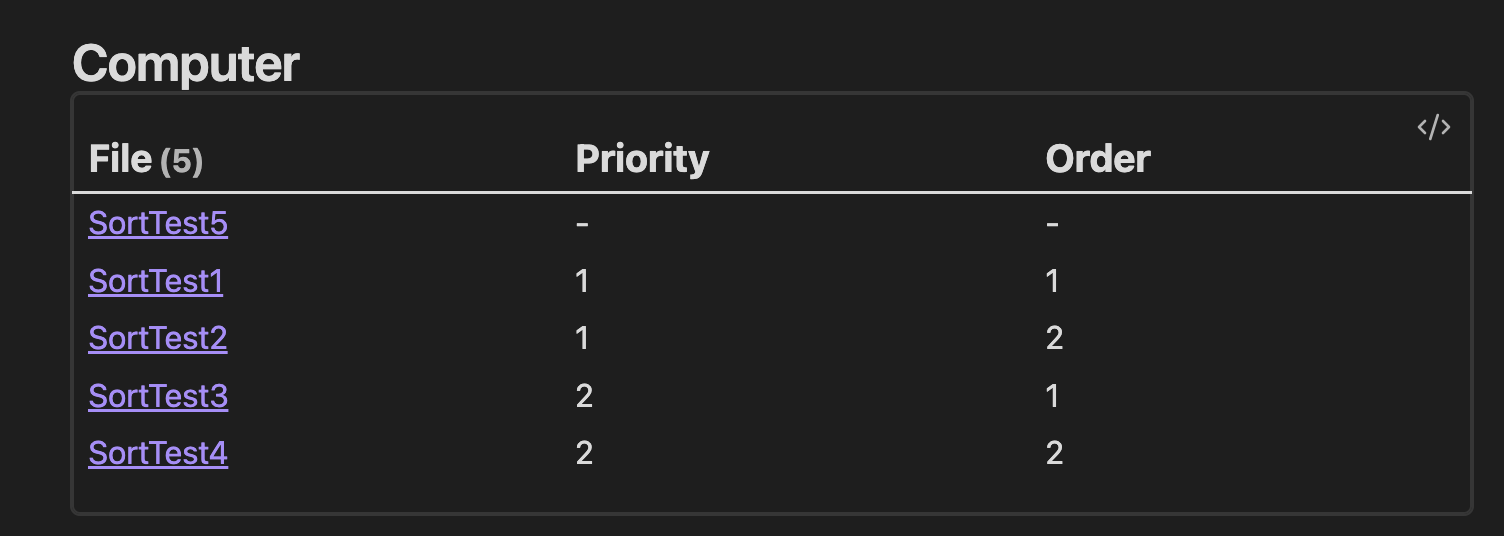
Thanks

oh, then use a large number instead of 0

1 Like

Oh damn that was so simple! Works great now Thanks

1 Like

By the way, this is what the default() function is for.

The following Dataview query will sort all null instances of myfield as though they were equal to the string “zzz”, sending them to the bottom:

```dataview
TABLE myfield
SORT default(myfield, "zzz")
LIMIT 10
```
1 Like

oh cool, I hadn’t spotted that function. thanks!

This topic was automatically closed 28 days after the last reply. New replies are no longer allowed.