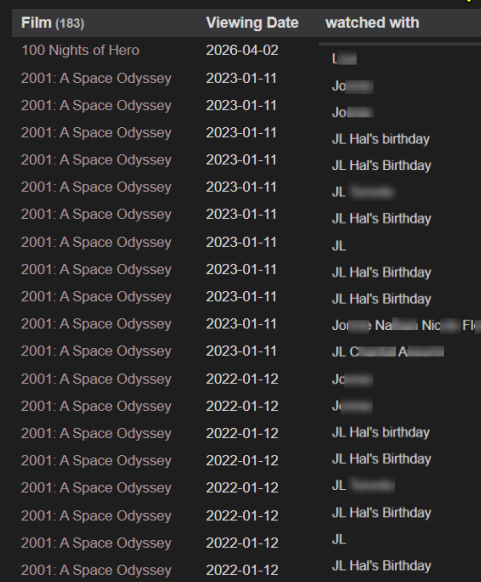
Dataview (or dvjs or datacore?) list of watched films by date incl multiple watches

The thing is…

For each one of my 14,000 film pages, I maintain a Viewing History section, under which I keep track of when the film was watched and with who, my rating, and my review. It’s all done with double colons (::) in keeping with dataview, like this:

Example: '2001: A Space Odyssey' because of multiple watches
# Viewing History
## watched:: 2023-01-11
who:: nick and stu

## watched:: 2021-01-12
who:: nick and Lou for Hal's Birthday
myrating:: 4

## watched:: 2016-01-12
who:: nick and Jim

I have never known how to create a decent list of all viewed films, in descending order, that was able to deal with multiple viewings. I don’t want to have to enumerate and/or get into a bunch of if thens, with watched[0], watched[1], watched[2], etc.


What I want (really really want)

(that Stanley Cup playoffs commerical is getting to me)

a table like this...
watched title who my rating
2026-05-02 Junebug nick and stu 3.5
2026-05-01 2001 A Space Odyssey nick and stu and terry 4.5
2026-04-24 Viva Las Vegas nick and mary 2
2026-04-22 2001 A Space Odyssey nick and charley 4.5

… or a comma separated list like this (which is preferable, actually, as it is easier to read when opening an md file outside of obsidian).

2026-05-02, Junebug, nick and stu
2026-05-01, 2001 A Space Odyssey, nick and stu and terry

:triangular_flag: The important thing is to have the various re-watches listed as individual watches (rows) in descending order, and if at all possible, output as a md table/list so that I can see info rather than code when opening the md file outside of Obsidian.


What I’ve Tried

Tried this dvjs code:

const pages = dv.pages("#filmtitle or #short or #tvtitle")
.where(p => p.watched && p.watched.year == '2022' && p.watched.month == '07')
.sort(p => p.watched, 'desc');
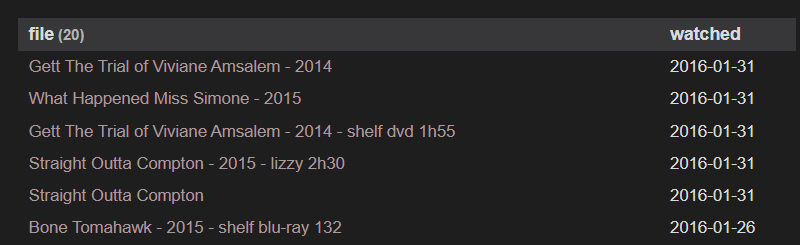
dv.table(["file", "watched"], pages.map(f => [f.file.link, f.watched]));
    
See Results: doesn't include rewatches

I watched 2001 on Jan 14 and it doesn’t appear on this list because it is a rewatch, so not watched[0] .
I also tried this:

TABLE WITHOUT ID "[[" + title + "]]" as "Film", watched as "Viewing Date", who as "watched with"
from "Films" or "Films not in collection"
WHere watched != null
limit 25
sort watched DESC
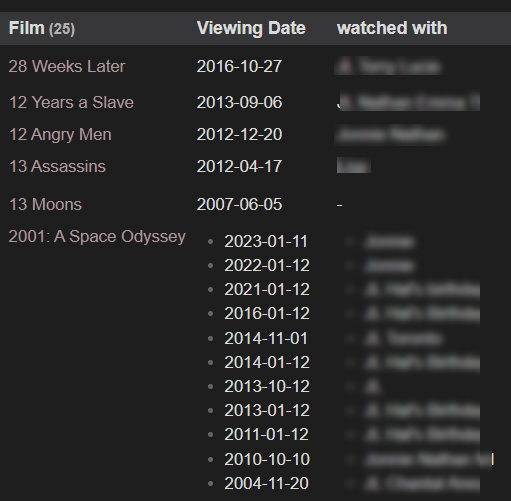
Result: This came close but includes all rewatches in one block

Conclusion

I’ve tried too many things in the past 5 years to list here. Needless to say, none worked.

Maybe I should give up on Dataview(and js), and give it a shot with Datacore? I read that it can do things with headings… and maybe that’s the way to do this given that each of my watched dates is a heading: ## watched:: 2025-09-12

Personally I would rather not depend on them being headings so if I could get dataview and/or dvjs to work, that would be fantastic.
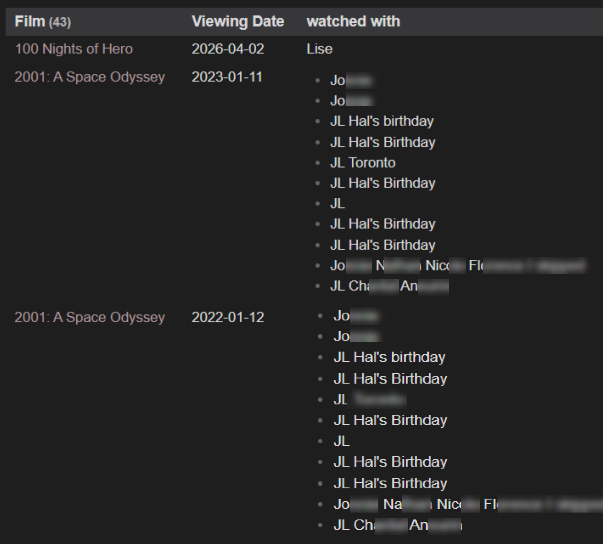
TABLE WITHOUT ID "[[" + title + "]]" as "Film", watched as "Viewing Date", who as "watched with"
from "Films" or "Films not in collection"
WHere watched != null
limit 25
FLATTEN watched
sort watched DESC

You need FLATTEN

Thanks so much. That almost works.
I mean it definitely works for the watched part.
I’m getting the various watched dates of the same film on a single row, which is perfect.
What isn’t so great is that each of those rows include all of the “who” details every time.

screenshot

I tried to slip in another Flatten for the who field but that didn’t work

TABLE WITHOUT ID “[[” + title + “]]” as “Film”, watched as “Viewing Date”, who as “watched with”
from “Films” or “Films not in collection”
WHere watched != null
limit 25
FLATTEN watched
:right_arrow: FLATTEN who :left_arrow:
sort watched DESC

results

Basically it combines all of the “who” values like in the previous example, but instead of lumping them all together for each date, it just duplicates the viewing date for each of the total ‘who’ values., instead of showing who viewed on this date, and who viewed on that date.

Your goal is out from DQL abilities. I don’t know how to rewrite your query into js. In fact comlicated things like data querying with fields concatenation (that’s what you want in my mind) are motivation for personal deep research of the tool (dataview now) and understanding how to compromise between your wishes and tool features.

Although I would recommend modifying the data structure to eliminate the necessity of concatenating this list into a single string, as well as removing duplicates. Consequently, the output may appear satisfactory even without overcomplicating the query.

Um… so you are saying you can’t help me, which is absolutely fine, but more than that, I’ve “comlicated (sic)” things, I should do some “personal deep research”, learn how to “compromise” and basically I should change all my data because you can’t come up with a reply?

Listen, I appreciate your first attempt at helping, but this is one serious condescending attitude here, and I’m suggesting that if that’s all you’ve got, for this case and all future ones concerning me and others, it is best if you just do not engage.

I sincerely apologize; I did not intend for my words to appear as an attempt to belittle you. My previous message was an attempt to highlight the limitations of the tool, which are entirely beyond our control. It is within your power to modify the data structure so that it is comprehensible to the existing tool. It is within your power to select another tool. It is within your power to create a new tool that will ideally correspond to the task. It is within your power to decide that you require a data representation different from the one initially presented. This is precisely what I meant by compromise.

The task currently posed is unfeasible due to the manner in which Dataview interprets data. It perceives the data as already grouped by field names. It is unaware that the field “watched:: 2023-01-11” appeared first, followed by “who:: nick and stu,” and only subsequently “watched:: 2021-01-12.” It recognizes the existence of multiple lines marked as “watched::” and a certain number of other lines marked as “who::” within a single note, without any association between them. Personally, I would find it simpler to modify the data structure within the notes rather than searching for a potentially non-existent method to tag the data during processing.

Thanks for the reply.

I never claimed the solution would be constrained to dataview. My title basically enumerates other ways of querying data. I was hoping that someone might be using a similar approach sucessfully, using either dataview OR dvjs OR datacore.

I’m working on a method to do something similar that accounts for multiple watches but the best way to do it I think is one note per media record, then in the yaml a list of “experience” records where each time you read/watch something you add another record. if you’re feeling fancy here you can also add stuff like location, format…

but yeah a long time ago I abandoned DQL :: style stuff for its inflexibility. The only way to make my recommendation work would be quite a painstaking refactoring of your data, but if you make a system that does the right thing, it may be worth it – especially if it can be accomplished at least in part with some automation.

Funny you should suggest different files… That’s exactly what I started testing with 2 weeks ago. But before I get into that, I just saw that Datacore can look at sections, which might do the trick for me, as each of my film pages includes a “Media” section, with subheadings like ## Shelf DVD or ## Criterion Blu Box Set, as well as a “Viewing Section”, with subsections like ## watched:: 2026-06-15 under which I have inline fields for stuff like who, myrating, review, etc. I’m playing around with that now and will see if I can get something going. In the meantime, my tests from the last two weeks:

I split about 20 films into these multiple pages:

Films/title

  • Two Mules for Sister Sara - 1970

Films/media

  • Two Mules for Sister Sara - 1970 - shelf blu 1h56
  • Two Mules for Sister Sara - 1970 - digital 1080p 1h56

Films/Calendar

  • 2026-06-13 Two Mules for Sister Sara - 1970
  • 2002-01-24 Two Mules for Sister Sara - 1970

Simple and works. I can embed the file title into each of the media files as well as the calendar files if I want. There is no question about when the films were last seen, and each type (media, calendar) can include it’s own relevant yaml (viewings can include who saw, where, ratings and reviews).

Pros: I can easily sort my calendar to see what was seen when and it includes all rewatches.
In Windows Explorer, everything is clearly seen without having to open a file.

Cons: my database is already 22,000 pages, and that is with one single page per film. To the very least I would tripling the number of files. Obsidian sync might not like that; nor will my Android phone! The other con is that I currently have very few links in my film pages (only things like box set info, or “related” films). I do have lists, like all the films that played at Cannes, which auto show up as backlinks. In this new scenario I would still have all of those links as well as embedded links to each of the media and calendar pages. I think I might blow up Obsidian :wink: I suppose given the info in the titles I could forfeit the links and rely on the file names in search results.

If you’re refactoring I think I would rather do something like this in one note:

---
type: media
media:
  type: film
  title: Two Mules for Sister Sara
  year: 1970
  formats:
   - format: bluray 
     resolution: 4k
     duration: 1:56
   - format: digital
     resolution: 1080p
     duration: 1:56
  exp:
   - date: 2002-01-24
     format: bluray
   - date: 2026-06-13
     format: cinema
---

Then you can do some trickery with flatten operations if you want to count “films watched 2026” or “new films watched 2026” etc.

It can be a bit of a pain to set up but metabind in tandem with dataview can take some of the friction out if you can do some of the yaml editing with buttons and fields instead of direct source editing.

the other advantage of one record per file is you have a much easier time using with bases.

I haven’t delved into datacore yet. One day perhaps!

I thought the folks at Obsidian said they do not (and would not) support nested collections (lists within lists, much like your:

formats:

  • format: bluray
    location: shelf
  • format: digital
    location: computer

or

viewing:

  • viewingdate: 2026-06-15
    who: Mary, Tom
    myrating: 4
  • viewingdate: 2002-03-14
    who: Mary, Tim, Wallace
    myrating: 3.5

Nested properties are handled, I think (never needed them) but only if you edit them in Source Mode.
There is a remedy via a plugin, I heard:

oh yeah I’m 100% source mode pilled. If I couldn’t use nested data I would probably look for an alternative tool. Being able to make arbitrary objects and lists in yaml is what unlocks a lot of power in obsidian.

I did not know about that plugin. Thanks, I’ll check it out.

I’ll give it a go again. Last time I tried yaml maps it didn’t work, but that was quite a while ago.

if you get stuck post your yaml and I can see if I can help