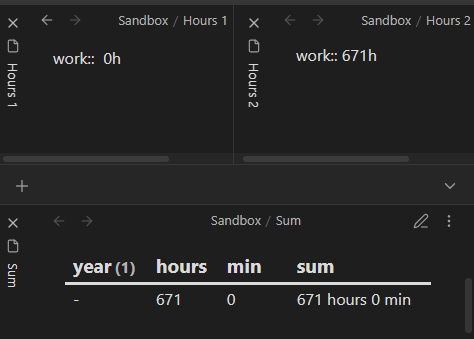
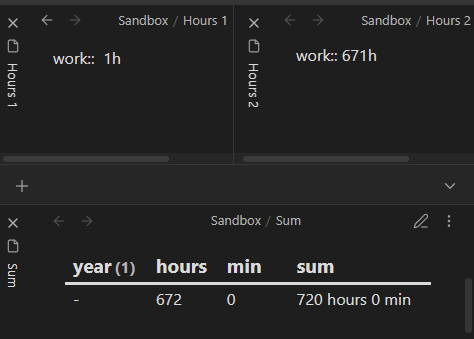
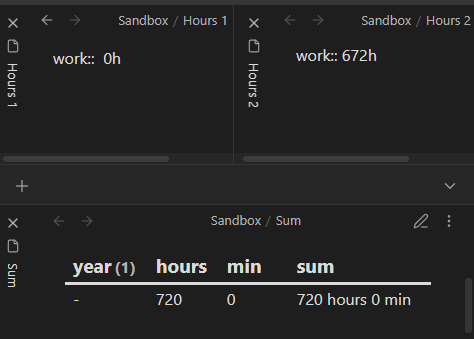
Can some kind soul help me to understand what’s happening here? I’ve been using the first way to count my working hours, and it seemed to work fine.
Later, I decided to try the other way, because it can display hours in my native language and it looks nicer. But then I noticed that sometimes the sum was incorrect. Both methods I took and modified from some helpful posts on the forum (like here: Sum of Duration across all instances - #5 by holroy ), but I have no technical background and I don’t fully understand how they differ.
I way
round(sum(rows.work.hours)-0.5) as “hours”, (sum(rows.work.minutes)%60) as “min”
II way
durationformat(dur(sum( filter(flat(rows.work), (r) => typeof(r) = “duration” ))),"h ‘hours’ m ‘min’ ") as sum
Things I have tried
I’m not sure, but it seems that with the second way it starts to happen when THE SUM is bigger than 671. And with the first method, when ONE OF THE VALUES is bigger than 671. That’s probably why I didn’t notice it earlier. I’m usually adding values around 160–180 hrs a month. So, with the first formula, it’s not visible with my data, but with the second method, the problem starts to occur after summing up a few months of work. Any help in understanding this will be greatly appreciated.
TABLE round(sum(rows.work.hours)-0.5) as "hours", (sum(rows.work.minutes)%60) as "min" ,

durationformat(dur(sum( filter(flat(rows.work), (r) => typeof(r) = "duration" ))),"h 'hours' m 'min' ") as sum

from "Sandbox"
WHERE work != null
group by year
The two numbers you’re seeing are the number of hours in a month, but in shorter and longer months:
28 days ( 24 hours / day ) = 672 hours
30 days ( 24 hours / day ) = 720 hours
It seems the sum function returns “1 month” at 672 hours. But then the durationformat function receives that “1 month” duration and translates it as 720 hours. I tested various units, sums, and formats and consistently saw the same behavior, unfortunately.
Options:
You could use the component sums you used in your first “way”, arranging them into a format that durationformat accepts:
Hey. Actually, since I posted the question, I managed to figure out that it is 28 days, but I didn’t know what to do with that fact. And I’ve tried to use durationformat with the other formula, but couldn’t do it either. Looks like your first solution works for me. It renders how I wanted it to. And I won’t be working more than 671 a month, ever, so I should be in the clear with the amounts. Also, I cross-check this with my Excel spreadsheet for certainty. By the way, even in Excel, there are some crazy dependences between dates and durations. Time calculations are always confusing for me, so thanks for helping and for some explanation.