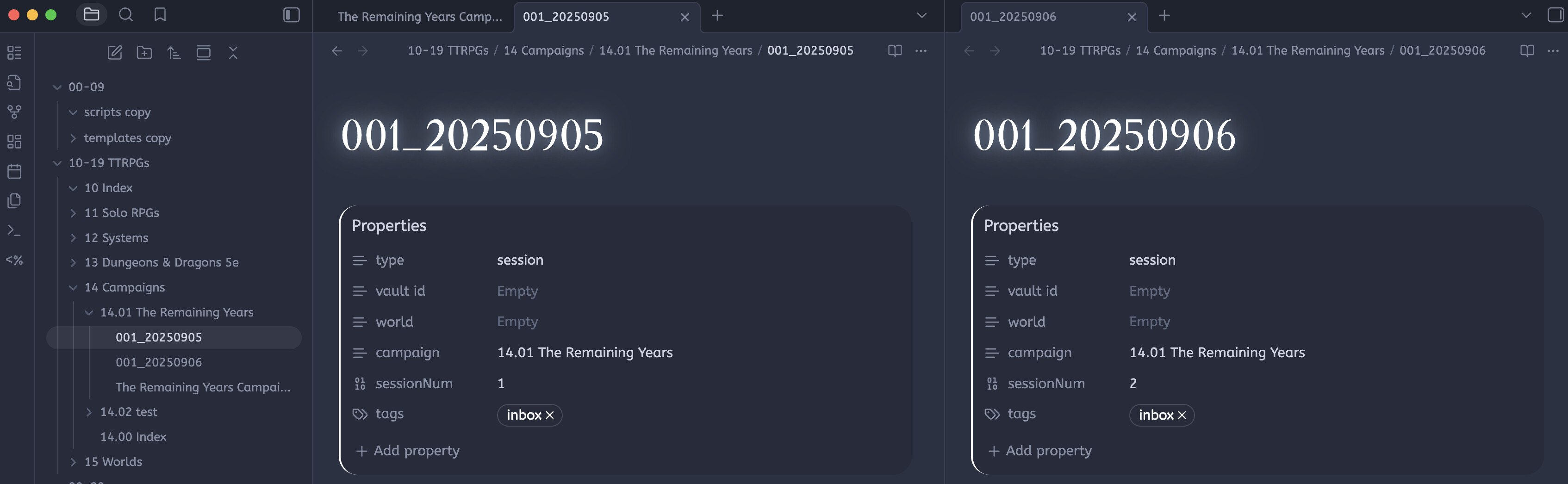
I downloaded a base ttrpg vault from a Youtuber that included custom user scripts to help with the automation of templates. I have a basic knowledge of coding and javascript, so I changed the folders in the script to match what I had changed it to as I use the johnny decimal system to organize my files. After I made the changes in the script, the file title no longer automatically increments to the correct session number. So instead of going from 001_YYYYMMDD to 002_YYYYMMDD, it does 001_YYYYMMDD to 001_YYYYMMDD. However, in the properties, it correctly reflects the session number.
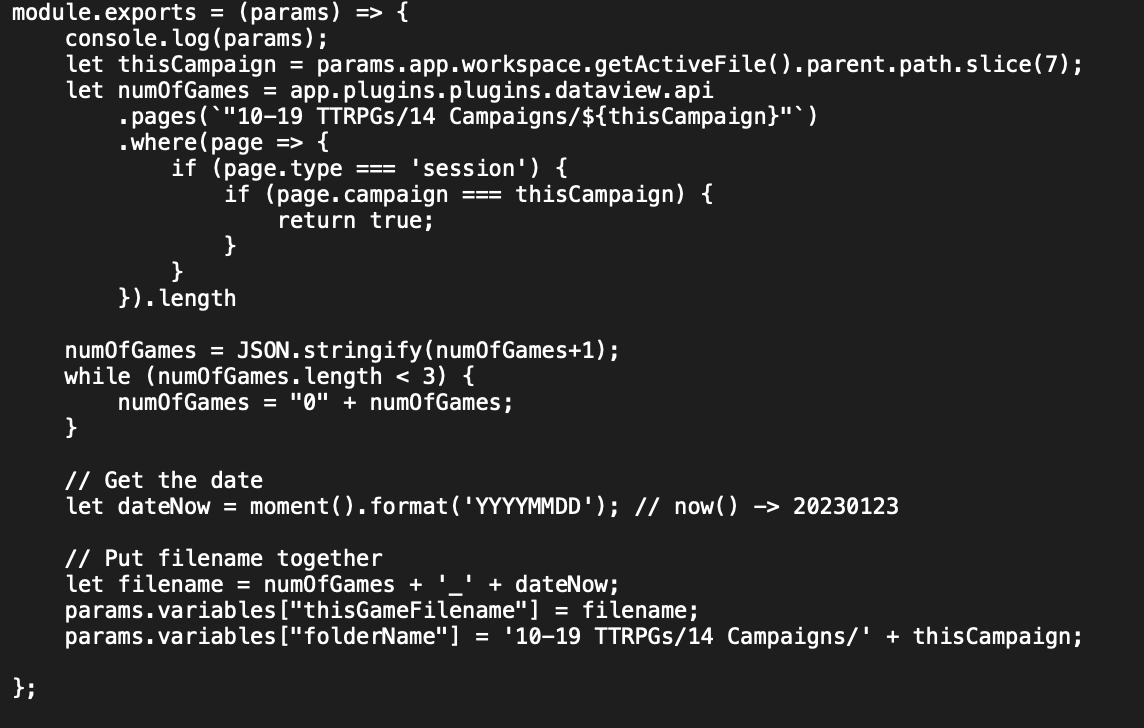
I’ve tried changing the pathway or even some of the automation in Obsidian, but it would either error or create a new folder with each new file which isn’t what I wanted. Does anyone have any idea how to correct this? Here are the two scripts that work together.
EDIT : I forgot to mention that these user scripts are used by the templater plugin as a part of the custom user script functions feature. It looks like it works perfectly fine and as intended if I use “10-19 TTRPGs/${thisCampaign}” instead of “10-19 TTRPGs/14 Campaigns/${thisCampaign}”, but I’m not sure why?
I think the main difference (if you only focus on the parts of the functions that have to do with numOfGames, which is the session number) is that the file name function defines thisCampaign differently from how the session number function defines it.
The file name function defines it as:
let thisCampaign = params.app.workspace.getActiveFile().parent.path.slice(7);
… which takes the full path of the active file’s folder, 10-19 TTRPGs/14 Campaigns/14.01 The Remaining Years/. And then for some reason the function takes only the 7th character onwards (.slice(7))… and then inserts that into "10-19 TTRPGs/14 Campaigns/${thisCampaign}" so you are repeating the parent folders twice? That folder doesn’t actually exist, so that’s why numOfGames never finds any other notes, thus your session number is always 1.
The session number function’s definition makes more sense:
let thisCampaign = tp.file.folder(false);
It uses Templater’s function to get only the immediate subfolder the active file is in, aka the last part of the full path, which in your case is 14.01 The Remaining Years. But then the function rebuilds the full path anyway because it hardcodes the parent folders "10-19 TTRPGs/14 Campaigns/${thisCampaign}" in numOfGames…
Basically, if the session number function is working, just copy those lines into the file name function.
imo, the more efficient way to do this would be
Use tp.file.folder(true); to get the full path to the active note, save that as a variable, replace that everywhere you see "10-19 TTRPGs/14 Campaigns/${thisCampaign}". This way, you avoid hard coding folder names, and the function will work if you ever change folder structures (otherwise you’d have to edit all of these functions/scripts!)
Use thisCampaign = this.file.folder(false)
Then use the getThisGameNum() function in the file name function so that you are not repeating the same code twice! However, I don’t know what the rest of your scripts look like so not sure how all of this works together
p.s. for future: if you share the code as text in code blocks instead of images, it would be easier for others to help you troubleshoot!
Hi! Thank you for the suggestions! This is only my second time using the forums for help, so I wasn’t sure how to best show the code! I didn’t write any of the scripts as they came with the vault I downloaded, so I didn’t really understand them. These scripts I showed works with two other scripts and it makes use of the templater plugin and the quickadd plugin, so I was really confused. I’m going to try out your suggestions though, thank you!
Sorry — I know you took the scripts from somebody else! I realize now my use of “you” in my previous comment is confusing, I meant it more in a general “you” sense, not you specifically.
I forgot to mention that if you use any Templater functions in custom user scripts, you need to pass tp into the custom function, exactly like how it is passed in the getThisGameNum(tp) function. More explanation here.
Also, in case you do not already know, you can open the developer console in Obsidian (View menu > Developer Tools > Console) so you can see the error messages that Templater outputs and any outputs from the console.log(...) lines. Use console.log() to “print” the result to the console to help you troubleshoot and see where the problem is.