Steps to reproduce
- Update to 1.13.6
- Enable this custom callout CSS snippet:
.callout[data-callout=“test”] {
–callout-color: 83, 223, 221;
–callout-icon: calendar-heart;
}
- Use snippet in a note while Default color theme used with Dark base color scheme.
>[!test]
>content
Did you follow the troubleshooting guide? [Y/N]
Yes.
Expected result
Previous to the update, my custom callouts displayed with the chosen background color and a complimentary outline. This seems to still work with the Catppuccin color theme over the base Dark theme.
Actual result
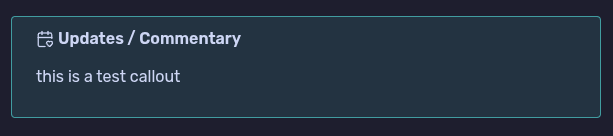
Callout appears with custom icon, but background is missing and there is no outline.

Environment
SYSTEM INFO:
Obsidian version: 1.13.6
Installer version: 1.13.6
Operating system: #1 SMP PREEMPT_DYNAMIC Mon Jul 20 03:39:43 UTC 2026 7.1.4-200.nobara.fc44.x86_64
Login status: not logged in
Language: en
Insider build toggle: off
Live preview: on
Base theme: adapt to system
Community theme: none
Snippets enabled: 3
Restricted mode: off
Plugins installed: 6
Plugins enabled: 6
1: Image Toolkit v1.4.3
2: Highlightr v1.2.2
3: Local Images Plus v0.16.4
4: Table of Contents v0.2.0
5: Regex Find/Replace v1.2.0
6: Update time on edit v2.4.0
RECOMMENDATIONS:
Custom theme and snippets: for cosmetic issues, please first try updating your theme and disabling your snippets. If still not fixed, please try to make the issue happen in the Sandbox Vault or disable community theme and snippets.
Community plugins: for bugs, please first try updating all your plugins to latest. If still not fixed, please try to make the issue happen in the Sandbox Vault or disable community plugins.
Distro: Fedora (Nobara)
Version: 44 (GNOME Edition)
Desktop Env: Gnome
Install method: Flatpak