Current Date and Time (Property)

Use case or problem

Current Date and Time.

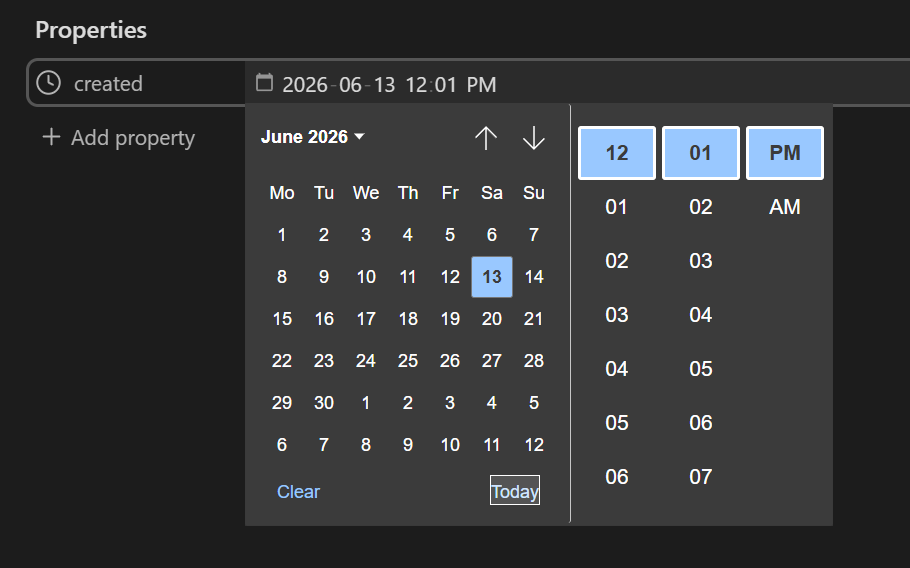
When clicking on the date and time property, we get the “today” function, which returns only today’s date.

However, instead of “today,” I would like you to change or add the “now” function, since this would update both the date and time, not just the date as it currently does.

Proposed solution

Add the “now” function.

Current workaround (optional)

Add property created.
Change to “date and time”
View the Date and time selector
Dont have the function “now”
Related feature requests (optional)

I didn’t find any similar requests.

I think you mean in the Properties interface.

I’ll add to it—or possibly clarify if this is what you mean:

When the property type is “Date & time”, clicking Today for the first time fills in the current date and time:

But subsequently clicking Today changes the date without changing the already-entered time.

FR: Updating the time would be useful for a manually managed modified property, for example.

Workaround

Press Clear then press Today.

Steps to reproduce

  1. Add a property called modified.
  2. Set the property to “Date & time” type.
  3. Enter yesterday’s date and any time that isn’t now.
  4. Open the date picker and press Today.
    • Note that the date updates to today but time time does not.

That is exactly the problem. Currently, clicking “Today” updates only the date without updating the time.

If I click “Clear,” the date picker closes; I have to open it again and then click “Today” to update both the date and time.

An “Now” button for the “Date and Time” property type would certainly make much more sense.

If you could add that, it would be a huge help.