I know this topic has been addressed multiple times, but none of the entries I’ve found has helped me.
My Obsidian app on iPhone does not display any of the snippets that appear on my Mac, even though the folder path seems to be correct on both devices: vault/.obsidian/snippets.
I use iCloud to synch between devices. I have also made sure that the Obsidian folder is fully downloaded and all my notes seem to synch without issue. But not my snippets.
Is there a way to use desktop snippets on mobile?
If the answer to the previous question is no, then how do you create CSS snippets for the mobile version of Obsidian?
Using iCloud Drive, the snippets will sync over within a few seconds.
Is it only snippets not syncing or plugins as well? If you add a random plugin to desktop Obsidian, does it show up on the phone after a few seconds? I’d restart Obsidian on the phone, and then check in Community plugins to see if it’s there or not.
Most of the time snippets/themes/plugins not syncing using iCloud Drive is due to a path issue; accidental nesting of vaults happens occasionally resulting in two .obsidian/ folders in one vault, with macOS using one and iOS using another. Don’t know if that’s the issue here, but it could be.
Just to double check, the Finder in macOS should look something like this for the ATESTVAULT in the iCloud Drive Obsidian main folder (ignore the .obsidian.mobile folder).
I’ve checked the structure of the folders in iCloud and found the following:
There are two .obsidian folders.
The first one, which contains the snippets, is located (hidden) outside the folder of my vault. This is normal.
The second one (hidden) is within my vault folder, but it does not contain any folder for snippets. This folder was created by the mobile app, as if it could not recognise the one outside the folder.
Now, I deleted the .obsidian folder that was created by the mobile app, hoping that this way it would be forced to use the main .obsidian folder. However, none of this happens.
After deleting that folder, Obsidian mobile just changes to the default appearance, and if I add a plugin or change the theme, it automatically creates a new .obsidian folder.
What’s the name of the vault that you are having the issue with? You can’t create or open a vault in the wrong location on iOS, so it seems likely your vault isn’t in the proper place on macOS (either created in the wrong place or the wrong folder was opened as a vault).
Screenshot your iCloud Drive Obsidian folder in the Finder on macOS.
There are four vaults in the Obsidian main folder (each with its own .obsidian/ folder) here. If there are any files or an .obsidian folder in here, your structure is messed up.
If you have one vault, there should be one folder in here and that’s it.
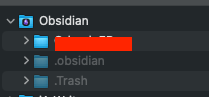
Therefore, under the Obsidian folder, I only have one visible folder, which is my vault. Additionally, there are two hidden folders: 1) .obsidian and 2) .Trash, as depicted in the image.
Now, if I understand you correctly, that .obsidian hidden folder should not be there but should be inside my vault’s folder, is that right?
Well, I just deleted that .obsidian folder to see what happens. And voilà, when I open Obsidian (desktop), it automatically creates a brand new .obsidian folder exactly in the same place (outside the vault’s folder).
Now do as joethei said on Discord: use the vault switcher in your current vault to open folder as vault the folder you have in red marker in your screenshot. Close the old vault called “Obsidian”.
There is only one vault, which is the one in red marker, so I cannot switch to any other vault.
The Obsidian folder that you see in the screenshot is simply the .obsidian folder that contains the CSS Snippets and themes etc. It is hidden (that’s why it’s grey).
Anyway, I give up. It seems that the mobile version simply does not want to use that .obisdian folder.