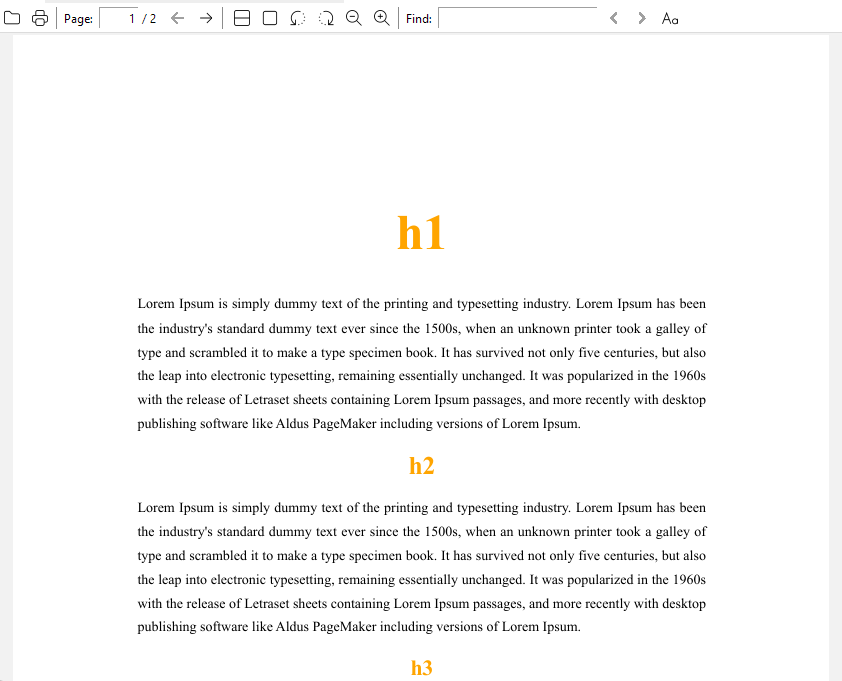
As you can see, there is a reference to a javascript file. I use this to create a conditional page break if headers 2 to 6 happen to be the last line in the page or there is text preceding them.
Everything works as expected.
However, I cannot seem to influence in any way the headers in terms of margins, font or font size.
Why could that be?
Thank you!
PDF export is kind of a black box because we can’t preview the output with the applied CSS to see if it’ll work or not. So… as much as it’s frowned upon, !important to the rescue unless you want to spend hours exporting over and over again to see what works or what doesn’t.
I rearranged a few things and added the excessive size + orange to make sure it was working, but this seems to work exporting from the default theme. You can add more individual h2~h6 rules if you need them. I’m not sure about the ATimport as I’ve never used a .js file in PDF export before.
Hello ariehen. Thank you so much for taking the time to test this out. You have given me the solution to my problem by pointing out that certain header values require the !important property to override whatever the builtin PDF converter does.
Now everything works like a charm. My final versions of the CSS and JS script, if that can help anyone else, are: