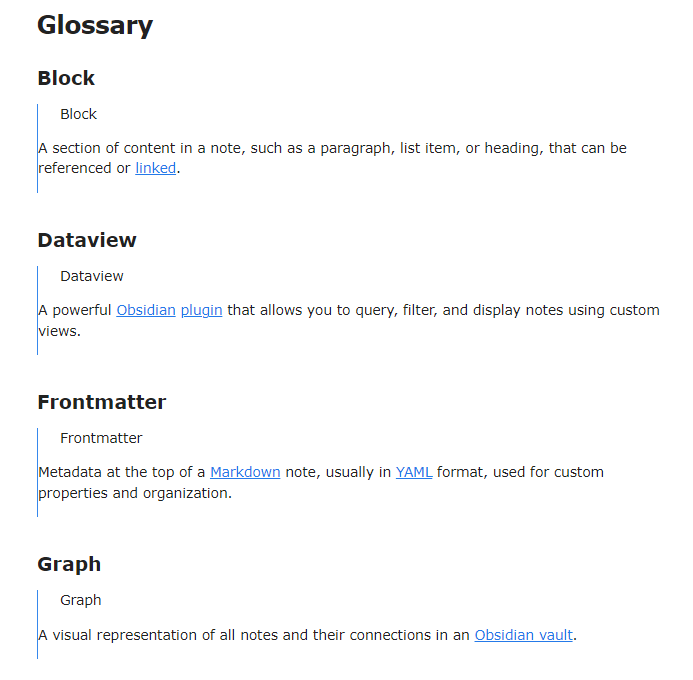
I am have a folder of glossary terms, each with their own file that I link to so when I mouseover the link I get the glossary item.
I would like to make a dataview query where I get a list of the filename wrapped with bold markdown followed by the file contents.
I can work with a table where the contents of each file are in a corresponding cell, but I would prefer a list.
I am not wed to dataview if there is a better solution. As it stands I am looking at a script to generate the list, but I would prefer it dynamically updates as I add files and make changes.
Things I have tried
        TABLE WITHOUT ID file.link as name, file.content
        FROM "SRD/Glossary"
        WHERE !contains(file.name, "_")
        SORT file.name asc
        TABLE WITHOUT ID file.link as name, embed(file.link)
        FROM "SRD/Glossary"
        WHERE !contains(file.name, "_")
        SORT file.name asc
        list file.content
        FROM "SRD/Glossary"
        WHERE !contains(file.name, "_")
        SORT file.name asc
For Bonus points
I also want to make spell lists from files in a specific folder that use this template
All your glossary notes are in a folder called “Glossary” (you can change the variable folder otherwise)
Each of the notes in “Glossary” folder contains a simple definition (it can use markdown and even link to other notes or glossary terms). No “top-level” heading repeating the term being defined.
The note containing the above snippet is called Glossary.md or is outside the “Glossary” folder
You have installed the css snippet Embed Adjustments (this is to remove the extra space and the note name around embeddings)
For example, I created a sample “Glossary” folder, containing:
As for your second request, I don’t see the relation with the first one. Do you want these “spells” to be listed as part of the glossary? Otherwise it is a different question, so better remove it from this one and create a new thread for it.