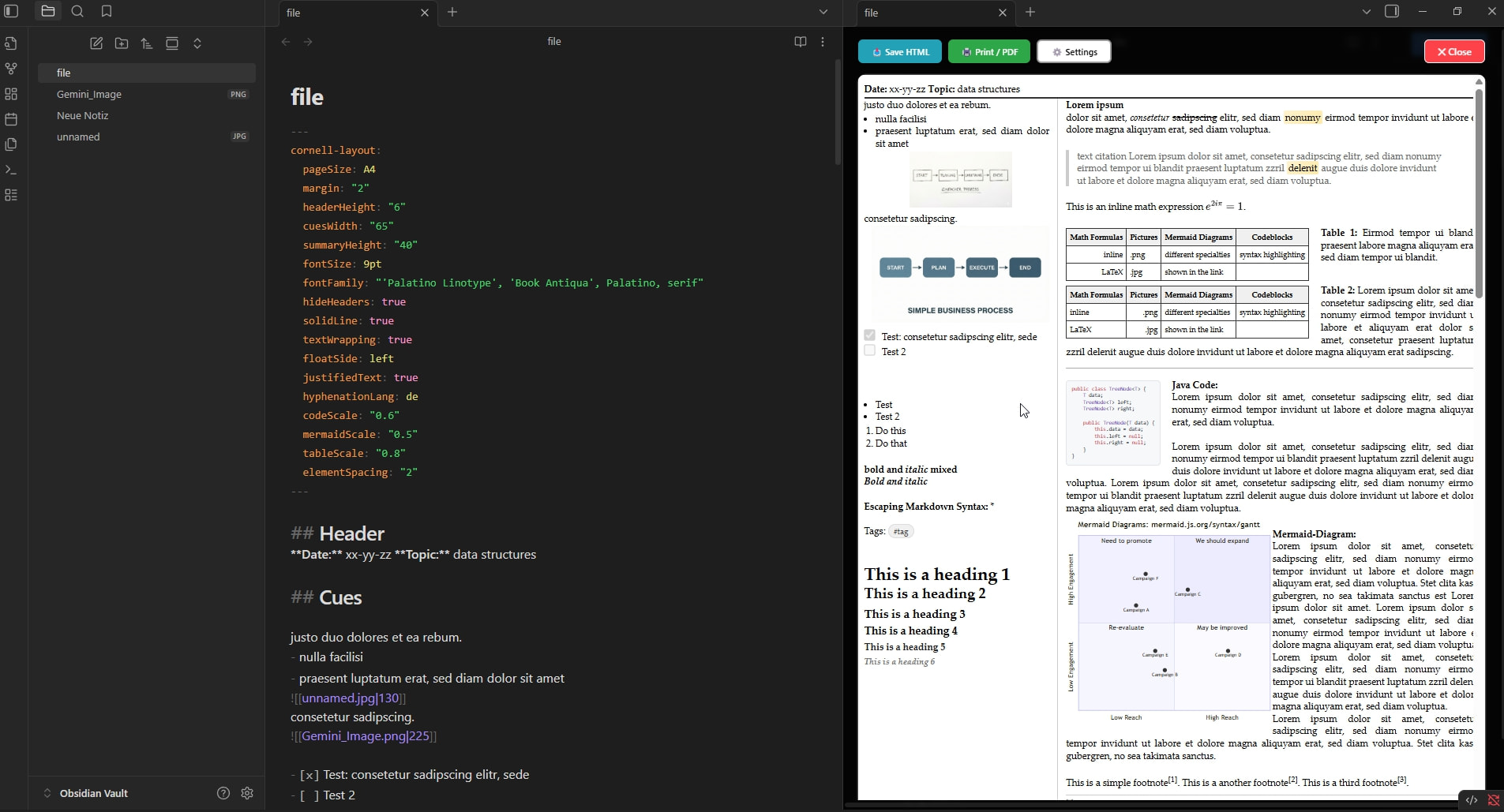
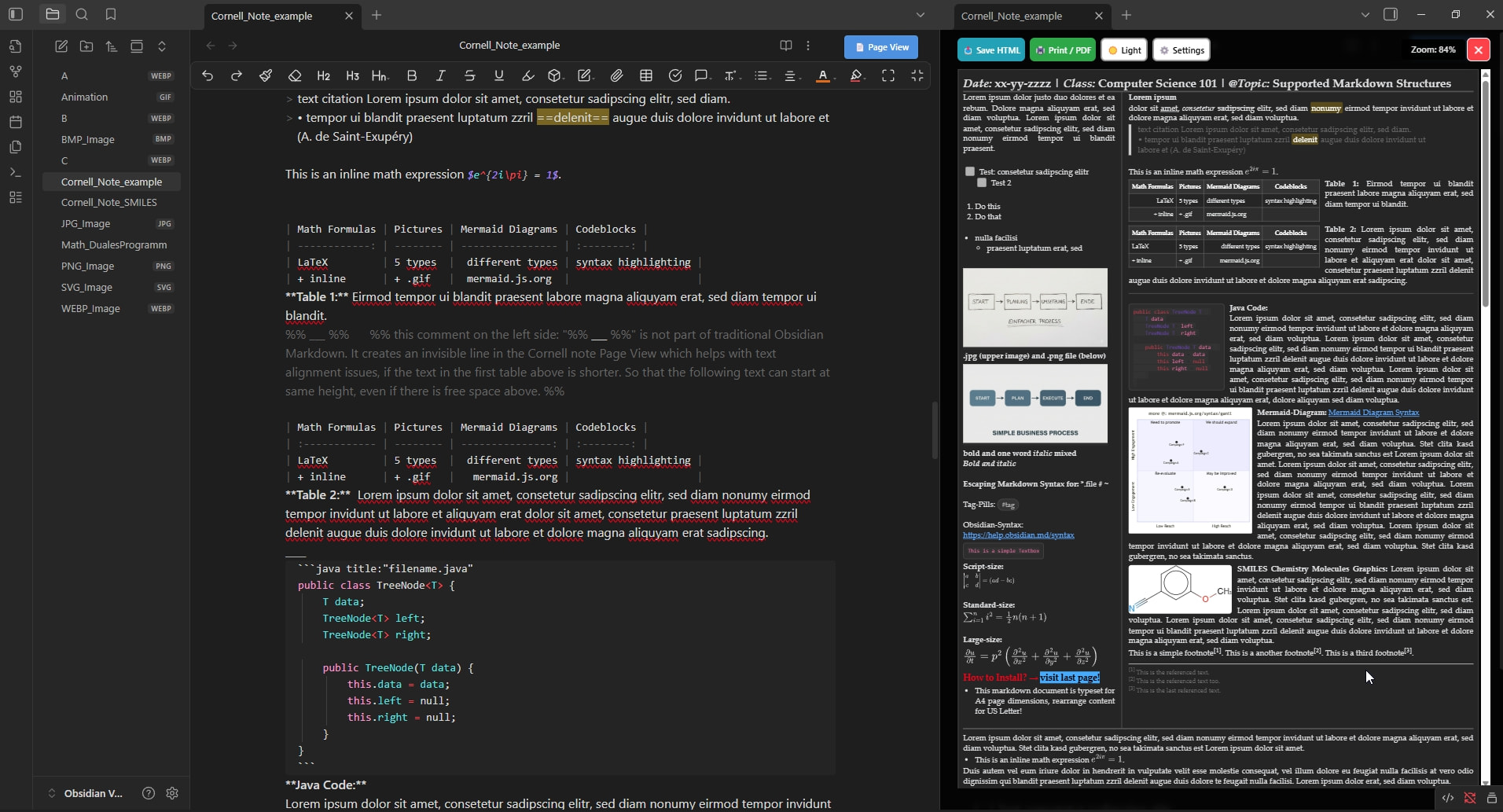
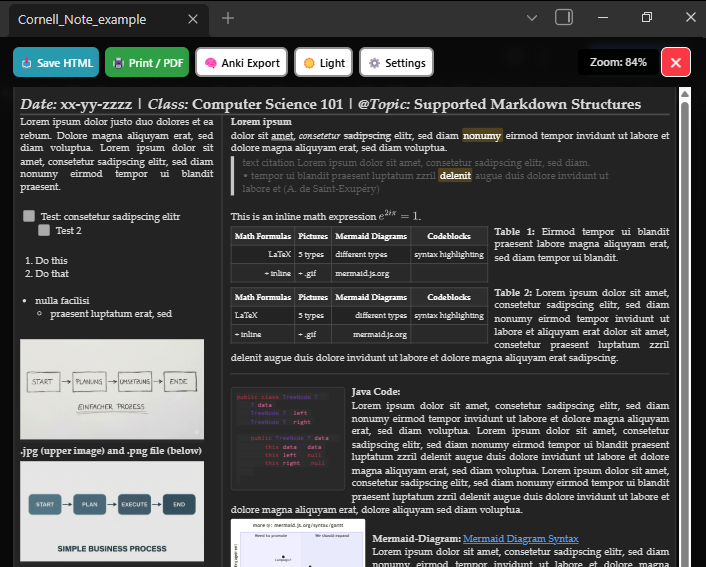
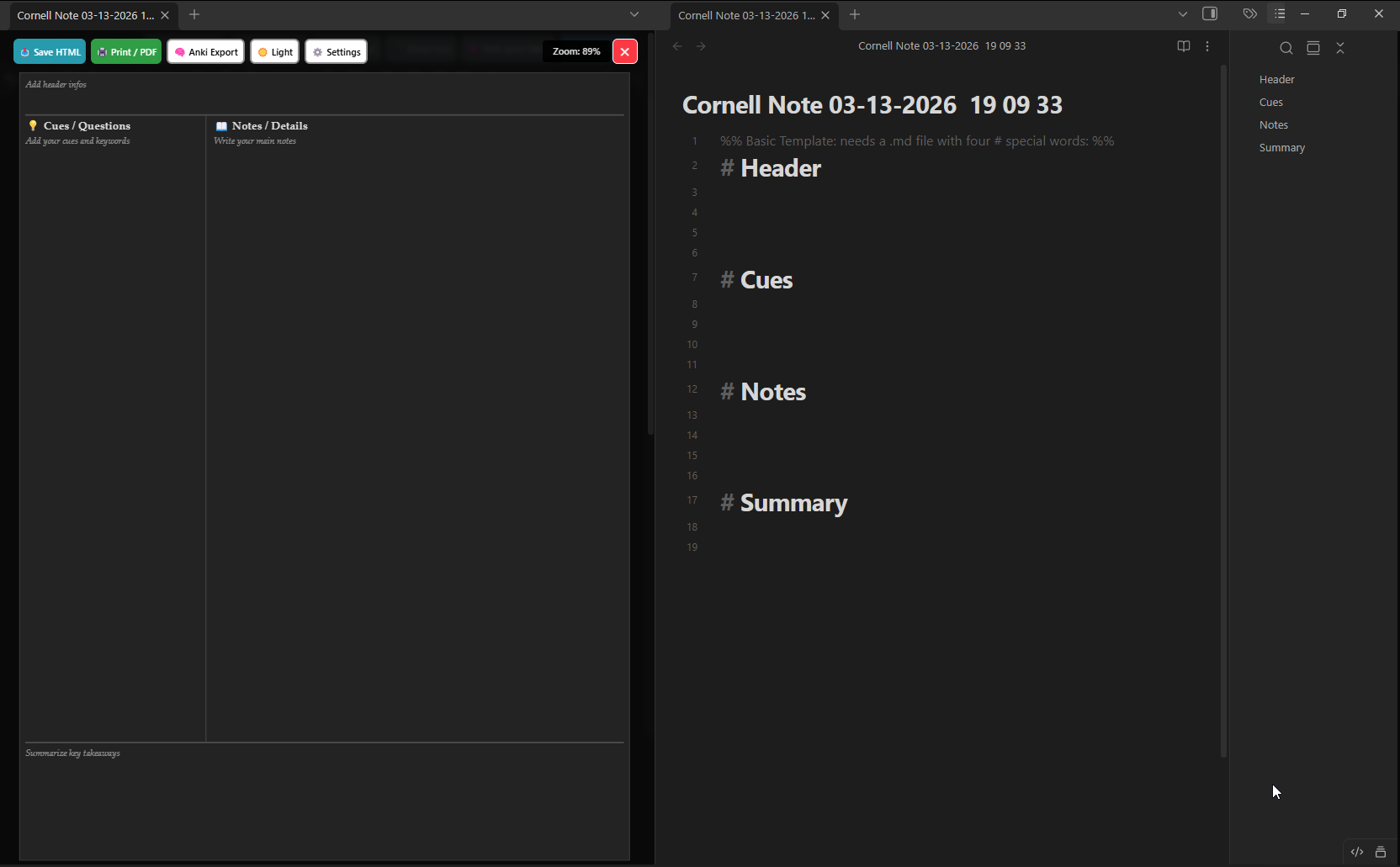
So I tried to do my best to tackle the tricky problem of creating a better working and better feeling Cornell Notes plugin experience in Obsidian. Cornell Notes are quite complicated to build an extension for and I’m not the most sophisticated IT-guy…
Perhaps this is why I started to get this project running, to learn something useful along the way.
I am glad that I came across this post, get to learn about the Cornell system for the first time. Also lot more to learn. I searched the community marketplace, seems like you are the first one to build a plugin for this system for note taking. (Although I think there are snippets or some other resources might be available in the community). So, in short, this plugin idea seems to have a good potential. One possible feature is, instead of opening an editor and renderer side-by-side, the renderer itself, can become the editor, just like Obsidian’s live editor. So, we can take notes on multiple topics side by side in their custom tabs. This can be done…
Anyway, the main reason why I joined this discussion, as I am really interested in how you achieved the layout rendering from the markdown content. Is it all custom styling?
Because, I wanted to create such a plugin, where I can write research papers (the two sections layout format), because its so simple to just write markdown content compared to starting a latex project. I understand that, even if we build such kind of plugin, it will take time to perfect it, because the automatic feature we get in latex like auto-numbering the pages, headers/footers, etc. is really helpful. But, still I always wonder whether markdown can someday replace latex.
Thanks for your feedback.
I’ve uploaded added a 2nd .gif so you can see what it is capable of right now.
I’m not shure if I will be able to get all the coming suggestions and additional features integrated.
I’ve made some design choices, that can get the most important things done I guess:
make view more or less 100% looking the way it would look like beeing in printed version A4 & US Letter
making it a bit more flexible with section geometry (sometimes you need more summary space an less notespace)
making working with it convenient: so you don’t have to type in all the settings again and again, after chosing the right ones for a file.
and some other stuff
LaTeX / Mermaid / Code integration, is rendered externally (online, so the newest features are available) and sent back to the Page splitview and will be scalable afterwards.
.jpg and .png integration, with individual scaling capability
common markdown table integration
some things are custom made, because otherwise I couldn’t have get it done that easy - but I try to strictly limit those cases. Example: Put this in the markdown code, then: “- - -” content below this marker will appear in the same section on another page. And if you use this in the .md file for the first time: it’ll create a new page at the same time in the Page view mode in the splitview. So this is also for kind of user convenience reasons.
I am still working on this thing… but some things I am not capable of for sure, because I worked in another space (until I got the layoff) but have a background in business informatics. Working on this project for quite some time… with lots of failures and roadblocks.
I think soon I’ll be able to get it to a 1.0 stage. So thanks for every comment…
I ‘m thinking about also implementing an Anki support / export function for each note. So you can use your notes to create multiple Anki cards from one .md Cornell Notes file. The ‘Cues/Keywords’ section contains the questions part for the Anki card and the ‘Notes’ or ‘Summary’ section contains the answers to a question. So no more copying and pasting, just press a button and a file is created that just needs to be imported by Anki.
What do you think?
It was is and will be a pretty intense and exhausting journey, but I think it was will be worth it. Going the extra mile…
Because Anki and the Cornell method have a few important things in common. Building a bridge between the two methods could be an added benefit for some lots of users.
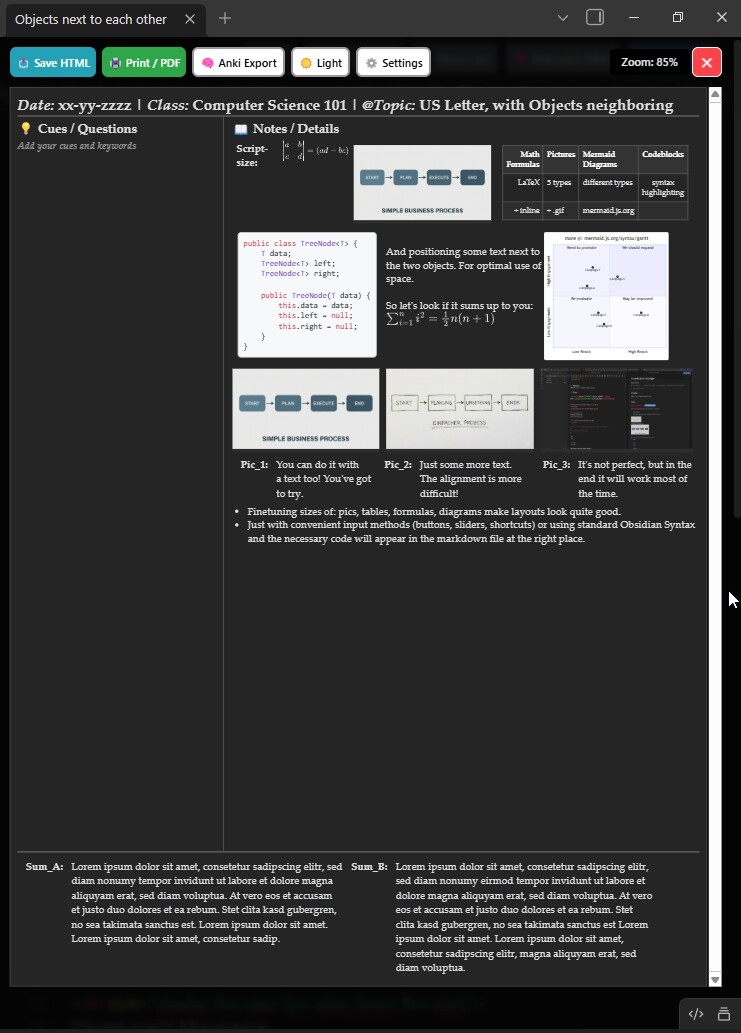
Showcase: Positioning text and objects (Text, Codeboxes, diagrams, tables, formula, pics) in Cornell notes next to each other horizontally. Flexible spacing… of objects globally and individually too.
(here in: US-Letter format)
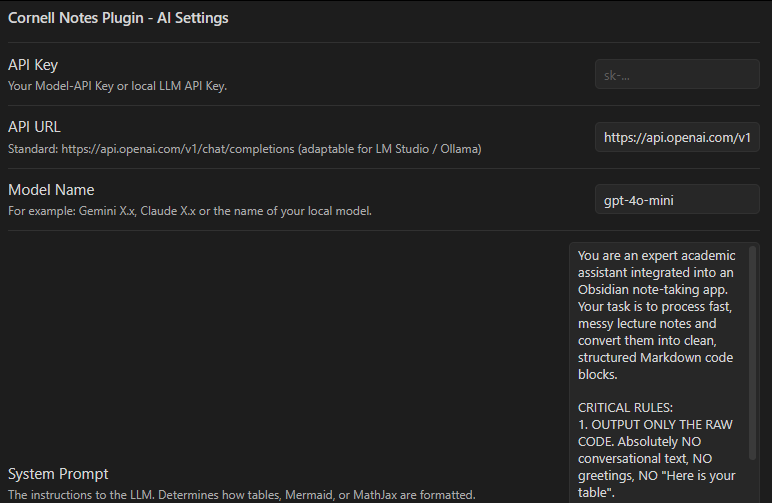
One of the main problems with digital note taking in class was always the inefficency and time consumption (mostly after class to transcribe the notes in scientific subjects, which are not so text heavy). Now with AI integration it’s possible to get beautiful CornellNotes done in class in real-time! Even if your teacher is quite fast with chalk and board. You can use messy notes and send it to your LLM of choice. You can even run it locally on a laptop, because those standard tasks don’t need the most memory hungry models. You can use it even without expensive API subscriptions. As of now, I’ve tested it with a totally free API version from Openrouter and the paid version of gemini-2.5-flash.
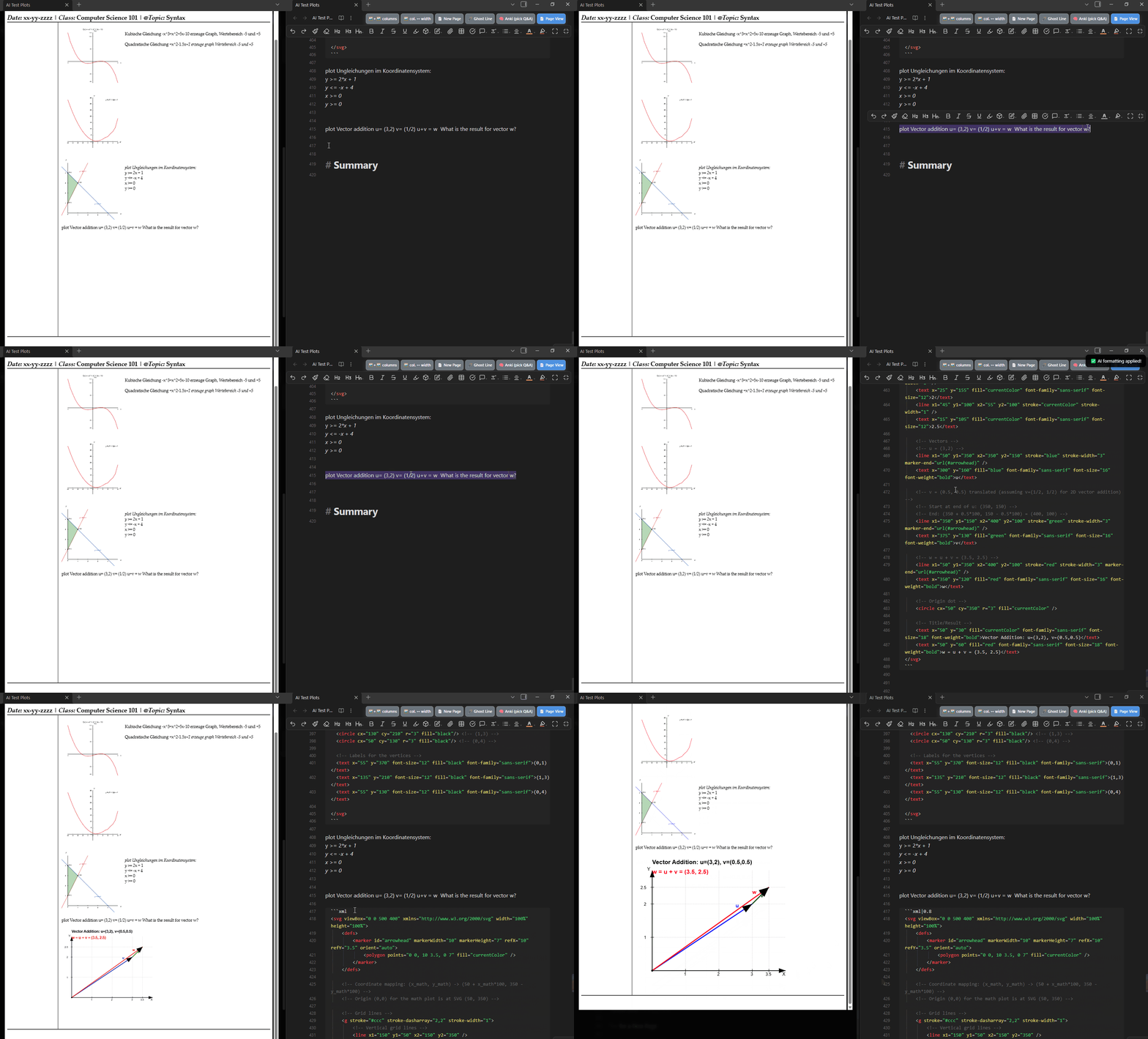
Usage: You set up your API connection (free or from your subscription, online or with your local running open source model on your laptop or Mac or PC) within the plugin and do short messy notes on the fly in class, then select those and send them via shortcut to your LLM API. Then you can listen to your teacher and follow the explanations (because you’ll have to wait between 15 seconds and a minute) and your diagram appears first as cryptic code in your .md file and in the split-screen view in the notes section of your Cornell markdown note. You don’t need to understand that code or even generate it during class yourself. You can follow the teachers explanations for vector addition and after 35 seconds the .svg is generated! You can scale it up or down, just as needed. No more editing after class, you have print-ready, book-quality graphics often in less than a minute. You can use your native language too, as the LLM does typically understand german, english, japanese, chinese, french or whatever… but I’ve just tested it with german and english, as I’m living in the swiss-german speaking part of Switzerland.
It seems I’ve been creating a quite useful tool… so far. But still needs quite a lot of testing… as you can see above… some german messy notes, giving it to the LLM and testing different subjects: graph theory, quadratic and cubic equation plots. Plotting: Inequalities and solution sets for solving linear inequalities graphically and other subjects and use cases.
german / english messy note as LLM input:
zeichne Geometrie: Pythagoras Dreieck, mit Flächenvergleich
Draw: Geometry: Pythagorean Triangle, with area comparison
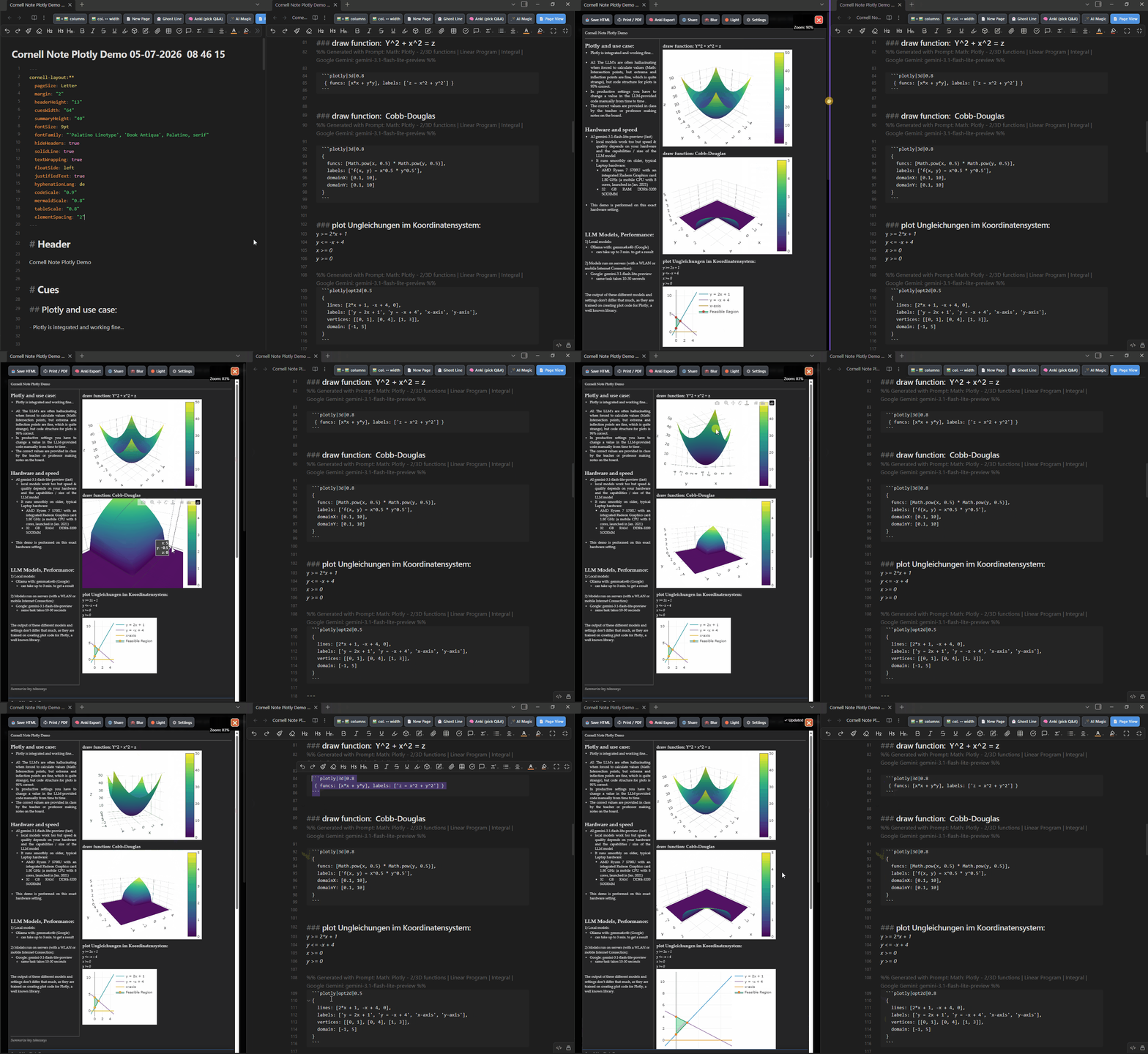
Hi, as I wanted to get more fancy graphs I decided to integrate the well known plotly library. And combine it with the AI functionality, which I already implemented earlier. So you don’t have to memorize the syntax of the Plotly library to create your notes—you’ll get the results quickly, on the spot, and right in the classroom…
This is how it looks right now:
I also integrated a flashcard function, which can blur/unblur out parts of the document with a mouseclick. So you don’t have to use the Anki export function and another tool or app for spaced repetition support. You might want to combine it with this Obsidian free plugin: Recall – Obsidian Plugin · Obsidian Stats
This plugin allows reviewing your set of Cornell_Note.md files with different algos on a .md file base: choose, different spaced repetition algorithms like Anki, SM2, and Leitner from different providers.
I’ll create a demo for that in the near future. I hope you’re pleased with what you’re seeing.
roadmap:
On the function side I’ve run out of ideas and user scenarios, at the moment. I think there is all a user can expect from it… But if you have an idea or comment, you’re invited to give some feedback.
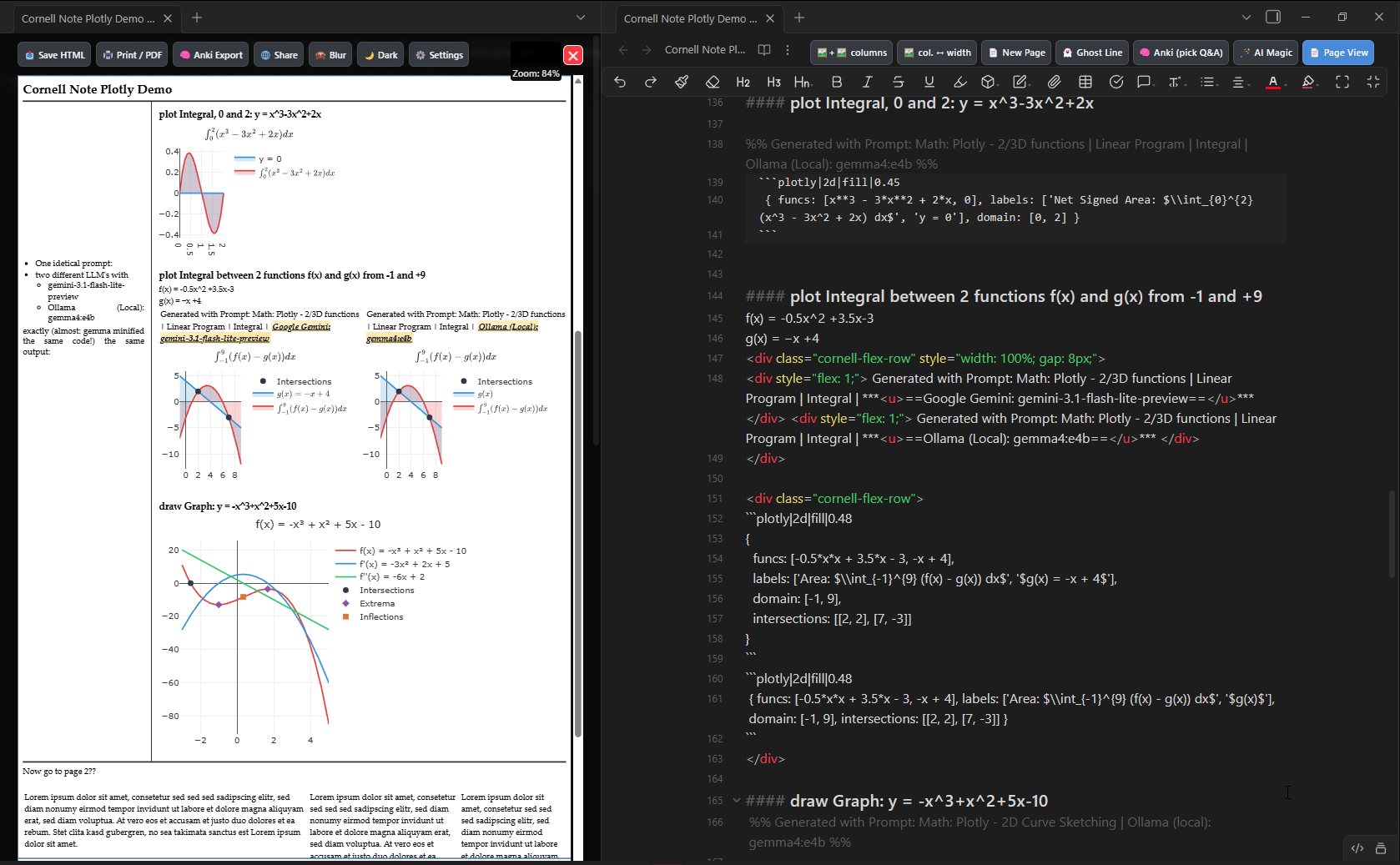
This pic shows further plotly graph / Integral drawing skills, together with a comparison:
one identical prompt, two LLM models (one locally run: Ollama (Local): gemma4:e4b).
the graphing skill shows a typical scenario for middle school math: curve sketching
and once again, the very useful creation of columns above the two Integral pics next to each other in the Notes section (structure created with the Columns Button / shortcut). Also shown in the summary section at the bottom… with 3 columns, with different widths!
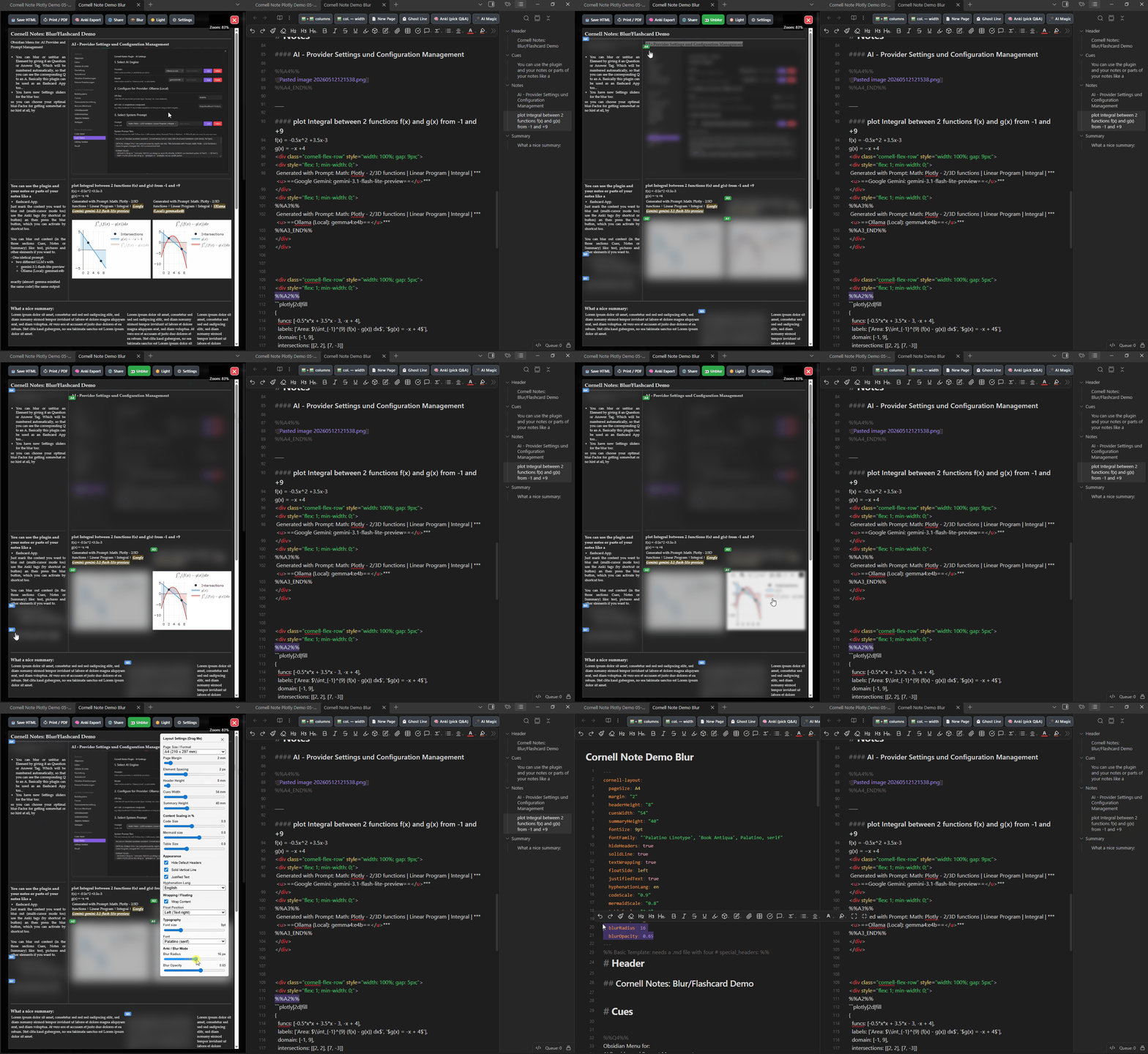
Demo of the Cornell Notes Plugin with Flashcard / Blurring Capabilities:
btw: the big pic in the note is showing the AI Provider Settings and Config Management System
also integrated: a System Prompt Management System
Flashcard Functionality:
use the already known Syntax for Anki Card Q’s and A’s (just mark [single or multi-cursor] the content you want to blur an push the “Anki (pick Q&A)” button or use a shortcut to enclose the content you want to blurrrrr… )
Q: %%Q1%% Your Question-Content here %%Q1_END%%
A: %%A1%% Your Answer-Content here %%A1_END%%
How to blurr something:
Select the Element you want to blurr in the .md file and do the shortcut or press the button to get the content wrapped with the Anki-Card-Syntax-Tag.
There are two new sliders in the settings menu for changing the level of blur:
This allows you to change the difficulty-level by revealing more or less of the content.
So you don’t need a separate flashcard app anymore. Or you can still export or create the Q’s and A’s pairs to Anki App.
This was cool. I never knew what Cornell note-taking was. I am active user of Zettelkasten for my PKM. It seems Cornell could get along with it quite well.
Cornell Note taking is more widespread in North America and the UK I guess…
But it gained some popularity worldwide…
Reasons for its global popularity:
Active learning (retrieval practice): The left column allows you to cover the note section and use it as a flashcard system for testing your knowledge.
the creation of a flashcard is also a kind of mental process, which helps to anchor the content you study more deeply in your mind. The left side of a page can be viewed as a front-side of a flashcard… where you usually deposit your technical terms from a lecture or Cues…
Time savings: There is no need for the time-consuming and passive process of rewriting notes.
Visual clarity: The clear layout makes it easy to quickly review and locate information.
And it is scientifically proven to be quite useful, if you use it right. That’s why I heard about it back in university. But that was a few years ago…
Walter Pauk invented it in the 1950s btw…
Hi youfoundjk,
I’ve read your comment and did intensive brainstorming about the fact, that Backlinks are essential and create a very useful benefit in Obsidian. Then I’ve tested how my plugin behaves if I put in those kind of…
Internal links (within the vault):
Standard link to a note [[Note name]]
Custom display text (aliasing) [[Note name|Alternative text]]
Link to a heading [[Note name#Heading name]]
Link to a specific block (paragraph) [[Note name#^block-id]]
Embedded content (preview) ![[Note name]] (Displays the content directly)
and ![[Note name#Heading]] (Displays only this section)
And it behaves badly, it shows the Links in the View Mode, so that those kind of links could be seen in the rendered Cornell Note. I Think I’ll have to fix that, so that users still can use those kind of backlinks within the body text of an lecture note in the Obsidian write /view mode, but when it comes to the Cornell Notes view mode, those Links shouldn’t be visible!
The solution should be a “Best of Both Worlds” scenario. This is why I decided to add some new code. I’m not shure, that this solution will be easy to achieve. Sometimes things look simple to implement, but are very hard in the details…
An experience I’ve made and still make from time to time… I don’t like it, but you have to go the extra mile to achieve things! In the end it will be worth it with this task.
So thanks again @youfoundjk for your posting and mentioning the zettelkasten thing… it makes a difference and kept swirling through my head, finally led me to the conclusion that Backlinks should be usable in native Obsidian write / view mode, but not not visible in any Cornell Note page view for this plugin.