*Once you’ve done the above, delete everything above this line.
Steps to reproduce
Just ran the Format Convertor to update my YAML blocks. I get responses that 13 files failed, but no hint as to which ones. Looking in the console, I can see the error messages, but a log file would be helpful.
Did you follow the troubleshooting guide? [Y/N]
No I can see the error messages in the console and it’s YAML errors.
Expected result
Failures should be logged
Actual result
I get an alert saying that 13 files failed, but no hint as to which.
In the console I see:
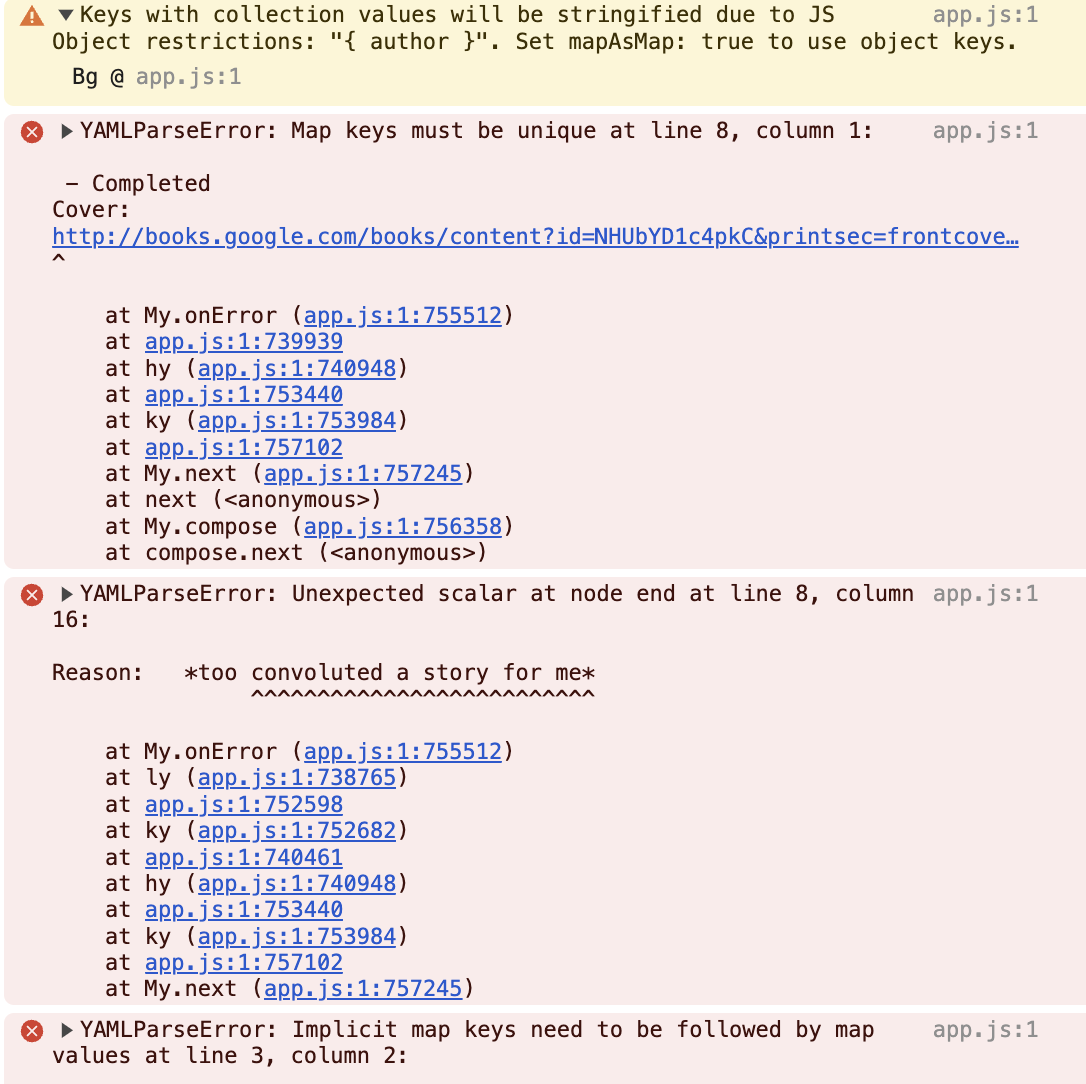
However, there is no indication of which files failed.
Environment
SYSTEM INFO:
Obsidian version: v1.9.10
Installer version: v1.7.7
Operating system: Darwin Kernel Version 24.5.0: Tue Apr 22 19:52:00 PDT 2025; root:xnu-11417.121.6~2/RELEASE_ARM64_T6031 24.5.0
Login status: logged in
Language: en
Catalyst license: supporter
Insider build toggle: on
Live preview: on
Base theme: adapt to system
Community theme: Minimal v8.0.0
Snippets enabled: 0
Restricted mode: off
Plugins installed: 34
Plugins enabled: 27
1: Banners v1.3.3
2: Book Search v0.7.5
3: Callout Suggestions v1.0.2
4: Copilot v2.9.5
5: Dangling links v0.3.0
6: Dataview v0.5.68
7: Dictionary v2.22.0
8: File Tree Alternative v2.6.0
9: Footnote Shortcut v0.1.3
10: Linter v1.29.2
11: Local Images Plus v0.16.3
12: Metadata Menu v0.8.9
13: Minimal Theme Settings v8.1.1
14: Mononote v1.2.2
15: Note Refactor v1.8.2
16: Omnisearch v1.27.2
17: Plugin Update Tracker v1.7.0
18: Readwise Official v3.0.1
19: Style Settings v1.0.9
20: Tag Wrangler v0.6.4
21: Templater v2.14.1
22: Text Extractor v0.6.1
23: Text Format v3.1.0
24: Various Complements v10.7.1
25: Share Note v1.2.0
26: Callout Manager v1.1.0
27: Git v2.35.0
RECOMMENDATIONS:
Custom theme and snippets: for cosmetic issues, please first try updating your theme and disabling your snippets. If still not fixed, please try to make the issue happen in the Sandbox Vault or disable community theme and snippets.
Community plugins: for bugs, please first try updating all your plugins to latest. If still not fixed, please try to make the issue happen in the Sandbox Vault or disable community plugins.