Content of a Note totally Replaced/overwritten with content of another note

I want to report this issue too. It happened to me on July 18th (last time the notes were edited), but I realized about it today. Some notes were completely replaced by the content of other notes, super weird :thinking:. Fortunately I could recover those affected notes.
I want to provide a possible clue: the issue might be related with creating/changing backlinks fast in the frontmatter. Because that’s what I was doing. And I was working at super speed, with 2 Obsidian windows and multiple tabs opened (may be something with the “refreshing” of the backlinks broke it, I don’t know).

Another thing is that the affected notes were in the same folder.

I’ve realized that sometimes when I’m creating new fields and assigning/changing values fast in the frontmatter, the values don’t get assigned (I have to re-enter them). I just mentioned this latter because it could be related.

Do you not have a general backup system setup, or is this just extra insurance? If you don’t, I recommend setting up Time Machine and checking Back up your Obsidian files - Obsidian Help for a friendly guide to other options.

I’m seeing this bug as well, using obsidian vault on a single machine but placing the vault in google drive to get a backup. On latest obsidian 1.9.12 Mac OS 15.7 Apple Silicon. Latest google drive as well (114.0.1.0). No community plugins.

I’ve noticed a few things on my system trying to find out what’s going on:

  • Affected file history in google drive shows several renames back and forth (A to B, B to A, which can explain how they are getting overwritten)
  • Affected files are highlighed in an inverse color scheme (e.g. white text on a black background in ls -G). Not 100% sure what ls is trying to indicate there but I think that means the file is “globally writable” which makes sense if the OS thinks google drive created these files via the rename

I am not sure if this is an obsidian or google drive issue and I haven’t been able to reproduce it. Just noticed several random notes going missing from time to time. What I think I’ll do to mitigate this is schedule a copy via cron or similar once a day to google drive and keep the obsidian vault OFF google drive. I only need it on one machine anyway.

For the affected files ls -l does not show anything unusual (“mode 600” in most cases) but xattr shows an additional attribute of “com.google.drivefs.item-id#S” which does in fact mean the file was created by google drive (“created” via the renames I think).

I’m experiencing this bug as well with Macos 15.6.1 and Obsidian 1.10.3. My vault is on local storage.

This is a critical, breaking bug. It undermines the primary purpose of the tool. I’ve stopped using Obsidian until it is resolved.

We recently (1.10.2) fixed a bug that could cause this when editing dates in properties and then navigating tab history.

Under which circumstances does it happen to you? do you have reproducible steps?

This isn’t super-useful but might give context.

I’ve used the same vault for many months with no problem. A few days ago I moved the vault to a very slow filestore - SMB to a cheap Azure Files share - and this problem has happened 3 times already. It makes me suspect there’s a race condition when a tab loads a new file, which only presents itself when the filestore is slow.

The outcome is that the content from the previous file gets written into the next one.

This is me entirely looking at it as a black box, and I’d be fascinated to peek around the source code, but it almost feels like either/or:

  • Edits to the new note can be made before it’s been fully read in, so the edit buffer still has the contents from the previous note… Which it then writes back to the new one.
  • There’s a write buffer being emptied from updates to the previous note, but because of the filestore delay it doesn’t finish before the tab changes to a different file. (feels unlikely unless there’s a hidden retry behaviour)

And to show how slow the filestore is - and therefore how unlikely this race condition is under normal circumstances - another symptom of the filestore delay is that the Properties pane takes a few seconds to open when the tab changes to a new file. In fact, if I rush editing and don’t wait for the Properties pane to appear, then the problem described seems to happen more often.

The OP mentioning iCloud makes me wonder if that’s similarly slow when there are updates and iCloud sync happening the background.

I’ll try to gather some better evidence and repro details; or maybe a video. In the meantime:

SYSTEM INFO:
Obsidian version: v1.10.6
Installer version: v1.5.12
Operating system: Windows 10 Pro 10.0.22631
Login status: not logged in
Language: en
Insider build toggle: off
Live preview: on
Base theme: adapt to system
Community theme: PLN v1.18.0
Snippets enabled: 3
Restricted mode: off
Plugins installed: 14
Plugins enabled: 7
1: Dataview v0.5.68
2: Templater v2.16.2
3: Update modified date v1.5.0
4: Tasks v7.22.0
5: Auto Note Mover v1.2.0
6: Iconize v2.14.7
7: Style Settings v1.0.9

Further info, and a short-term workaround:

By forcing links to open in a new tag (e.g. with obsidian://show-plugin?id=opener) the problem doesn’t manifest itself. Presumably this is because any async operations to finish writing changes to the previous file can still happen, while the new note loads into a completely fresh tab.

hello Riscy. I agree with you that there is some rare race condition at play here.

Out of curiosity, does downloading and reinstall Obsidian from the website help in your case or not?

Hi @WhiteNoise - yes, it’s a fresh installation of Obsidian from the website. I downloaded it in December 2025. Thanks.

This has happened to me a few times now, most recent is today. According to Google search, this problem is at least 1 year old and I have only noticed it this month. Basically a certain portion of contens from one note are replaced with the complete contents of the previous note I clicked on. It’s Windows 11 and Obsidian 1.8.

I’m sort of scared about how many of my notes within this year have been replaced with the previous notes without my knowledge, particularly more so because I’m writing a book and all my thoughts were in those notes. I considered switching from Evernote to Obsidian as one of the best decisions and now I’m not so sure. Is there anyone actually solving this issue? I’m asking this because I like Obsidian and I can wait for a few days. But if no one is working on it, then we might have to switch to an alternative, as this problem will become more widely known to other users.

Thank you

@qmc check my workaround. Content of a Note totally Replaced/overwritten with content of another note - #29 by Riscy

Got it. Thank you.

Related:

I agree, had the issue a couple of times last year, can’t reproduce since then but just wanted to add:

- it happened on Android

- was not using any sync plugin/alternative and it

- occurred while working with the frontmatter, as fast as possible, changing from one note to the other in the same tab (haven’t found a way to visualise multiple notes/tabs at the same time

).

Possibly related yes; but the bug I experienced as described with the slow filestore doesn’t trigger the “automatic merging of notes” message.

I have seen that on other occasions, but not in the circumstances that I was describing in this thread.

Have been having this issue more and more often - frequently, when I open my (entirely local, no cloud sync or anything) vault on android, one of the first files to be loaded is replaced with the contents of a file that is also open in another tab. Likewise, I am deeply deeply concerned by this, and I hope the response has been deeper than just a few replies in this thread. I have no idea how many files I may have lost from this - and yes, although backup certainly helps, even knowing which files need restoring would involve scanning them for a specific type of change and each individual person would have to do it.

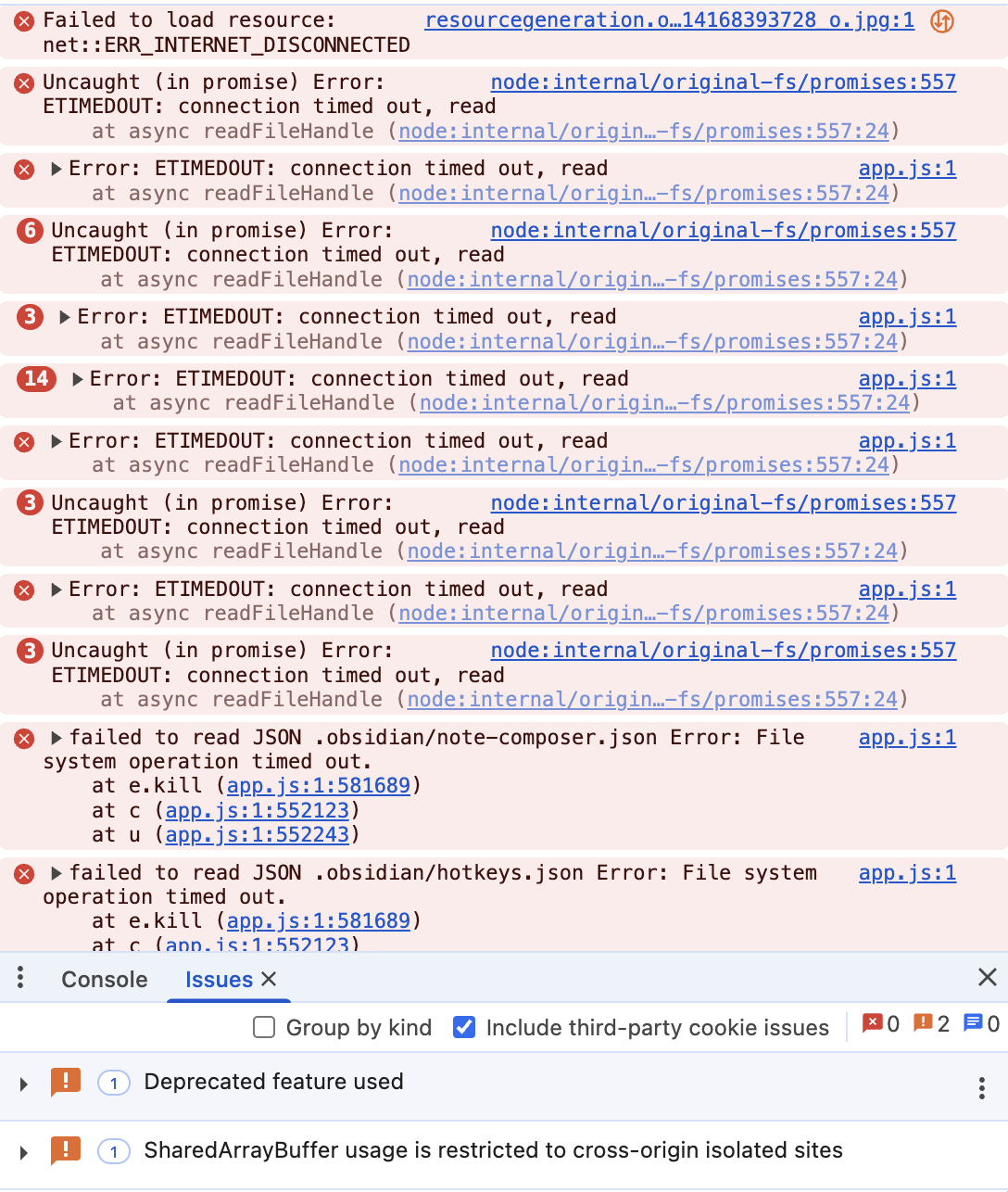
Hello–this has also been consistently happening to me. I took my vault off of the iCloud sync but it’s continued to happen. Screenshot from the console is below. I assume there’s no way to recover these notes from within Obisidan?

You can try the file recovery plugin and see if there is something in there.

Your logs point to the fact that obsidian read operation fail.
Are you sure you took your vault off of iCloud?
If so, Where did you put your vault exactly?
Are you using some network share?

**Deterministic reproduction and the mechanism — still present in 1.13.7**

I’ve been hit by this: roughly fifteen notes in my vault silently replaced with other notes’ content over several weeks. I built (OK, Claude built) a test vault to isolate it, and I believe I have the mechanism plus a reliable way to reproduce it. It still reproduces on **1.13.7**, after the 1.10+ file-opening changes mentioned earlier in this thread.

### The mechanism

When you switch to a note whose content takes time to load, **the editor keeps showing — and holding — the previous note’s text, but has already retargeted to the new file.** A keystroke in that window edits the previous note’s buffer, and autosave writes it into the new note’s file.

It is **silent**. At the moment it happens, the UI goes on to show the new note’s *correct* content once loading finishes. The wrong content is on disk only, and appears on the next fresh read — which is why it can go unnoticed for weeks.

### Steps to reproduce

Restricted mode: **no community plugins**, default core plugins. Using iCloud Drive on macOS purely as a reliable way to make one file load slowly; I don’t think iCloud is the cause — see “Why slow load” below.

1. Create a vault in iCloud Drive, in a folder **not** set to “Keep Downloaded”, with *Optimise Mac Storage* on (so macOS allows eviction).

2. Create two notes with clearly distinguishable content, e.g. `note-100.md` containing “This is note-100” and `note-014.md` containing “This is note-014”.

3. Evict the second note so its content must be downloaded when opened: `brctl evict note-014.md`. Confirm with `ls -lO note-014.md` — it should show `dataless`.

4. Open `note-100` and let it load fully.

5. Switch to `note-014` using ordinary navigation (I used the file explorer).

6. **Type a character before `note-014` finishes loading.** It appears in `note-100`'s displayed text.

7. Wait for `note-014` to load. It displays its own correct text; the typed character has vanished.

8. Switch back to `note-100` (correct), then back to `note-014`.

### Expected

`note-014.md` is unchanged, or at worst contains its own text plus the typed character. `note-100.md` is unaffected.

### Actual

`note-014.md` on disk now contains **`note-100`'s entire text plus the typed character**, with a fresh modification time. `note-100.md` is untouched. The damage shows at step 8, not at step 7.

### Why “slow load” rather than “iCloud”

I tested each ingredient separately against 300 self-identifying notes (each note’s text states its own ID, so any substitution names its source):

| condition | Obsidian involved | substitutions |

|—|—|—|

| evicted files downloaded by Finder, no app open | no | 0 of 553 |

| evicted files read with `cat` | no | 0 of 5 |

| evicted files written by shell (append and overwrite) | no | 0 of 6 |

| vault open in Obsidian, evicted notes left untouched (60 s) | yes, passive | 0 of 5 |

| evicted notes opened in Obsidian, **no typing** | yes | 0 of 5 |

| evicted note opened, **typed during load** | yes | **1 of 1** |

iCloud reads and writes on their own are clean, and Obsidian viewing without typing is clean. It takes **Obsidian’s editor plus a slow load**. Eviction is just the most reliable way I found to make the load slow on demand. Any other cause of a slow open — a large vault, a sync client or plugin touching the file, rapid navigation while a previous load is still in flight — should open the same window. That would explain the reports above from Obsidian Sync and local vaults, and the pattern of **rapid navigation** (clicking quickly through Calendar days, repeated Back) that several people describe.

I also checked inode numbers throughout: they never change and are never reused, so this doesn’t look like file identity getting confused at the filesystem level.

### Suggested fix direction

Either don’t accept edits — or don’t autosave — until the newly opened file’s content has actually loaded; or bind the save target to the buffer that was loaded rather than to the currently-selected path. The core problem is a window in which the displayed buffer and the save target belong to different files.

### Environment

- Obsidian **1.13.7** (installer 1.12.7)

- macOS 15.7.4 (24G517), Apple Silicon

- Reproduced in restricted mode, no community plugins

- Real-vault damage occurred with community plugins enabled (Calendar, Dataview, Templater, Local REST API, plus a custom plugin) — consistent with the mechanism rather than caused by any one plugin

### Test harness

Happy to share the small Python script that generates the self-identifying vault and a verifier that reports intact / evicted / substituted notes without reading evicted files (reading an evicted file forces a download, which would disturb the experiment).

(Full disclosure: Claude Code wrote this bug report, but I did sit with it during all the testing and have read and approved the report.)