Why doesn’t the obsidian team think this is a desirable feature (the original 4+ yo feature request for a CLI)? Is there some security or architecture or reliability reason? All my other note-taking tools accept command line args and parameters so that they can be used within an ecosystem of other command line tools.
I’d love to see the Obsidian team implement a command-line interface (CLI) option!
This is a fundamental feature for any serious editor — tools like BBEdit, IntelliJ, and Sublime Text all support launching the app with a specified path via the command line. It’s a small addition that would make a big difference for workflow efficiency.
At-least something of this nature - let’s say I want to open my markdown files at /usr/local/markdown, and below command should open that folder with Obsidian:
/Applications/Obsidian.app/Contents/MacOS/Obsidian "/usr/local/markdown"
It would be a dream come true if that happens!! Obsidian team.. please…!!!
You can use Obsidian URI via command line
If anyone else is having issues opening vaults or specific *.md files from the linux command line, here are some bits of information that will help you understand why it simply won’t work sometimes. It’s frustrating because Obsidian assumes a couple of odd behaviors.
If you installed Obsidian using official and well curated package managers, the following should work:
xdg-open obsidian:///path/to/my/vault
open obsidian://open?vault=VAULT_NAME&file=relative/path/to/specific/file.md
They require the correct mime settings declared in your *.desktop files, and those should have been correctly configured during the installation process. If you can see Obsidian listed in the your desktop environment’s application menu, that usually means you’re good to go.
HOWEVER!!!
Another requirement is that the vault should have already been opened at least once using the GUI interface.
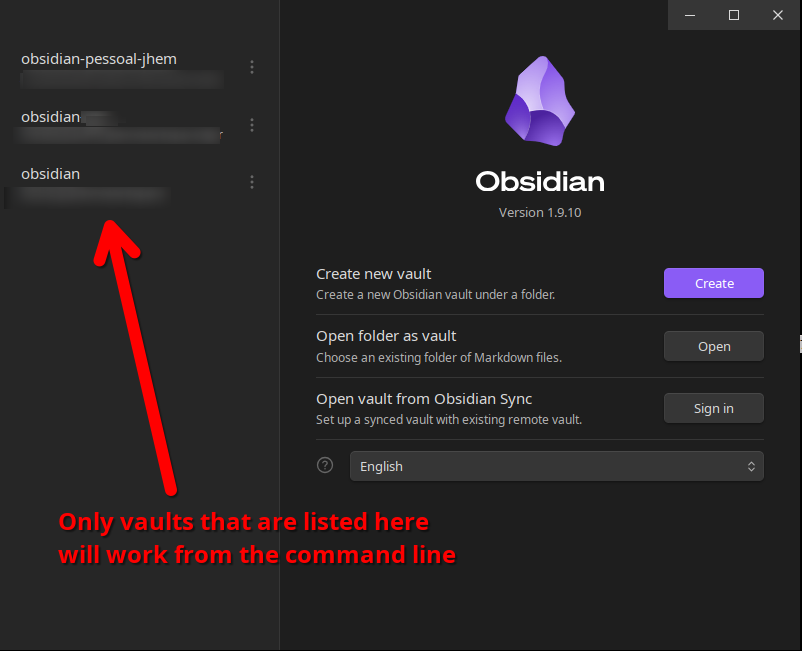
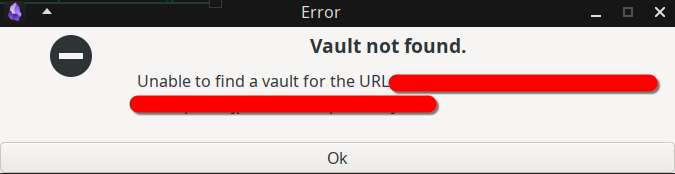
Techincally, the vault must be listed in your ~/.config/obsidian/obsidian.json so it can be found by name, id or path when the command line URL is parsed by Obsidian, otherwise you will see this error message:
You should also be aware that Obsidian is excessively micro-managing obsidian.json. When launching any instance, it will review obsidian.json every time and remove vaults from the list that are no longer accessible. That means if you have vaults that were mounted from remote hosts (sshfs or samba shares), Obsidian will remove these vaults from your list if these paths cannot be reached at the time it is being launched. The next time you try to use the command line, it might not be there anymore and the vault will be unknown. You will need to open it again using the GUI interface buttons to navigate directories and find it again.
No need to wait for Obsidian to implement this - you can use this open-source python CLI: New Obsidian CLI
Will be implemented V1.12.x. No ETAs.
Obsidian 1.12 includes the official Obsidian CLI.
1.12 thus far does not provide one of the features that’s being requested in this post (or in a similar post I made on Reddit not too long ago), because you still cannot open a folder as a vault with Obsidian CLI. The folder must already be known and registered to Obsidian as a vault (and have a unique name!) in order to open it with the CLI.
This is a big feature gap for me, because I want to open a folder as a vault without needing to interact with the Obsidian UI, and because I would not like to have those vaults polluting Obsidian’s global vault list. I have two main scenarios I could really use this for:
- I’m working on several plugins at the moment, and each has their own independent test vault, all of them named “testvault”. I’d like to be able to open the vault via an npm command or something similar without Obsidian needing to know beforehand of this vault’s existence, but even if I do register them, I need them to all have unique names or it could choose the wrong vault to open.
- I’m working on an tool which generates Obsidian vaults using data collected during my work codebase’s build. The pain point here is that I cannot make my tool open the generated vault after it’s done, I need to first manually register the vault with Obsidian.
Please, open a separate FR for this.
This would also be a separate FR linked to the first one.
I’ll happily open a separate FR if it helps get this feature rolling!
But respectfully, I’m a bit confused why this would need a new FR? The original poster asks for “opening a folder as a vault with a CLI command”, but the feature that 1.12 brings is “opening a vault by its name provided it was already added via the UI”. Other feature requests asking for the same thing (such as Open folders as vaults from the CLI ) all got closed and pointed to this thread. I just want to check in before I make a new FR that gets marked as a duplicate.
This is an old and long thread that over the years grew into asking a mix of things some are implemented some are not. I am not even sure the OP wanted to open any folder (including folders that are not yet a vault).
I am not sure the OP wanted to open any file, including files that are not yet in vault. We cannot do do that even if you use the GUI (See this).
Now we have a CLI, so at this point we need narrow, better shaped Feature Requests that can be done and closed.
I have decided to create a new feature request. This request is specificially about allowing the user to open vaults by filepath using the URI.
See here:
I agree. It’s pretty limiting that the Obsidian CLI still can’t open a folder as a vault unless it’s already registered in the app.
For comparison, VS Code (which is also an Electron app running Chromium and Node.js) has let you open any folder from the terminal since day one using code ..
I suspect Obsidian can’t do this easily because of how it handles data. It needs to scan the directory beforehand to build an in-memory metadata cache and index all internal links via IndexedDB. VS Code, on the other hand, just reads the file tree directly and indexes things asynchronously in the background.
>Any suggestions there @mlamb ?
@mzee sorry for missing this! My kludgy approach for this is to make a temporary modification to my overall obsidian config so that it can find an ad-hoc vault.
This config file is called obsidian.json. Mine happens to be in /home/mlamb/.var/app/md.obsidian.Obsidian/config/obsidian/obsidian.json.
The file contains one entry per vault. So I add a new entry for the directory I want to open, then invoke obsidian to open it. Automatically removing it later is a little trickier because I don’t have a reliable way to know when I’m finished with it.
No worries @mlamb. You’re right and that’s the only way I too found and I built and open sourced those scripts for the same. Have been using them for a while now it works fine. Only issue is that the Obsidian needs restarting every time you want a new vault to be created through command line.
So I’m longing for a better approach to open a folder as a vault (new or existing) through Obsidian CLI too.
For those still looking for “Opening a folder" as a vault” functionality that isn’t satisfied by the recent Obsidian CLI update, I’ve created a new ticket for that request here, please like it so we can get some traction on it:
Open folder as Obsidian vault from terminal - Feature requests - Obsidian Forum