What I’m trying to do
I’m trying to write the code for an inline Base to list all the Pdf files that are in the Parent folder and all its sub-folders.
My usual folder structure is like this
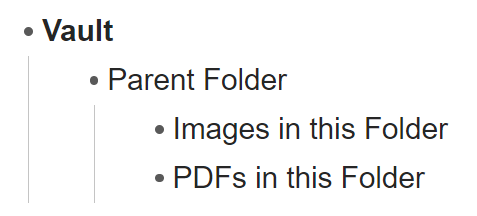
And I try to always put my Pdf documents into the PDF folder, but sometimes I forget and they appear as below:
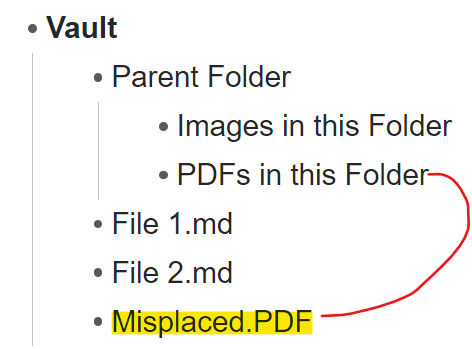
and the Pdf file isn’t in the correct folder.
I have learned how to do this by using a view of a Base, by filtering for the file extension Pdf.
Using a Base will also return the Misplaced Pdf file.
I’ve been trying to learn how to embed a base as a code block. I have read the help files here. I’m not at a level where I can understand enough about coding queries yet, but I have tried!
Things I have tried
I found this code which created a table which showed all the files that links into the open file.
This is the code and I found it on this Reddit thread here.
```base
views:
  - type: table
    name: Table
    filters:
      and:
        - file.hasLink(this.file.name)
    order:
      - file.name
      - file.folder
      - file.ctime
      - file.mtime
    columnSize:
      file.name: 500
      file.folder: 500
      file.ctime: 175
      file.mtime: 175
And I tried to use bits of the above code and the code shown in the Obsidian Help page to create my own Inline Base.
This is the code I wrote - but it doesn’t work!
views:
  - type: table
    name: Table
filters:
  and:
   - file.ext(pdf)
  order:
      - file.name
      - file.folder
      - file.ctime
 columnSize:
      file.name: 500
      file.folder: 500
      file.ctime: 175
      file.mtime: 175
The error says “encountered an error when rendering the code block”.
I tried swapping the line
-File.ext(pdf) for
-file.inFolder(“This.Folder”)
But I still got an error!
If I could code this correctly I would save it as a template and then insert the template as an inline code block and see all the pdfs in that parent folder, even if they are not in the correct location.
Any advice appreciated 
.

