What I’m trying to do
Use shell-session language for code blocks which should work as it is supported by PrismJS.
Things I have tried
```shell-session
# echo "Hello, world!"
Hello, world!
```
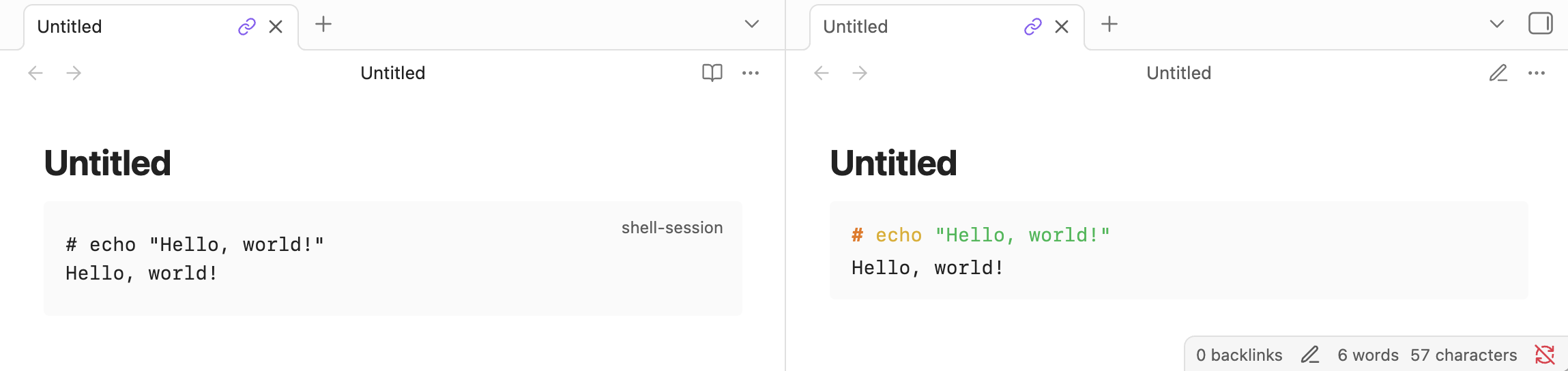
This should be correctly rendered but it looks like this.
What I am expecting instead is this (Test drive ▲ Prism):
Is it supported by the version that Obsidian uses?
Also note that Obsidian uses different code highlighters in Editing View and Reading View (I don’t remember which one is Prism).
ariehen
3
It looks like you are in the editor there (live preview). Switch to reading view and you will see the syntax highlighting.
Source mode and Live Preview do not support PrismJS, and may render syntax highlighting differently.
https://help.obsidian.md/syntax#Code+blocks
live preview | reading view
If you are looking for a plugin to have all views the same (or close), have a look at:
Thanks, I never noticed that source mode and preview could have different syntax highlighting. It works for me now.