Clicking on the audio slider should skip audio to that point in the recording.
Actual result
This doesn’t happen. Clicking instead pauses the audio briefly while the left mouse button is held down.
Environment
Operating system: macOS 10.14.6 Mojave
Obsidian version: 0.8.4
Additional information
I have noticed this issue since i started using Obsidian at v0.8.2.
No OS updates in that time.
Audio recorder works very well aside from this issue.
Play pause buttons and volume slider works as expected.
Yes i was using custom CSS and I have since removed it. This has not helped.
I should also say that loading the audio files of the older recordings into some other program (firefox web player or VLC) works fine so it doesn’t seem to be an issue with those audio files.
I have also completely reinstalled obsidian after removing obsidian from Applications and the Library/Application Support/obsidian folder.
I took some new test recordings after the reinstall. After about 5-6 seconds it seems like these recordings are fully loaded into the application and I can skip using the slider.
The recordings I took with the old install (with custom css) still don’t allow skipping. But these are much larger recordings and I don’t know if that is the reason.
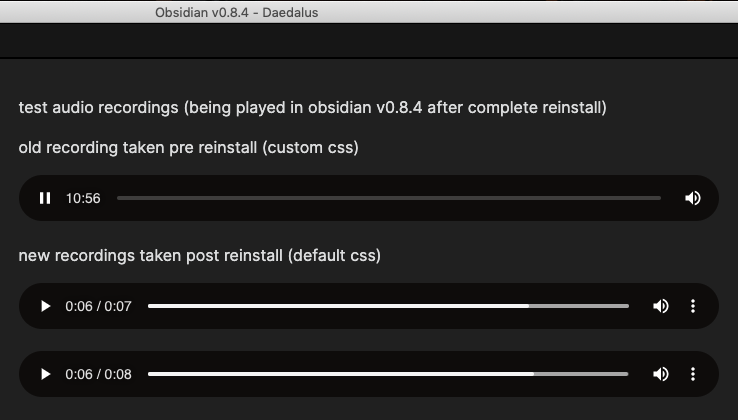
It seems like it takes a long time for the linked audio file to be loaded into obsidian. See below images.
What the linked audio files look like after opening the note
What the new recordings look like after playing for ~6 sec. The file appears fully loaded and skipping works using the slider. Old audio notes do not display this behaviour after playing for at least 11 mins.
Finally I linked an mp3 file and skipping using the slider works perfectly without any loading time. m4a files from macOS voice memo app also work perfectly so that is a workaround in the meantime if anyone else has this issue.
i have the same problem with .webm on windows 8.1
It is a codec problem, as VLC also doesnt allow me to skip forward.
Maybe the plugin could record wav instead?
Or in the settings you choose what format you want the audio to be recorded (mp3, wav, webm, m4a)
Any Solutions on this? I’m still facing this problem in the latest version of the obsidian. What newer codec should I use? Can you help me with the link for the newer codec? I’m using obsidian on windows 10, 64-bit pc.
I’m still having issues with this too, kind of a showstopper for me since I’m using Obsidian for songwriting. I’m having the issue with the latest version of Obsidian, latest Mac OS, default theme in Safe Mode.