Steps to reproduce
```mermaid
flowchart LR
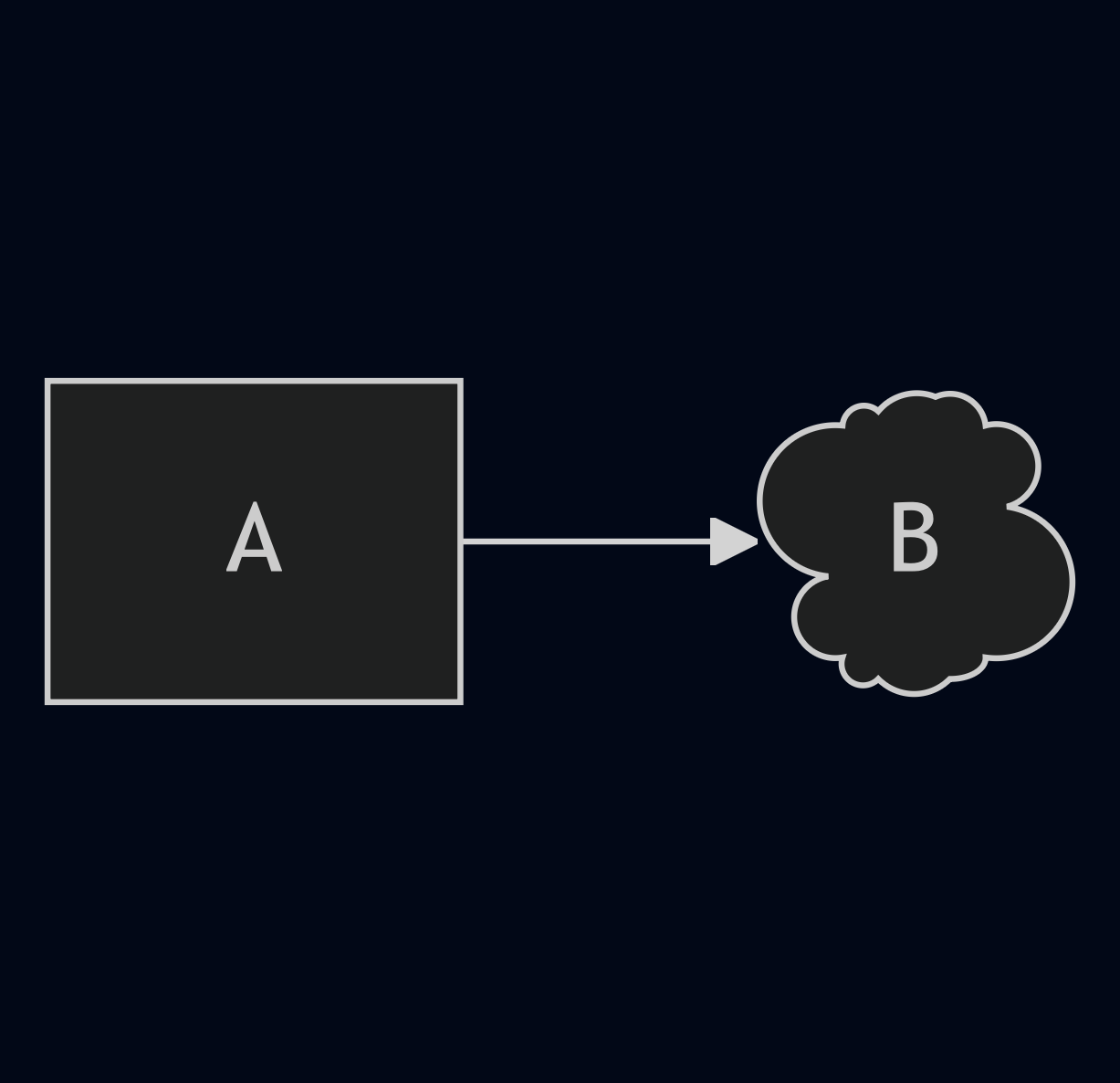
A → B@{shape: cloud}
```
Did you follow the troubleshooting guide? [Y/N]
Yes, I reproduced the error in the Sandbox Vault
Expected result
A flowchart showing a Rectangle labeled “A” connected to a Cloud labeled “B” with an arrow. Here’s an image generated by the Mermaid Live Editor:
Actual result
Obsidian throws this parsing error:
Error parsing Mermaid diagram!

No such shape: cloud.
nvironment
Additional information
cloud is one of several expanded node shapes added in Mermaid v11.3. All other shapes and aliases work just fine with the same syntax in the Sandbox Vault.
Full Expanded Chart Shapes Test
Bang (Bang)
Bang
bang
flowchart LR

A --> B@{shape: bang}
Notched Rectangle (Card)
Represents a card
notch-rect
flowchart LR

A --> B@{shape: notch-rect}
card
flowchart LR

A --> B@{shape: card}
notched-rectangle
flowchart LR

A --> B@{shape: notched-rectangle}
Cloud (Cloud)
cloud
cloud
flowchart LR

A --> B@{shape: cloud}
Hourglass (Collate)
Represents a collate operation
hourglass
flowchart LR

A --> B@{shape: hourglass}
collate
flowchart LR

A --> B@{shape: collate}
Lightning Bolt (Com Link)
Communication link
bolt
flowchart LR

A --> B@{shape: bolt}
com-link
flowchart LR

A --> B@{shape: com-link}
lightning-bolt
flowchart LR

A --> B@{shape: lightning-bolt}
Curly Brace (Comment)
Adds a comment
brace
flowchart LR

A --> B@{shape: brace}
brace-l
flowchart LR

A --> B@{shape: brace-l}
comment
flowchart LR

A --> B@{shape: comment}
Curly Brace (Comment Right)
Adds a comment
brace-r
flowchart LR

A --> B@{shape: brace-r}
Curly Braces (Comment with braces on both sides)
Adds a comment
braces
flowchart LR

A --> B@{shape: braces}
Lean Right (Data Input/Output)
Represents input or output
lean-r
flowchart LR

A --> B@{shape: lean-r}
in-out
flowchart LR

A --> B@{shape: in-out}
lean-right
flowchart LR

A --> B@{shape: lean-right}
Lean Left (Data Input/Output)
Represents output or input
lean-l
flowchart LR

A --> B@{shape: lean-l}
lean-left
flowchart LR

A --> B@{shape: lean-left}
out-in
flowchart LR

A --> B@{shape: out-in}
Cylinder (Database)
Database storage
cyl
flowchart LR

A --> B@{shape: cyl}
cylinder
flowchart LR

A --> B@{shape: cylinder}
database
flowchart LR

A --> B@{shape: database}
db
flowchart LR

A --> B@{shape: db}
Diamond (Decision)
Decision-making step
diam
flowchart LR

A --> B@{shape: diam}
decision
flowchart LR

A --> B@{shape: decision}
diamond
flowchart LR

A --> B@{shape: diamond}
question
flowchart LR

A --> B@{shape: question}
Half-Rounded Rectangle (Delay)
Represents a delay
delay
flowchart LR

A --> B@{shape: delay}
half-rounded-rectangle
flowchart LR

A --> B@{shape: half-rounded-rectangle}
Horizontal Cylinder (Direct Access Storage)
Direct access storage
h-cyl
flowchart LR

A --> B@{shape: h-cyl}
das
flowchart LR

A --> B@{shape: das}
horizontal-cylinder
flowchart LR

A --> B@{shape: horizontal-cylinder}
Lined Cylinder (Disk Storage)
Disk storage
lin-cyl
flowchart LR

A --> B@{shape: lin-cyl}
disk
flowchart LR

A --> B@{shape: disk}
lined-cylinder
flowchart LR

A --> B@{shape: lined-cylinder}
Curved Trapezoid (Display)
Represents a display
curv-trap
flowchart LR

A --> B@{shape: curv-trap}
curved-trapezoid
flowchart LR

A --> B@{shape: curved-trapezoid}
display
flowchart LR

A --> B@{shape: display}
Divided Rectangle (Divided Process)
Divided process shape
div-rect
flowchart LR

A --> B@{shape: div-rect}
div-proc
flowchart LR

A --> B@{shape: div-proc}
divided-process
flowchart LR

A --> B@{shape: divided-process}
divided-rectangle
flowchart LR

A --> B@{shape: divided-rectangle}
Document (Document)
Represents a document
doc
flowchart LR

A --> B@{shape: doc}
document
flowchart LR

A --> B@{shape: document}
Rounded Rectangle (Event)
Represents an event
rounded
flowchart LR

A --> B@{shape: rounded}
event
flowchart LR

A --> B@{shape: event}
Triangle (Extract)
Extraction process
tri
flowchart LR

A --> B@{shape: tri}
extract
flowchart LR

A --> B@{shape: extract}
triangle
flowchart LR

A --> B@{shape: triangle}
Filled Rectangle (Fork/Join)
Fork or join in process flow
fork
flowchart LR

A --> B@{shape: fork}
join
flowchart LR

A --> B@{shape: join}
Window Pane (Internal Storage)
Internal storage
win-pane
flowchart LR

A --> B@{shape: win-pane}
internal-storage
flowchart LR

A --> B@{shape: internal-storage}
window-pane
flowchart LR

A --> B@{shape: window-pane}
Filled Circle (Junction)
Junction point
f-circ
flowchart LR

A --> B@{shape: f-circ}
filled-circle
flowchart LR

A --> B@{shape: filled-circle}
junction
flowchart LR

A --> B@{shape: junction}
Lined Document (Lined Document)
Lined document
lin-doc
flowchart LR

A --> B@{shape: lin-doc}
lined-document
flowchart LR

A --> B@{shape: lined-document}
Lined Rectangle (Lined/Shaded Process)
Lined process shape
lin-rect
flowchart LR

A --> B@{shape: lin-rect}
lin-proc
flowchart LR

A --> B@{shape: lin-proc}
lined-process
flowchart LR

A --> B@{shape: lined-process}
lined-rectangle
flowchart LR

A --> B@{shape: lined-rectangle}
shaded-process
flowchart LR

A --> B@{shape: shaded-process}
Trapezoidal Pentagon (Loop Limit)
Loop limit step
notch-pent
flowchart LR

A --> B@{shape: notch-pent}
loop-limit
flowchart LR

A --> B@{shape: loop-limit}
notched-pentagon
flowchart LR

A --> B@{shape: notched-pentagon}
Flipped Triangle (Manual File)
Manual file operation
flip-tri
flowchart LR

A --> B@{shape: flip-tri}
flipped-triangle
flowchart LR

A --> B@{shape: flipped-triangle}
manual-file
flowchart LR

A --> B@{shape: manual-file}
Sloped Rectangle (Manual Input)
Manual input step
sl-rect
flowchart LR

A --> B@{shape: sl-rect}
manual-input
flowchart LR

A --> B@{shape: manual-input}
sloped-rectangle
flowchart LR

A --> B@{shape: sloped-rectangle}
Trapezoid Base Top (Manual Operation)
Represents a manual task
trap-t
flowchart LR

A --> B@{shape: trap-t}
inv-trapezoid
flowchart LR

A --> B@{shape: inv-trapezoid}
manual
flowchart LR

A --> B@{shape: manual}
trapezoid-top
flowchart LR

A --> B@{shape: trapezoid-top}
Stacked Document (Multi-Document)
Multiple documents
docs
flowchart LR

A --> B@{shape: docs}
documents
flowchart LR

A --> B@{shape: documents}
st-doc
flowchart LR

A --> B@{shape: st-doc}
stacked-document
flowchart LR

A --> B@{shape: stacked-document}
Stacked Rectangle (Multi-Process)
Multiple processes
st-rect
flowchart LR

A --> B@{shape: st-rect}
processes
flowchart LR

A --> B@{shape: processes}
procs
flowchart LR

A --> B@{shape: procs}
stacked-rectangle
flowchart LR

A --> B@{shape: stacked-rectangle}
Odd (Odd)
Odd shape
odd
flowchart LR

A --> B@{shape: odd}
Flag (Paper Tape)
Paper tape
flag
flowchart LR

A --> B@{shape: flag}
paper-tape
flowchart LR

A --> B@{shape: paper-tape}
Hexagon (Prepare Conditional)
Preparation or condition step
hex
flowchart LR

A --> B@{shape: hex}
hexagon
flowchart LR

A --> B@{shape: hexagon}
prepare
flowchart LR

A --> B@{shape: prepare}
Trapezoid Base Bottom (Priority Action)
Priority action
trap-b
flowchart LR

A --> B@{shape: trap-b}
priority
flowchart LR

A --> B@{shape: priority}
trapezoid
flowchart LR

A --> B@{shape: trapezoid}
trapezoid-bottom
flowchart LR

A --> B@{shape: trapezoid-bottom}
Rectangle (Process)
Standard process shape
rect
flowchart LR

A --> B@{shape: rect}
proc
flowchart LR

A --> B@{shape: proc}
process
flowchart LR

A --> B@{shape: process}
rectangle
flowchart LR

A --> B@{shape: rectangle}
Circle (Start)
Starting point
circle
flowchart LR

A --> B@{shape: circle}
circ
flowchart LR

A --> B@{shape: circ}
Small Circle (Start)
Small starting point
sm-circ
flowchart LR

A --> B@{shape: sm-circ}
small-circle
flowchart LR

A --> B@{shape: small-circle}
start
flowchart LR

A --> B@{shape: start}
Double Circle (Stop)
Represents a stop point
dbl-circ
flowchart LR

A --> B@{shape: dbl-circ}
double-circle
flowchart LR

A --> B@{shape: double-circle}
Framed Circle (Stop)
Stop point
fr-circ
flowchart LR

A --> B@{shape: fr-circ}
framed-circle
flowchart LR

A --> B@{shape: framed-circle}
stop
flowchart LR

A --> B@{shape: stop}
Bow Tie Rectangle (Stored Data)
Stored data
bow-rect
flowchart LR

A --> B@{shape: bow-rect}
bow-tie-rectangle
flowchart LR

A --> B@{shape: bow-tie-rectangle}
stored-data
flowchart LR

A --> B@{shape: stored-data}
Framed Rectangle (Subprocess)
Subprocess
fr-rect
flowchart LR

A --> B@{shape: fr-rect}
framed-rectangle
flowchart LR

A --> B@{shape: framed-rectangle}
subproc
flowchart LR

A --> B@{shape: subproc}
subprocess
flowchart LR

A --> B@{shape: subprocess}
subroutine
flowchart LR

A --> B@{shape: subroutine}
Crossed Circle (Summary)
Summary
cross-circ
flowchart LR

A --> B@{shape: cross-circ}
crossed-circle
flowchart LR

A --> B@{shape: crossed-circle}
summary
flowchart LR

A --> B@{shape: summary}
Tagged Document (Tagged Document)
Tagged document
tag-doc
flowchart LR

A --> B@{shape: tag-doc}
tagged-document
flowchart LR

A --> B@{shape: tagged-document}
Tagged Rectangle (Tagged Process)
Tagged process
tag-rect
flowchart LR

A --> B@{shape: tag-rect}
tag-proc
flowchart LR

A --> B@{shape: tag-proc}
tagged-process
flowchart LR

A --> B@{shape: tagged-process}
tagged-rectangle
flowchart LR

A --> B@{shape: tagged-rectangle}
Stadium (Terminal Point)
Terminal point
stadium
flowchart LR

A --> B@{shape: stadium}
pill
flowchart LR

A --> B@{shape: pill}
terminal
flowchart LR

A --> B@{shape: terminal}
Text Block (Text Block)
Text block
text
flowchart LR

A --> B@{shape: text}