Steps to reproduce
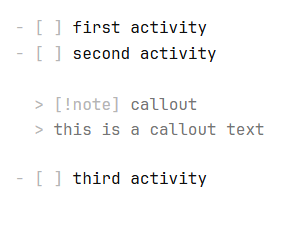
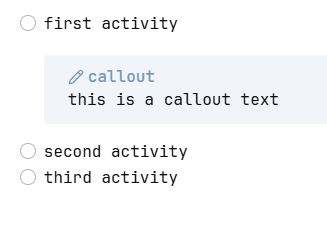
When drafting a (activity) list sometimes I need to have a callout indented as a sort of sub-task. If I press tab the text is indented, but the “>” char still is in the first columns. The outcome is not an indented callout but a raw text.
Did you read and follow the Troubleshooting Guide ? Yes
Expected result
Actual result
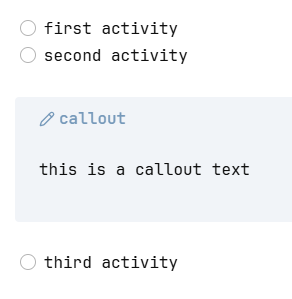
if I manually insert spaces before “>” it roughly works, but in the wrong line:
Environment
SYSTEM INFO:
Obsidian version: 1.14.4
Installer version: 1.14.4
Operating system: Windows 11 Enterprise 10.0.26200
Login status: logged in
Language: it
Catalyst license: none
Insider build toggle: off
Live preview: off
Base theme: adapt to system
Community theme: Minimal 9.1.2
Snippets enabled: 0
Restricted mode: off
Plugins installed: 21
Plugins enabled: 21
1: Advanced Tables v0.23.2
2: ASCII Tree Generator v1.3.0
3: File Explorer Note Count v1.2.4
4: GPG Encrypt v1.2.0
5: Ideascape v1.0.0
6: Importer v3.1.12
7: Janitor v1.1.3
8: Kroki v1.3.1
9: Linter v1.33.0
10: Maps v0.2.2
11: Vault Size History v3.0.0
12: Various Complements v11.4.2
13: Tasks v8.4.0
14: Tag Wrangler v0.6.5
15: Set View Mode per Note v1.0.3
16: Pretty Properties v2.1.1
17: PlantUML v1.9.0
18: Pandoc Plugin v0.4.1
19: Number Headings v1.16.0
20: Meld Encrypt v2.4.5
21: Shiki Highlighter v0.7.7
RECOMMENDATIONS:
Custom theme and snippets: for cosmetic issues, please first try updating your theme and disabling your snippets. If still not fixed, please try to make the issue happen in the Sandbox Vault or disable community theme and snippets.
Community plugins: for bugs, please first try updating all your plugins to latest. If still not fixed, please try to make the issue happen in the Sandbox Vault or disable community plugins.