Steps to reproduce
- Open Obsidian
- Run Command from Command Palette: “Bases: Insert new base”
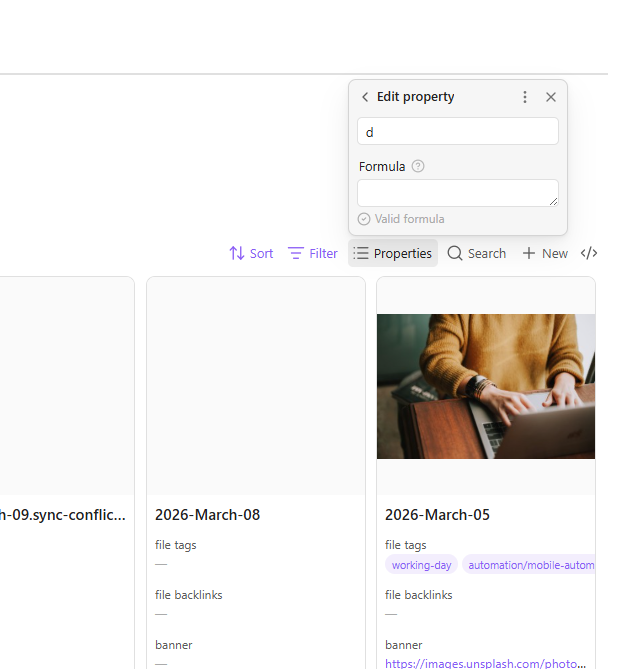
- Click to Properties > Click Add Formula
- Click on the formula editor box.
- The app will just stop you from editing the formula box.
Did you follow the troubleshooting guide? [Y/N]
Please, follow the Troubleshooting Guide before answering Yes.
- I used it in the test vault, the issue disappears. Wondering if any plugin caused the issue.
- I turned off all the extensions. But bug still exists.
- It’s not theme fault because using default.
Confirmed I am getting this bug.
I think the reason I am getting this issue is because I have too many files in my vault that formula can’t load. Maybe.
Expected result
Just be able to edit the formula after I added formula.
Actual result
Demo demonstrated how I slowly get frustrated about why the edit formula box can’t being not editable anymore.
It is just not letting me edit the editor box like why?
Environment
Platform:
SYSTEM INFO:
Obsidian version: 1.12.4
Installer version: 1.10.6
Operating system: Windows 11 Home Single Language 10.0.26200
Login status: not logged in
Language: en
Insider build toggle: off
Live preview: on
Base theme: light
Community theme: none
Snippets enabled: 0
Restricted mode: on
RECOMMENDATIONS:
none
Additional information
The recording is in the actual result (it’s the IPFS Link).
To rule out the installer version, I’d download and reinstall Obsidian from https://obsidian.md. The latest public version for Windows is Obsidian-1.12.4.exe.
Once that’s installed, open the vault and enable restricted mode (Settings > Community plugins > Restricted mode > Turn on and reload) to see if you still have the issue.
@ariehen
I downloaded the new installer and testing it again (like you told me to). It still is buggy but I can finally edit formulas properly. It ALWAYS disables me editing the formula editor box when I create a new formula property. and then when I try editing that created formula property, it allowed me to edit the formula again.
Okay it just went back to being uneditable again.
SYSTEM INFO:
Obsidian version: 1.12.4
Installer version: 1.12.4
Operating system: Windows 11 Home Single Language 10.0.26200
Login status: not logged in
Language: en
Insider build toggle: off
Live preview: on
Base theme: light
Community theme: none
Snippets enabled: 0
Restricted mode: on
RECOMMENDATIONS:
none
My vault currently has: 10441 files and 834 folders.
This issue doesn’t happen in the sandbox vault in both installer versions so it probably has somehthing to do with vault size.
I think I figured out the error, I was doing the formula thing in a window that was like dragged out of the main instance of obsidian so now I got two instances of obsidian, first one being the original one that has access to the settings and vault buttons. While the second one is just a note.
The error is only getting applied to the dragged out note but not in the main instance, the main instance works fine.
w.i.p will send video later.