I use emojis for certain notes as a visual queue for its note type (e.g., =collection, =relationship). I place these emojis at the beginning of a note’s title. Occasionally, the note type will change and requires an emoji change as well.
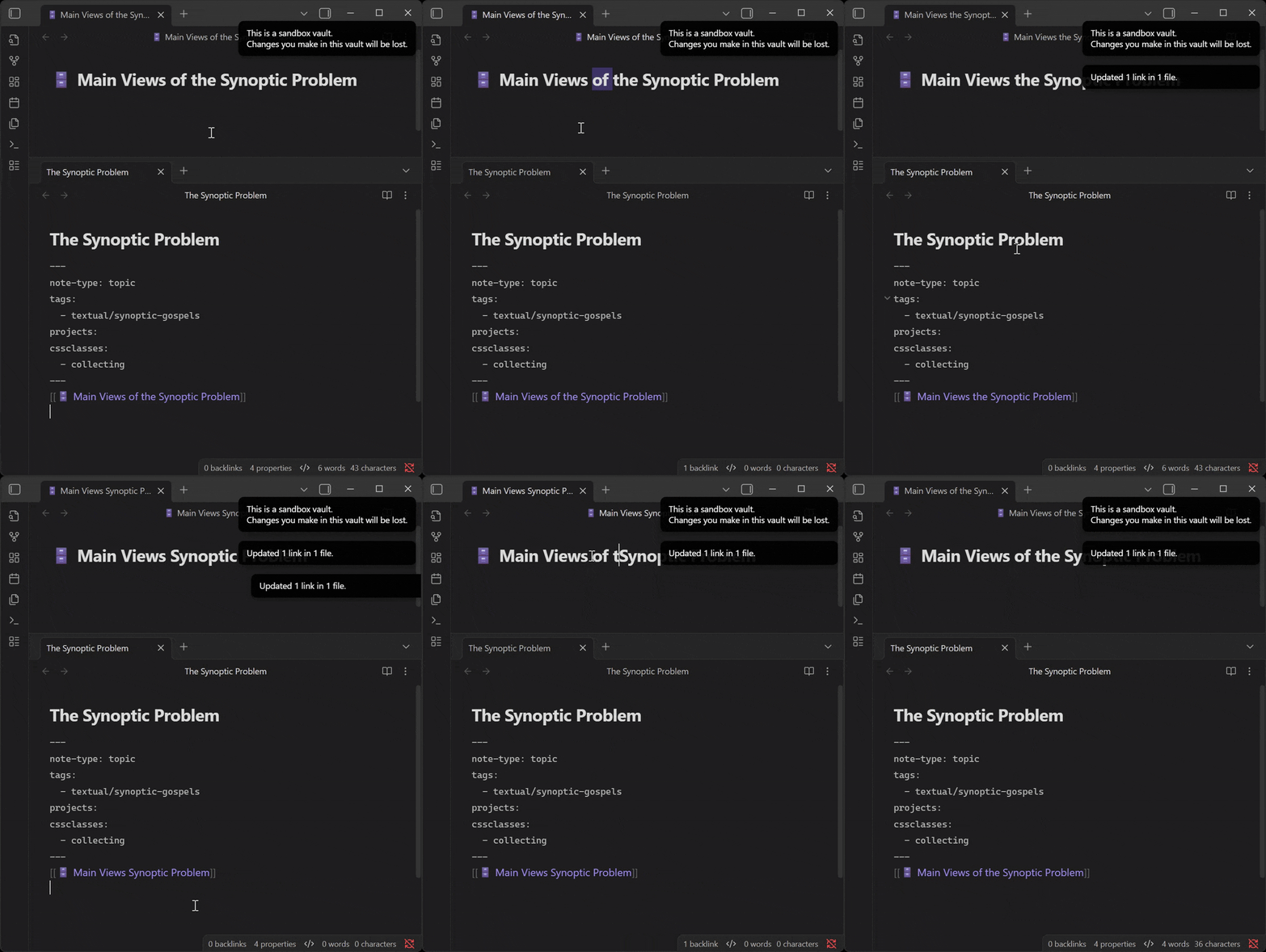
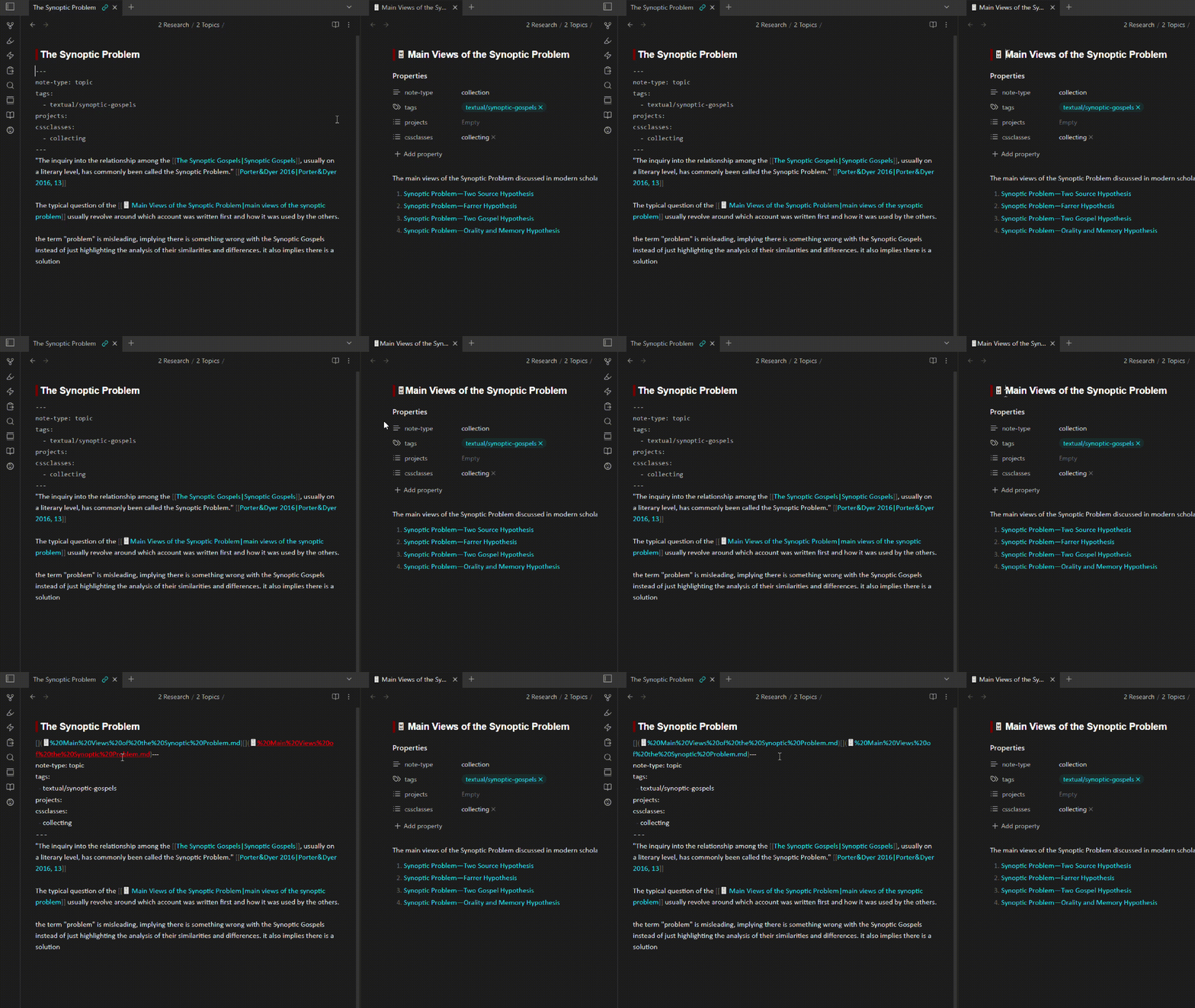
I have noticed several pairs of notes (i.e., notes linked together in some way) in my vault that have a very similar issue to the following example. Note A is named “ Note A”. I change the emoji in the name and notice note B now has broken yaml at the beginning of the note, as in it is just text instead of properties. Upon further investigation, I realize note B has had some weird “” style link prepended to the “—” of the yaml, usually duplicated several times. When I delete this, it goes back to normal.
I have seen other threads for the installer being old and the callout bug, but those don’t seem to line up with my issue.
This issue doesn’t occur every single time I change the name, but fairly consistent. It’s not just these two notes; there are several pairs in my vault doing this. I have disabled all plugins (core & community) but it still occurs. It doesn’t seem to be related to using emojis in the title as I have notes doing it that have typical text titles.
Two key pieces of info maybe are
I copied the two notes into the sandbox vault and the issue did NOT happen again.
I have watched the backlinks for the note that breaks the other note as I rename it and just before the rename that does so, the yaml will show up as a full block in the backlinks.
Here are two note examples. For example, if I remove the space between “ Main” and then put it back, it adds the weird links before the yaml of the second note.
Since it doesn’t happen in the sandbox, have you tried disabling plugins and snippets and switching to the default theme?
Presuming it doesn’t happen in that state, it’s time to selectively re-enable theme, snippets, and plugins to see which one is responsible. There’s a plugin called Divide & Concquer that can help you out if you have lots of plugins.
However, if it does happen with everything disabled, then
Can you paste in a code block what your YAML is like before you change the note name? I can’t tell from your screenshot.
How are you changing the note name? E.g., editing the inline title, right-clicking in the file explorer, right-clicking the link, editing the tab title bar, or whatever method you’re using.
Which note has the changing YAML: is it the first of the two notes involved in the name change, the second, or some other note?
What are your Obsidian version and installer version?
Thank you for your reply. I had already tried disabling all plugins (core & community) and using the default theme. I had not tried disabling my snippets. I just tried that but the issue persists.
The second note listed (“The Synoptic Problem.md”) has the changing yaml when I rename the first note (“ Main Views of the Synoptic Problem.md”). The second note has an intentional internal link to the first in its body.
I’m not catching any clues in there. Here’s an interpretation of the info you shared:
Maybe you can spot something substantially different between that and your set-up. Or maybe even that exact example also produces the issue for you.
Hoping you’ll gather enough info to either reproduce in the sandbox (in which case, could be a bug) or figure out what part of your set-up has introduced the problem.
Oh, you’ve put links with no display text before the intended front matter. I thought renaming the other note was creating links in that location.
So, in order to function as properties, YAML has to be the very first thing in the note . The two --- indicators can’t share the line with other content, including links.
I change the emoji in the name and notice note B now has broken yaml at the beginning of the note
Unfortunately, you didn’t have properly formatted YAML to begin with. Thus no properties. Changing the note name didn’t break it.
When you switch that note to Reading view, you should be able to confirm by seeing that it’s just text, not properties.
And of course, the link is expected to change when you update the note name, per your auto-update settings.
I may have not been clear. If so, my apologies. When I rename the file on the right, those links with no display text automatically get inserted before the front of matter of the left note. I am not inserting those links — they happen automatically. All I did in the example was remove the space in the title of the right note and then add it back.
I missed that you uploaded your notes thus was late to test with your copies (did it just now). Still didn’t see any clues.
There are no error notices at the top-right of your window, right? (It’s cut off in the screencap.) Only the notification for “Updated x links in y files”?
To be honest, since it doesn’t happen in the sandbox, it’s something to do with your set-up, almost always plugins/snippets/theme. I would test again:
Disable all snippets, switch to the default theme, and turn off all plugins by turning on restricted mode (Settings > Community Plugins > Restricted mode).
If it still happens in that state, then I would make a fresh vault in a folder beside the existing vault—to minimize possible differences—and try to reproduce there.
… Unless someone who has already seen this behavior comes by, it’s going to be hard to help you troubleshoot something created by your Obsidian setup or your system.
Figured out the root cause: a bug in the Advanced Canvas plugin.
Temp Solution: disable “.canvas metadata cache compatibility” settings in Advanced Canvas plugin.
After playing around with disabling plugins and restarting obsidian cycles, I managed to pin down my issue coming from the metadata cache settings in Advance Canvas. Turns out this bug is a known issue documented here.
Thanks again for trying to work through it with me, dawni!
 =collection,
  =relationship). I place these emojis at the beginning of a note’s title. Occasionally, the note type will change and requires an emoji change as well.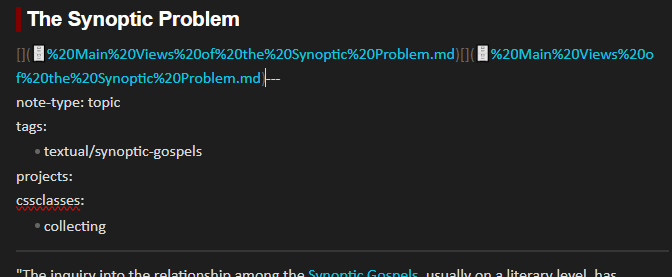
 Main Views of the Synoptic Problem.md”). The second note has an intentional internal link to the first in its body.