Once you’ve done the above, delete everything above this line.
Steps to reproduce
In note ‘Definition’ create a block with a reference, e.g.
- (Acronym: Definition)^def-acronym
In another note, reference the block with
![[Definitions#^def-acronym]]
When present with link autocomplete, select def-acronym from the Definitions page
Did you follow the troubleshooting guide? [N]
Please, follow the Troubleshooting Guide before answering Yes.
Expected result
The block should be referenced, with the reference unchanged and display
- (Acronym: Definition)
Actual result
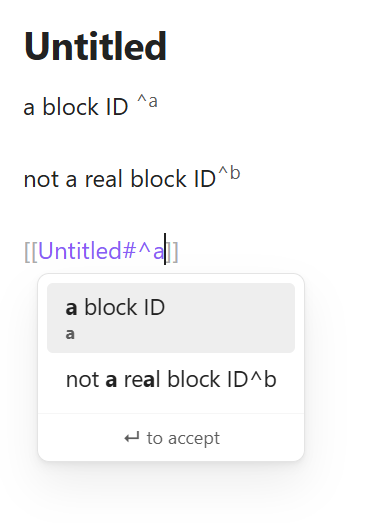
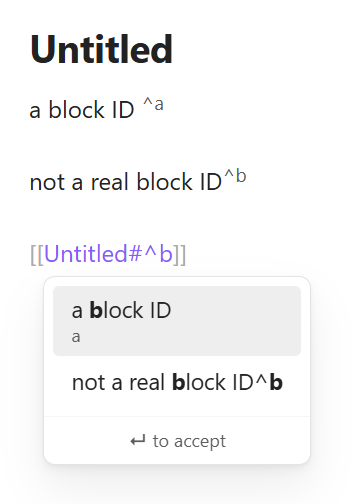
On selecting autocomplete, if there is no space between the block and the ^, a new unique id is created for the block and the original one is ignored and changed so that it is no longer a referenceable code.
I.e. selecting def-acronym from the auto complete menu resolves as
![[Definitions#^3a7566]]
Going to the Definitions page, this line has now become
- (Acronym: Definition)^def-acronym
^3a7566
The ^def-acronym is no longer formatted as a reference but ^3a7566 is
If you include a space before the block reference then the id is not modified on selection and ^def-acronym is maintained correctly
Environment
SYSTEM INFO:
Obsidian version: 1.12.7
Installer version: 1.11.7
Operating system: Windows 11 Enterprise 10.0.26200
Login status: not logged in
Language: en-GB
Insider build toggle: off
Live preview: on
Base theme: adapt to system
Community theme: Minimal 8.1.5
Snippets enabled: 0
Restricted mode: off
Plugins installed: 8
Plugins enabled: 8
1: Dataview v0.5.68
2: Homepage v4.3.1
3: QuickAdd v2.12.0
4: Templater v2.18.1
5: Tasks v7.23.1
6: Paste image rename v1.6.1
7: Minimal Theme Settings v8.2.1
8: Style Settings v1.0.9
Additional information
Either the reference should not appear valid in the link auto complete or should not be modified if selected in the autocomplete