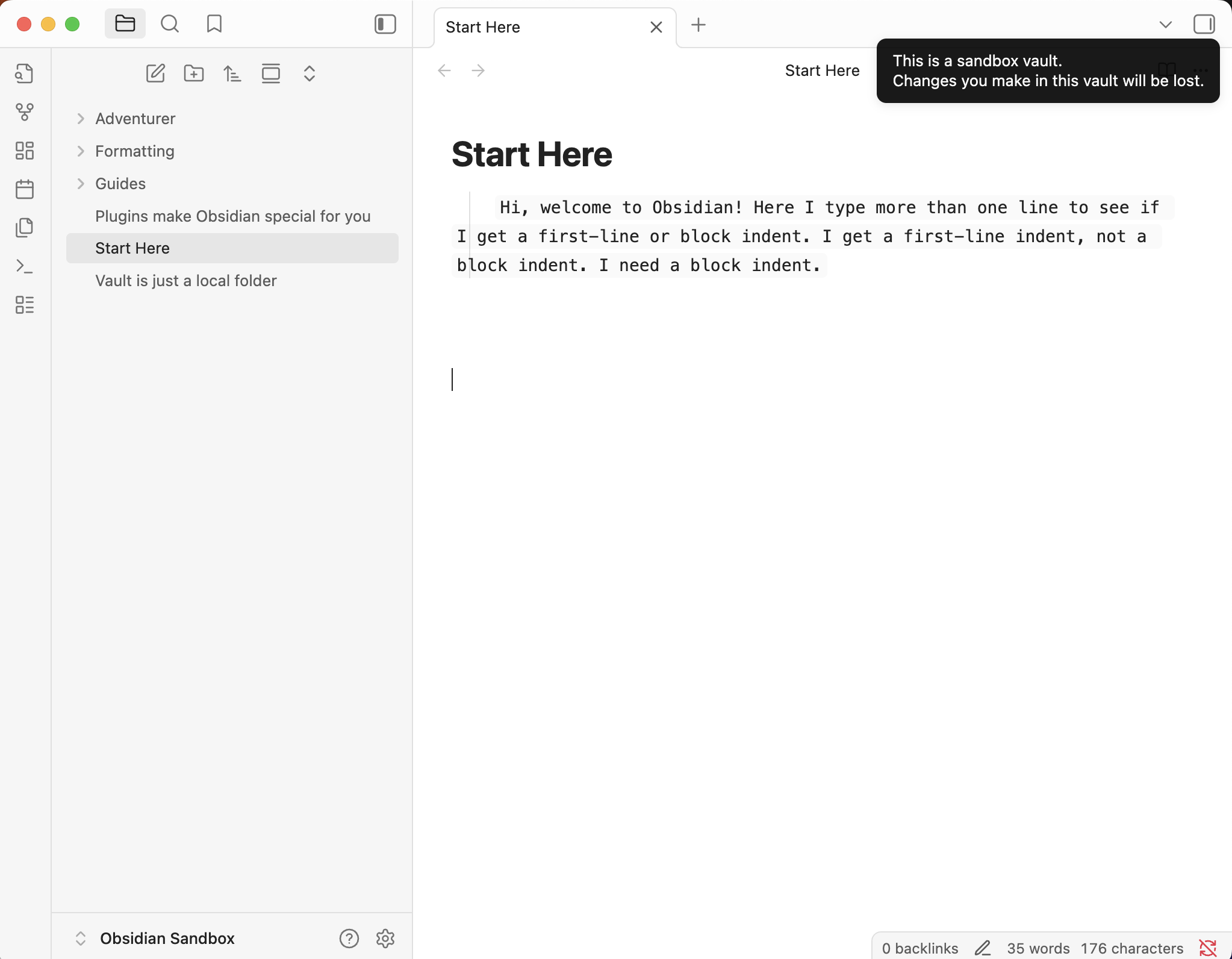
Tab key to begin block indent.
Type or paste content that is longer than one line.
Should be a block indent, but is a first-line indent.
Did you follow the troubleshooting guide? [Y/N]
I use the default theme.
I downloaded the latest version, but I was already on the latest version.
I manually entered tab+text in case it was a case of copy/paste that was causing it, but even manually entering, I lose my block indent for a first-line indent.
I tested in the sandbox and got the same results.
I vaguely recall this happening before, long ago, then it was fixed but I don’t recall how or who.
Expected result
A block indent is what I expect to see.
Actual result
A first-line indent is what I get.
Environment
SYSTEM INFO:
Obsidian version: v1.9.12
Installer version: v1.9.12
Operating system: Darwin Kernel Version 24.6.0: Mon Jul 14 11:29:54 PDT 2025; root:xnu-11417.140.69~1/RELEASE_ARM64_T8122 24.6.0
Login status: not logged in
Language: en
Insider build toggle: off
Live preview: on
Base theme: dark
Community theme: none
Snippets enabled: 0
Restricted mode: off
Plugins installed: 1
Plugins enabled: 1
1: Dictionary v2.22.0
RECOMMENDATIONS:
Community plugins: for bugs, please first try updating all your plugins to latest. If still not fixed, please try to make the issue happen in the Sandbox Vault or disable community plugins.
Normally, when entering text, hitting the tab key once automatically not only indents (my chosen 4 spaces), but creates a block indent.
I am not writing code.
I am not making lists.
I am just typing text that needs separation from the rest of text via the block indent.
It used to be there.
It has disappeared.
Sometimes the editor/LP can show block indentation, for example if there is a line of text right before the intendent text. However, that indentation won’t translate to Reading mode or any other markdown viewer.
Blockquote is made by adding a > before the line. And that should give you the indentation you seek.
Otherwise WhiteNoise is right. You are relying on an accidental glitch to get formatting. The blockquote sounds like what you actually want, and should render correctly, and can be adjusted with CSS predictably.
gives indentation of the block indent I was accustomed to, but it also adds a bright, unwanted vertical line on the left.
I would like to - still - officially request that it should not matter if there is a blank line or not before the tab key being hit: the results should be the same - a block indent.
If this was a rarely used option, I wouldn’t be asking. But it is massively used, daily.
If you programmers want it to do something different, then give yourselves another solution. I am willing to bet that most obsidian users are not programmers. Well … I was a programmer for 20 years, but that was mainframe assembler and cobol.
Then I’m going to join the train you seem to find annoying: there is no such thing in Markdown. The results are not and should not be expected to be the same.
You can edit or remove the blockquote line using CSS.
(Some CSS wizard might have an indentation solution for you. But I wouldn’t count on it being extremely reliable over the years.)