Hello all,
I’m running into a issue with Apple Shortcuts when trying to capture long-form text into YAML.
Here’s my setup: I use Apple Shortcuts for quick capture. I paste a block of text into the Shortcut, it formats a note, then saves it directly as a .md file in my Obsidian vault. That part works perfectly… except when the text needs to go inside the YAML frontmatter.
The issue:
When the Shortcut tries to insert a long block of pasted text - often a news article or something with line breaks, colons, quotes or blank lines - into a field like:
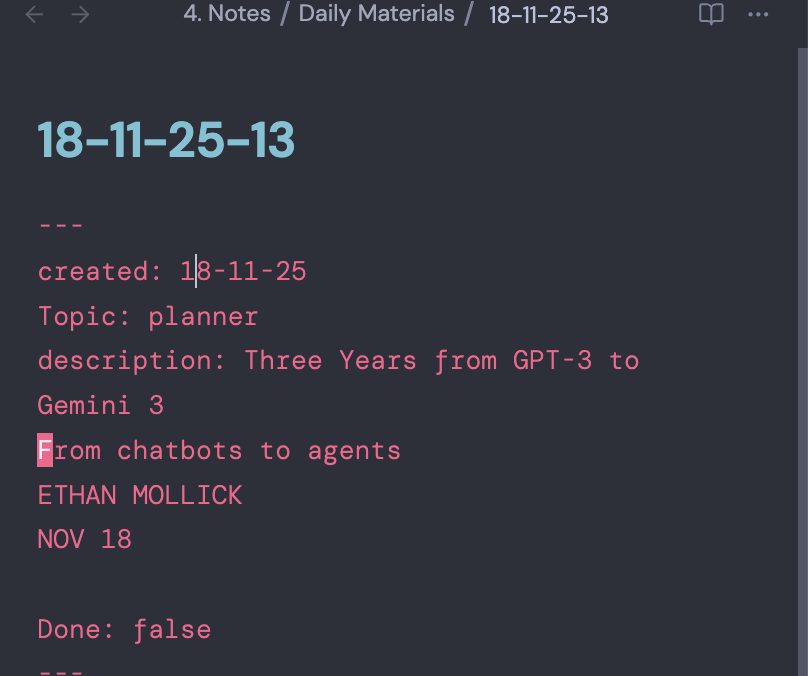
description: <pasted text>
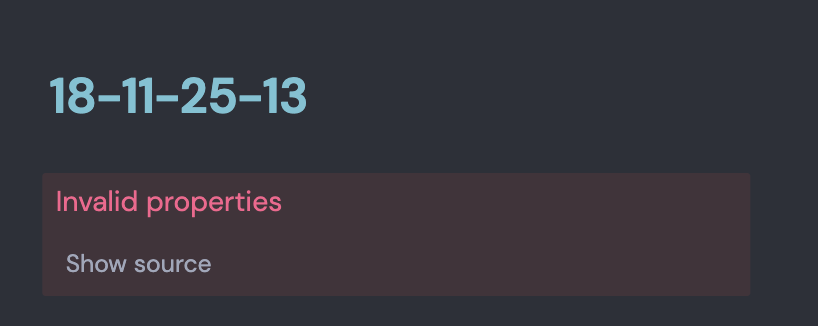
…it breaks the YAML. Obsidian throws Invalid properties, and tools like Dataview or Bases stop reading the frontmatter.
What I’m trying to solve for:
- Capture long multi-line text via Apple Shortcuts
- Store that text inside a YAML field (like
description) - Keep the YAML valid
- Ensure it’s fully queryable in Dataview and Bases
- Avoid any manual reformatting after the note is created
If anyone’s solved this or has a workaround, I’d love to hear how you approached it…
Thanks!