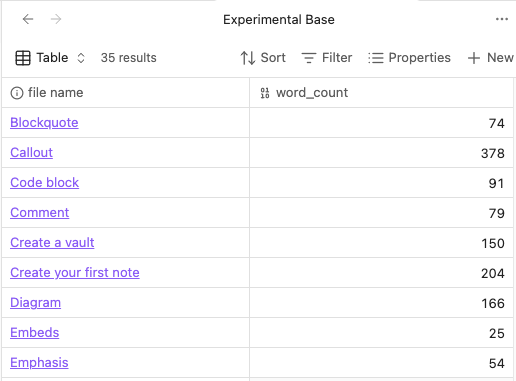
Bases: Word count function / property

Use case or problem

Bases is great for creating an overview over files, which can be used to see page count, read time etc. Which can be great to keep track of long works which is split into multiple files. But for this you need the word count. Right now, the only way to get this is to manually create a property and type in the word count.

Proposed solution

Create a function, or build in property, which can fetch the word count for a file.

Current workaround (optional)

You can use novel word count to show things like reading time and page count, but only in the file explorer. Which can be rather inconvenient. Or you can make a property and input the word count obsidian calculates, but this requires constant manual update.

17 Likes

I want to add an attribute that automatically counts the number of words in a document

I would also like to request this feature.

I too would like this feature!

Agreed, it ought to be a function in core. It probably exists in the API, I’m surprised the community plugins that provide status bar word count don’t offer this.

If I may be so bold, we should go find the still being maintained community plugins that do word count and create git feature requests for this functionality. Just did this with Novel-Word-Count-Obsidian plugin.

Novel-Word-Count-Obsidian plugin is a hard NO. The developer wants no part of frontmatter functionality.

I too am looking for this feature - does anyone have a workaround?

I am as well - this one seems promising but isn’t available yet.

Introducing CountCraft: Note Analytics Sidekick

1 Like

Well as it turns out - I managed to find a bit of a workaround.

You can see that below here:

Guide and Explanation

So, when I was playing around with my ‘Base’ installation and trying to find a property for the ‘word count’, I couldn’t find it (obviously). However, there was one thing that caught my attention. And that was the presence of two properties listed there called daily word goal and word goal.

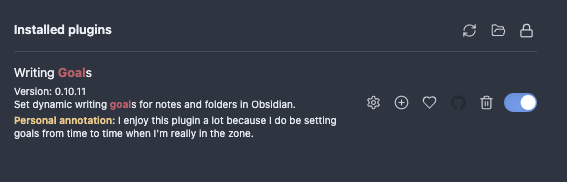
Neither one of these is the solution. But I started thinking to myself…how did those two values get there? Because they aren’t built into Obsidian. I recognized that those come from a plugin called “Writing Goals”.

This is just an app where you can create ‘word goal’ counts, if you’re interested in doing so. The app itself has nothing to do with the actual solution to this problem. But it is what led me to discover what the solution to this problem can be.

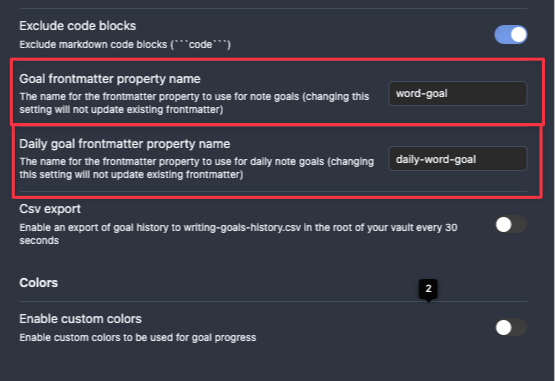
From there, I peered into the settings to get a better understanding of things. That’s when I discovered that those two names (word -goal and daily-word-goal) are actually frontmatter property names that were created by the plugin itself.

From there, I figured “All I gotta do is find a way to create another frontmatter property called ‘word count’ and I’ll be able to use it to curate the word count for the entire file.”

Creating the Frontmatter Property

This wasn’t too hard. Of course, I wanted to be efficient about this process too.

To be clear, here’s the goal: “Create a way of adding a frontmatter property item called word count and have it actually produce the word count and also add/update itself for each note in the vault.”

To ensure I didn’t fuck myself, I started off with a sandbox vault (which has plenty of files in it).

Going to include all of the steps in the next message because Obsidian is not letting me upload more than 5 images per fucking message for some reason…

Creating the Frontmatter Property

This wasn’t too hard. Of course, I wanted to be efficient about this process too.

To be clear, here’s the goal: “Create a way of adding a frontmatter property item called word count and have it actually produce the word count and also add/update itself for each note in the vault.”

To ensure I didn’t fuck myself, I started off with a sandbox vault (which has plenty of files in it).

Step One

First, we need to download the ‘Templater’ app (which you can find easily among the community plugins).

Once we’ve installed the Templater app, we can actually exit out of the settings panel entirely.

Step Two

Now we need to create a new file. You can name this file anything (just remember the name of the file when you enter it).

In that file, you’re going to want to copy.paste the following template code inside of it:

<%*
const files = app.vault.getMarkdownFiles();
let updatedCount = 0;

for (const file of files) {
    // Skip template files if you want
    if (file.path.includes("Templates/")) continue;
    
    const content = await app.vault.read(file);
    
    // Remove frontmatter from word count
    const bodyContent = content.replace(/^---[\s\S]*?---\s*/, '').trim();
    const wordCount = bodyContent ? bodyContent.split(/\s+/).length : 0;
    
    // Update the frontmatter
    await app.fileManager.processFrontMatter(file, (frontmatter) => {
        frontmatter.word_count = wordCount;
    });
    
    updatedCount++;
}

new Notice(`Updated ${updatedCount} notes with word counts!`);
%>

If you’re going to copy/paste this, it may be wise to select the option “paste as plain text”. Maybe you won’t have to do this. Just make sure that when you do enter this in the file that the syntax coloring renders in the same way you see it rendered in the screenshot below.

Step Three

Now, we’re going to click on the Templater icon, which should be located in your Obsidian side-ribbon.

From here, we’re going to see the option for us to search for a proper “template” file to use. Keep in mind that the script that I provided above is going to add this frontmatter to every single note in the Vault. If this is okay, with you, then select the note where you pasted the Template code that I gave in the previous step.

For me, the name of that note is New Template File.

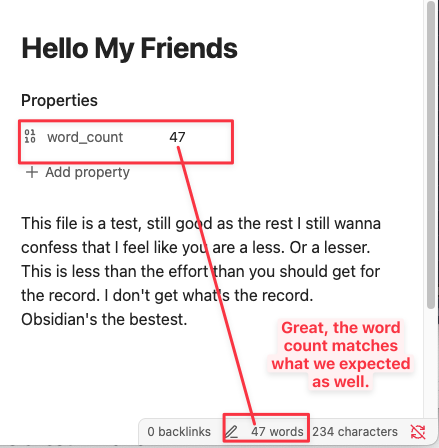
Once you do that, then voila! This frontmatter property should be added to all of your notes.

Awesome.

Once again, Obsidian forums doesn’t allow me to add more than 5 fucking media files per post, so I gotta break this up into another fucking post.

Step Four

Okay, last step is going to be easiest one for us here. All we need to do is create (or visit one of our already created) Base(s) and look for this property. If its there, then we succeeded! If not then…guess we’ll have to wait for someone else to come up with a proper solution for this issue!

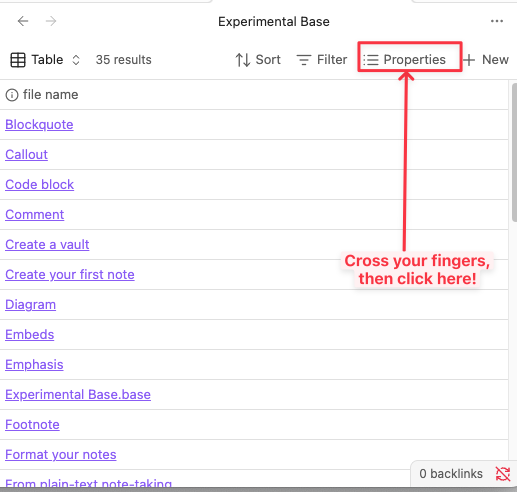
After clicking on the ‘Properties’ option at the top of the Base chart, we’re going to look to see if there has been a property created for word count.

Turns out…there is.

And, as expected, this column has been created with the correct value for each note.

So, there you go! This seems to be a pretty potent workaround if you ask me! Fairly simple and doens’t require too much effort. I’d imagine that in the not so distant future (now that it is known that the Obsidian app allows for the creation of categories via insertion/creation of frontmatter items).

Enjoy folks! This one is on the house.

Hopefully this helps some people out that were dealing with this issue. Because I know that it was kicking my ass as well! But this is what worked for me.

I created a Templater script that automatically updates the word count when the current note is closed.

English-word version (counts English words only):

module.exports = async (tp) => {
  const KEY_WORD_COUNT = "word_count";
  const app = tp.app;

  // Track the last active file
  let lastActiveFile = app.workspace.getActiveFile();

  // Wrapped function: calculate word count → write to frontmatter
  async function updateWordCount(file) {
    if (!file || file.extension !== "md") return;

    // Read file content
    const content = await app.vault.read(file);

    // Remove frontmatter
    const body = content.replace(/^---[\s\S]*?---\s*/, '').trim();

    // Simple whitespace-based word count
    const wordCount = body ? body.split(/\s+/).length : 0;

    // Write to frontmatter
    await app.fileManager.processFrontMatter(file, (fm) => {
      fm[KEY_WORD_COUNT] = wordCount;
    });
  }

  // Triggered when the active note changes (previous note considered "closed")
  app.workspace.on("active-leaf-change", async () => {
    const newActive = app.workspace.getActiveFile();

    // If the previous active file was closed, update its word count
    if (lastActiveFile && (!newActive || newActive.path !== lastActiveFile.path)) {
      await updateWordCount(lastActiveFile);
    }

    // Update tracker
    lastActiveFile = newActive;
  });
};

统计中文字数的版本(仅函数):

module.exports = async (tp) => {
  const KEY_WORD_COUNT = "字数";
  const app = tp.app;

  let lastActiveFile = app.workspace.getActiveFile(); // 当前活动文件

  // 封装为函数:统计字数 → 写入 frontmatter
    async function updateWordCount(file) {
        if (!file || file.extension !== "md") return;

        const content = await app.vault.read(file);
        const body = content.replace(/^---[\s\S]*?---\s*/, '').trim();

        // 去掉多余空白
        const text = body.replace(/\s+/g, "");

        // 1. 中文字数(汉字每字算 1)
        const chineseMatches = text.match(/[\u4e00-\u9fa5]/g);
        const chineseCount = chineseMatches ? chineseMatches.length : 0;

        // 2. 英文单词(word)+ 数字(作为词计算)
        // 英文词: hello world
        // 数字词: 2025, 12345
        const englishWordMatches = body.match(/\b[A-Za-z0-9]+(?:'[A-Za-z]+)?\b/g);
        const englishWordCount = englishWordMatches ? englishWordMatches.length : 0;

        // 3. 总字数 = 中文字数 + 英数字词数
        const totalCount = chineseCount + englishWordCount;

        await app.fileManager.processFrontMatter(file, (fm) => {
            fm[KEY_WORD_COUNT] = totalCount;
        });
    }

  // 当活动笔记切换时触发(上一个文件视为被关闭)
  app.workspace.on("active-leaf-change", async () => {
    const newActive = app.workspace.getActiveFile();

    // lastActiveFile 被关闭
    if (lastActiveFile && (!newActive || newActive.path !== lastActiveFile.path)) {
      await updateWordCount(lastActiveFile);
    }

    lastActiveFile = newActive;
  });
};

中文字数统计说明:

  • 中文按字数(一个汉字 = 1 字)
  • 英文按词数(一个单词 = 1 字)
  • 数字按词数(123 视为 1 个)
  • 忽略空白、换行、Markdown Frontmatter
  • 不统计标点符号

Usage

  1. Save the script inside your Templater script folder (e.g., Templater/scripts/wordcount.js).
  2. Create a Templater template that calls this script (for example, Templater/wordcount.md).
  3. Run this template once through Templater to initialize the script.
  4. In the Templater settings, add this template to Startup Templates so it will load automatically when Obsidian starts.

All I want for (holiday of choice) is the core plugin Word count to show note word count in a property. Or a bases function to do the same.

1 Like

Look, I get the work arounds listed above and appreciate the efforts, but that is just too onerous and requires 1.) fluency in those areas and 2.) a potential recurring maintenance headache.

Yeah, I’ll wake up some morning and sift thru these work arounds to get it to work, but I know it will chew up a whole day…

Is it really that hard to get the word count of a note into a property?

Apologize for the grouch vibe.

I don’t know how hard it is, but there are hundreds of feature requests and only a few developers, and difficulty isn’t the only factor they use to prioritize. I hope you can enjoy your holiday of choice anyway!

1 Like

I just happened to find this topic having the exact issue. My use case is I have a blog, and want to see how many words are there in each entry. I don’t really need EXACT number of words; rather some kind of estimate to sort and compare. This is a formula I ended up with - no plugins, no coding, no hacking:

(file.size * 0.85 / 6.5).ceil()

It reads file size in bytes, then accounts for average character size (special characters take up 2 bytes, and statistically there are 10% of them in my language), and then divide by average word length (again, statistically for my language, including spaces and punctuation). You can adjust for your case, I just asked ChatGPT :sweat_smile:

It works astonishingly well for what I need, some examples:

  1. calculated 1066 - real 1074
  2. calculated 1171 - real 1164
  3. calculated 842 - real 827
  4. calculated 282 - real 274

Error rate 3% for small files, 0,8% for bigger ones. This of course counts everything, including frontmatter, links, etc. This will more than do until code Word Count plugin provides the exact value.

Kepano mentioned a formula yesterday and it is pretty close:

(file.size/6).round()

1 Like