Bases that considers chained note links

What I’m trying to do

Given:

Note A (where bases grid lives)
  Note B (linked from A)
    Note C (linked from B)
       Node D(linked from C)

Note E
   Note F (linked from E)
      Note G (linked from F)

Goal:

In short:
I am trying to make sure all notes in a folder are used, either directly or indirectly, in a TOC/MOC… As such a bases view would be great to quickly see any orphaned notes needing to be cataloged in the TOC/MOC.

More detailed:

  • On Note A, have a bases view that shows all notes not linked directly for indirectly to Note A.
  • In the above, Note E, F, G would show in bases as unliked to A.
  • Note B, C, D would not show due to B being linked to A and the chain extending to B, C, D
  • If Note G alone was linked to A, it would no longer appear; however, E & F still would appear the view as there still would be no direct or indirect link to A

Things I have tried

ChatGPT created chained formulas up to X hops of depth, but the views are always blank.

Many thanks in advance.

This base shows your notes E and F and excludes the others:

views:
  - type: table
    name: not conected
    filters:
      not:
        - this.file == file
        - this.file.hasLink(file)
        - this.file.links.map(value.asFile().links).contains(file)
        - this.file.links.map(value.asFile().links.map(value.asFile().links)).contains(file)
        - this.file.backlinks.contains(file)
    order:
      - file.name

Explanation

For this method, you have to extend the connections to an arbitrary depth. I can’t think of a way to have Bases calculate it infinitely.

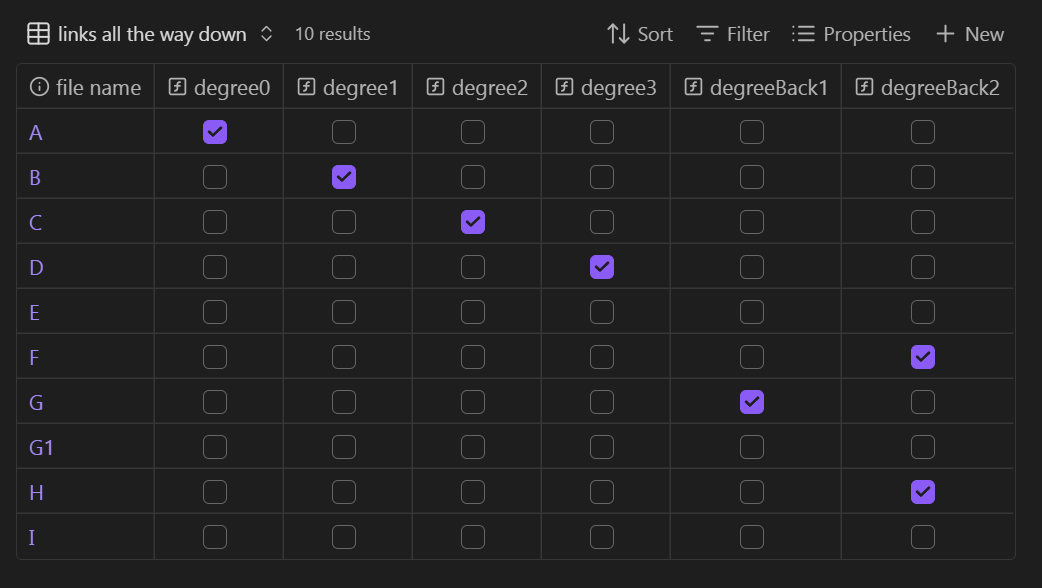
Files A through D are true in this set of formulas:

formulas:
  degree0: this.file == file
  degree1: this.file.hasLink(file)
  degree2: this.file.links.map(value.asFile().links).contains(file)
  degree3: this.file.links.map(value.asFile().links.map(value.asFile().links)).contains(file)

Were you to write link [[A]] in note G (as you said in your fourth bullet point), G would be true in this formula:

  degreeBack1: this.file.backlinks.contains(file)

To filter all of them out, put them in a not filter, aka None of the following are true.[1]

Extending the backlinks

Going “backwards” is not necessarily linear, regarding outlinks from the backlinked note, backlinks to the backlinked note, and in turn their outlinks and backlinks.

It’s branchy but doable. The toughest part could be deciding.

For instance, do you want to exclude a new note H that links to [[G]]? How about a new note G1 that G links to?

As a quick example should you decide to extend further, H is true in this formula:

  degreeBack2: this.file.backlinks.map(value.asFile().backlinks).flat().contains(file)

Matrix

Here’s a visual. I added notes:

  • H (H links to G)
  • G1 (G links to G1)
  • I (no links)

Note how formula.degreeBack2 branches to F. It can be filtered for; I just stopped writing at that point because I don’t know your specs.

Hopefully this has enough depth for you or the GPT to continue the patterns the way you want.


  1. In the full base, the formulas are written directly into the filters and do not have names. I named them in the explanation just to show what they’re doing. ↩︎

Wow – I so appreciate your quality and time-consuming reply! Thank you so much

I see the logic and think it’s likely right, but I seem to be missing something. Apologies for my denseness.

I created a folder called “Test”, created a file name “TOC” and posted your bases code in it:

\"Test"\
  TOC (with bases grid)
  Note A
  Note B

(TOC.md)

views:
  - type: table
    name: Not in TOC
    filters:
      and:
        - file.folder.contains("Test")
        - not:
            - this.file == file
            - this.file.hasLink(file)
            - this.file.links.map(value.asFile().links).contains(file)
            - this.file.links.map(value.asFile().links.map(value.asFile().links)).contains(file)
            - this.file.backlinks.contains(file)

On the TOC note, that contains bases grid, I created a link to Note A.

(TOC.md)

[[Note A]]

Note A disappears from the bases list, as expected.

In Note A, I likewise create a link to Note B.

(Note A.md)

[[Note B]]

I expected the bases view to now show nothing, as there is a chain of links TOC → Note A → Note B.
However, Note B is shown by the bases code.

It seems the following line would have removed Note B from the bases grid view on TOC.md:

- this.file.links.map(value.asFile().links).contains(file)

… Am I just overlooking something dumb?

Again - Thank you greatly for your time and quality direction.

Everything you said is perfect.

Could the refresh delay be the issue?

After typing [[Note B]] in Note A, move your cursor into the base code block then move it out. (Or close and reopen the TOC note.) The base should reload without Note B in the results.

Thank you.

I tried:

  • Move away from the grid and move back
  • Move to another note and come back
  • Close and reopen Obsidian

On all of those, any note beyond the first hop still shows. Conversely, I can link directly to a note and the grid immediately updates.

Just for completeness, in case I am missing something, here is the entire folder, attached.

Again – thank you greatly! Getting this working would be something I would heavily use, on every MOC/TOC… I appreciate your quality responses.

Attached folder and notes
Test.zip (2.6 KB)

Your zipped files are working in the sandbox vault.

Here’s video of me interacting with them (temporary link). When you see the code flash, it’s because I’ve put the cursor inside the base code block to force a reload.

Hmmm. That’s exactly what I am after, but don’t get the same result. Even split my screen like you and clicked the various notes in the same order.

Maybe I’m using a different Obsidian version? I’m using Obsidian 1.9.14 / Installer 1.8.10?

I can’t see it mattering, but for completeness: I’m on Mac with OSX 26.0.1.

Thanks again for your help. I appreciate it greatly.

Your zip is working on my iOS, Android, and Windows.

I’m on 1.10.1, but the functions didn’t change between our versions.

Maybe update your installer? Don’t know that it will help, but there have been updates since yours.

Call for tester assistance!
It’d be great if another person on 1.9.14 could give it a quick try (three notes are sufficient, paste the base, add two links) and just let Beech36 know whether the filters work for you.

The test vault works locally as in your video. Installer 1.9.14 and Obsidian 1.10.2.

1 Like

Issue Fixed.

Tried:

  • Reinstall Obsidian 1.9.14 by overwriting old app (which upgraded installer to 1.9.14)
  • Completely uninstalled Obsidian (Plist, Application Support, etc.) and reinstalled 1.9.14

Problem persisted.

What fixed it:

  • Upgraded to Catalyst account
  • Downloaded 1.10.2 / Installer 1.9.14
  • Grid now updates correctly

I hope that helps others – and thank you greatly @dawni – you really helped me a ton!

1 Like