Steps to reproduce
- Open a Base (that has a Property column with Type: List) in a secondary/extra Window (in the Desktop App)
- Click +New to add a New Note to the Base
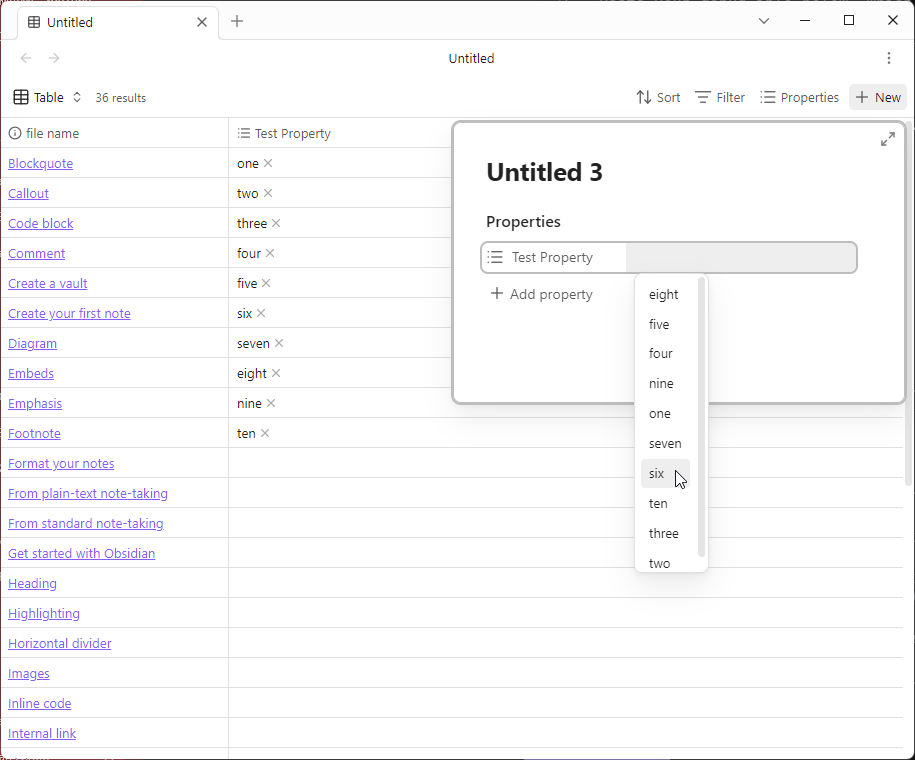
- Small popup window appears to enter the New Note details
- Add a Title to the Note
- Click the List Property input to select a value
- Click any value from the List
Did you follow the troubleshooting guide? [Y/N]
Y
Expected result
- Popup window stays open, allowing you to continue editing the New Note, and
- Selected Property value is saved to the Note
Actual result
- Popup window closes, taking you back to the Base view, and
- Selected Property value is not saved to the Note
.
- This is particularly frustrating if the Base has a Filter applied based on a Property, as the New Note does not appear in the Base View, and the only way to find it is to Search or go to the folder where New Notes are created in the File Browser
Environment
SYSTEM INFO:
Obsidian version: v1.11.7
Installer version: v1.8.4
Operating system: Windows 11 Pro 10.0.26200
Login status: logged in
Language: en
Catalyst license: none
Insider build toggle: off
Live preview: on
Base theme: adapt to system
Community theme: none
Snippets enabled: 0
Restricted mode: on
RECOMMENDATIONS:
none
Additional information
This issue does not occur when selecting Properties in a New Note Popup on the Main Window.
Properties can be selected successfully if using Keyboard Up + Down keys and Enter to select Property values - only goes wrong when clicking with a Mouse.