Steps to reproduce
- Create a Base with a list view and grouping enabled.
- Create many notes with different groups, groups should have a few or more notes per group.
- Create a Canvas and drag the Base to the canvas.
- Vertically shrink the Canvas card containing the Base so that you must scroll to see remaining notes in the list.
- Place a copy of this card next to it.
- Zoom the canvas view out or use a lower resolution display.
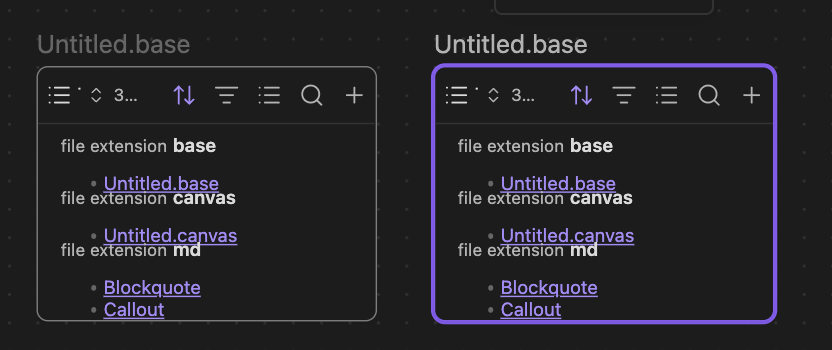
- Observe overlapping list items and group headings.
Did you read and follow the Troubleshooting Guide?
Yes. The screenshot above is using the sandbox vault.
Expected result
For proper spacing to be maintained.
Actual result
Spacing is miscalculated, causing list items to overlap.
Environment
SYSTEM INFO:
Obsidian version: 1.13.7
Installer version: 1.12.7
Operating system: Darwin Kernel Version 25.6.0: Fri Jul 31 19:17:12 PDT 2026; root:xnu-12377.161.14~5/RELEASE_ARM64_T8103 25.6.0
Login status: logged in
Language: en
Catalyst license: vip
Insider build toggle: off
Live preview: on
Base theme: adapt to system
Community theme: none
Snippets enabled: 0
Restricted mode: on
RECOMMENDATIONS:
none