I currently have a Base called “Companies” that lists six notes, each referring to a specific company. All of these have various numbers of backlinks in other notes.
Is there a way to create a new Base that lists out all the backlinked notes to any of the Companies in my original Base?
What I’m really trying to do is take all of those backlinks, aggregated across all six companies, and display them as a new base. Right now I can see all backlinks displayed in a separate column, with a line for each company. I just want to see all these backlinks combined and listed on their own. Any way to do that? Thanks again!
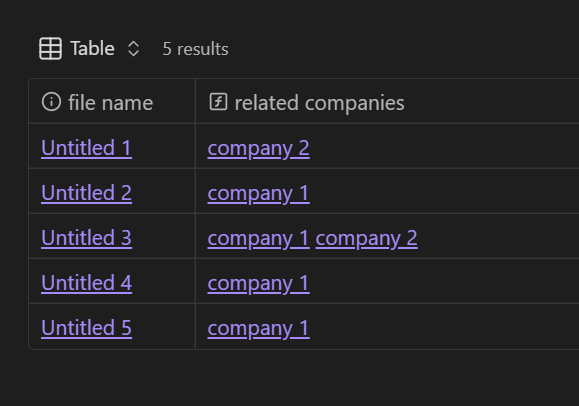
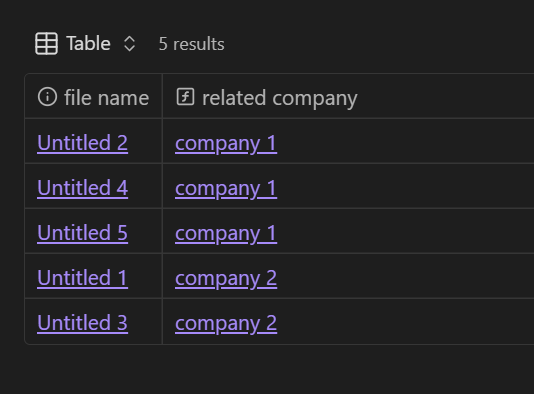
Your second example/screenshot there doesn’t show Untitled 3 associated with both company 1 and company 2, is there a way to achieve this? I’m trying to solve a very similar problem, where I want Untitled 3 to appear twice on two separate lines, once for company 1 and once for company 2. Not sure if that’s actually possible with bases though…
It doesn’t show a second link because there was no second link when I took the screenshot. I added it for the demo (I typed up the info for you then made the demos to take screencaps but in reverse order.)
All company links will show up with both methods.
But a single note won’t appear twice the way you’re thinking. Bases tables are essentially a catalog of your notes; it doesn’t repeat an entry (a note) in multiple rows.
I got my hopes up, as I thought (hoped) your underlying data was the same between both screenshots Thanks for confirming re the one row = one note too, that’s what I thought was the case but couldn’t find any confirmation in the docs.
For the record I want the duplicate row so when the upcoming groupby functionality arrives, I can have company 1 / company 2 groups with that row appearing in both.
 Thanks for confirming re the one row = one note too, that’s what I thought was the case but couldn’t find any confirmation in the docs.