Steps to reproduce
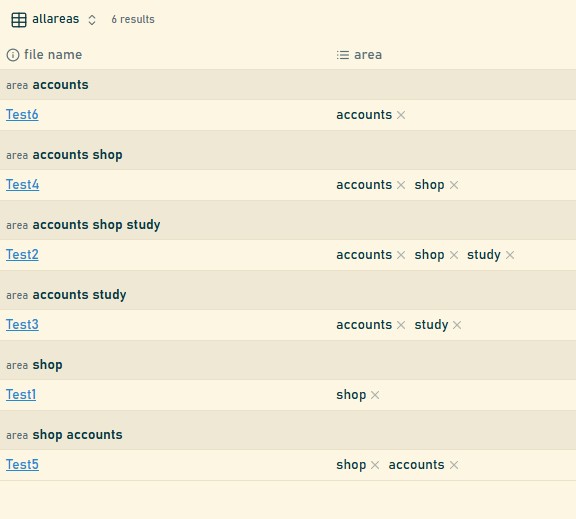
When creating bases and grouping by a property that is of type list, the grouping behaviour is not consistent.
- created a folder with some dummy markdown files with one property called area. area is of type list
- two notes with exactly same values of area but in different order will appear in different groups. For bases grouping area = A, B is different from area = B, A.
Expected result
- At a minimum, same values of area should be treated as same. If Note1 and Note2 have area values A, B and B, A, both the notes should belong to the same group.
- Even better (or possibly configurable), if grouping by a property which is of type list, the grouping should work for each individual property value and each file that has the value should appear in that group (which means some notes will repeat).
- In the example above, we should get two gropus A and B
Actual result
- Currently we will see groups A, B and B, A
Environment
SYSTEM INFO:
Obsidian version: v1.10.0
Installer version: v1.9.10
Operating system: Windows 11 Pro 10.0.26120
Login status: logged in
Language: en
Catalyst license: insider
Insider build toggle: on
Live preview: on
Base theme: adapt to system
Community theme: Minimal v8.0.4
Snippets enabled: 0
Restricted mode: off
Plugins installed: 6
Plugins enabled: 6
1: Git v2.35.1
2: Omnisearch v1.27.2
3: Smart Connections v3.0.80
4: TaskNotes v3.24.5
5: Minimal Theme Settings v8.1.1
6: Mindmap NextGen v1.14.4
RECOMMENDATIONS:
Custom theme and snippets: for cosmetic issues, please first try updating your theme and disabling your snippets. If still not fixed, please try to make the issue happen in the Sandbox Vault or disable community theme and snippets.
Community plugins: for bugs, please first try updating all your plugins to latest. If still not fixed, please try to make the issue happen in the Sandbox Vault or disable community plugins.