I have embedded Bases with the ```base syntax. It works great in the Obsidian UI. (BTW love this new feature and ability to inline edit - game changer)
When exporting to PDF no records are displayed in the PDF document.
Thanks
I have embedded Bases with the ```base syntax. It works great in the Obsidian UI. (BTW love this new feature and ability to inline edit - game changer)
When exporting to PDF no records are displayed in the PDF document.
Thanks
I see same in the Obsidian v1.9.1 Sandbox; Windows 11.
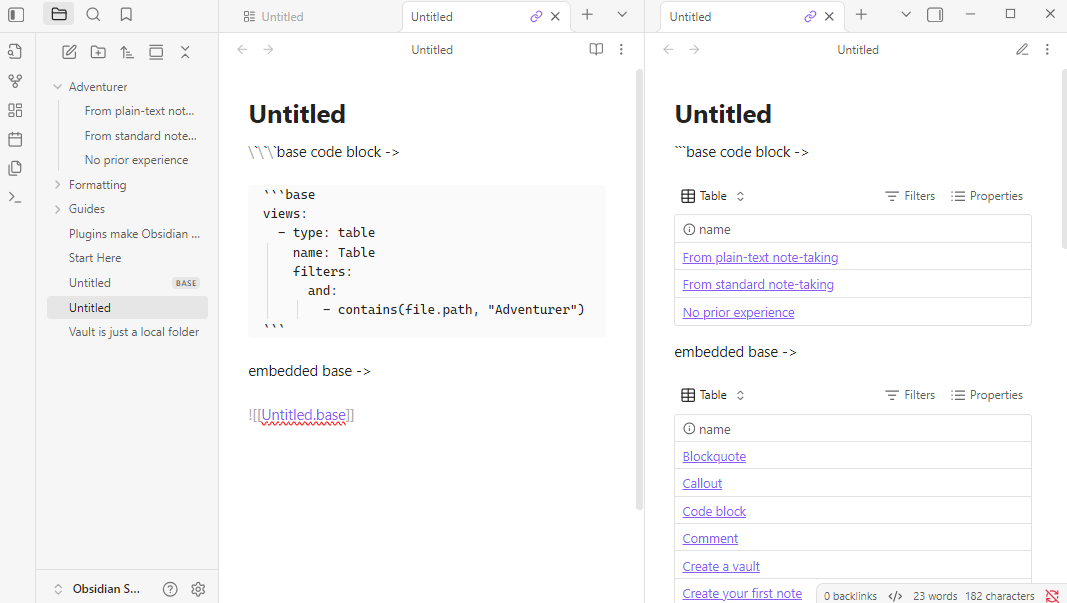
Create a new .base (Untitled.base) with no filters or properties.
Create a new note with the content of:
\`\`\`base code block ->

```base
views:
  - type: table
    name: Table
    filters:
      and:
        - contains(file.path, "Adventurer")
```

embedded base ->

![[Untitled.base]]
Export to PDF…
Yes.
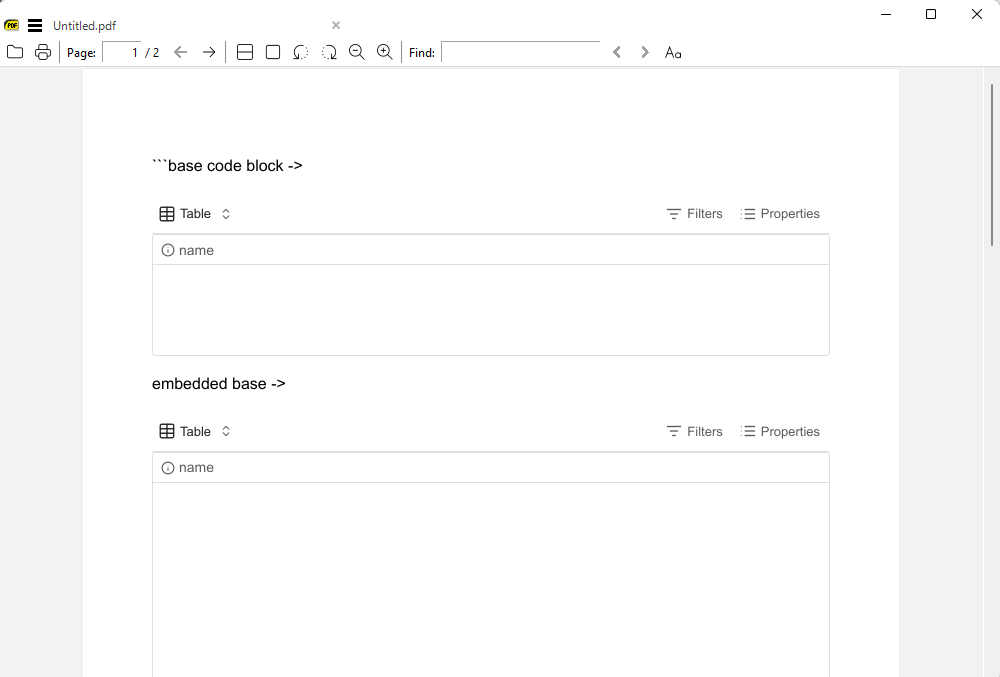
The content of Base code blocks and embedded Bases are shown.
The Bases are empty.
SYSTEM INFO:
	Obsidian version: v1.9.1
	Installer version: v1.8.9
	Operating system: Windows 11 Pro 10.0.26100
	Login status: logged in
	Language: en
	Catalyst license: supporter
	Insider build toggle: on
	Live preview: on
	Base theme: adapt to system
	Community theme: none
	Snippets enabled: 0
	Restricted mode: off
	Plugins installed: 0
	Plugins enabled: 0

RECOMMENDATIONS:
	none
It appears that as of 1.9.4 this is no longer broken and the export to PDF now includes the bases content
—-
Wrong the problem still exists
Problem still exists
There seems to be a problem with PDF exports which include or embed bases after other page embeds.
I am trying to build a Resume.md page which includes sections from a number of individual job pages and thought cards from Bases would be great for summarizing the data for each job. (Some custom CSS cleaned everything up well for Reading View.)
In creating the test for this sandbox vault example, I realized that base rendering for the PDF breaks immediately after I embed the regular markup section (“summaries” below.) I went ahead and included a few test case variations even though they may all be related.
I’ve figured out some manual workarounds for my resume in segments, but it would be great if a single export could work since I can’t cut-and-paste the entire page (including the cards) either.
[!Example] Job Number 1.md
---
title: librarian
location: Boston
---

# Summary

It wasn't technically my job, but I liked to cook the books.
[!Example] ResumeBase.base
filters:
  and:
    - file.path.startsWith("Jobs")
views:
  - type: cards
    name: Librarian
    filters:
      and:
        - title == "librarian"
    order:
      - file.name
      - title
      - location
  - type: cards
    name: Chef
    filters:
      and:
        - title == "chef"
    order:
      - file.name
      - title
      - location
  - type: cards
    name: Mechanic
    filters:
      and:
        - title == "mechanic"
    order:
      - file.name
      - title
      - location
[!Example] Resume.md
# Job Number One

![[ResumeBase.base#Librarian]]
![[Job Number 1#Summary]]

# Job Number Two

![[ResumeBase.base#Chef]]
![[Job Number 2#Summary]]

# Job Number Three

![[ResumeBase.base#Mechanic]]
![[Job Number 3#Summary]]
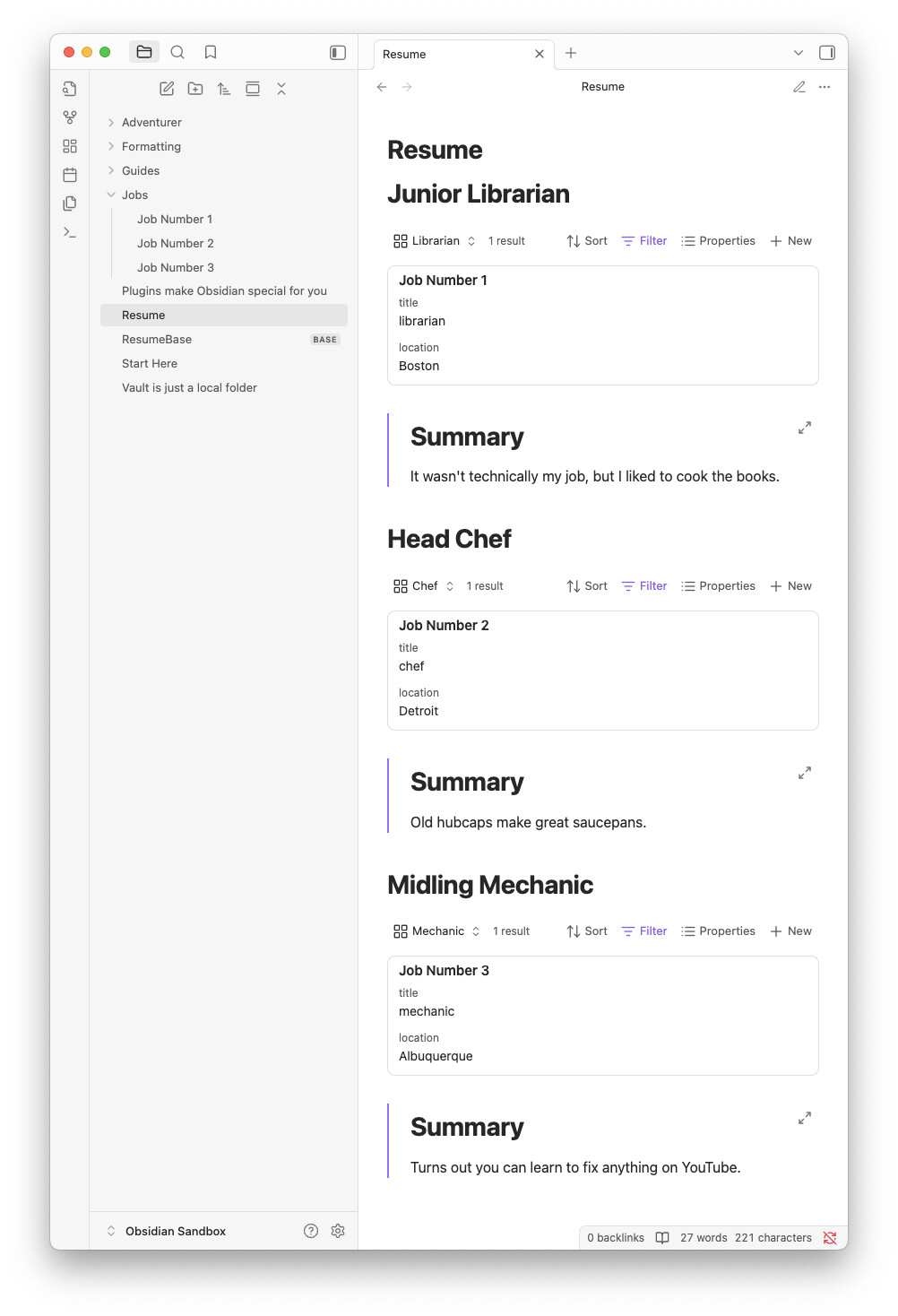
This displays correctly:
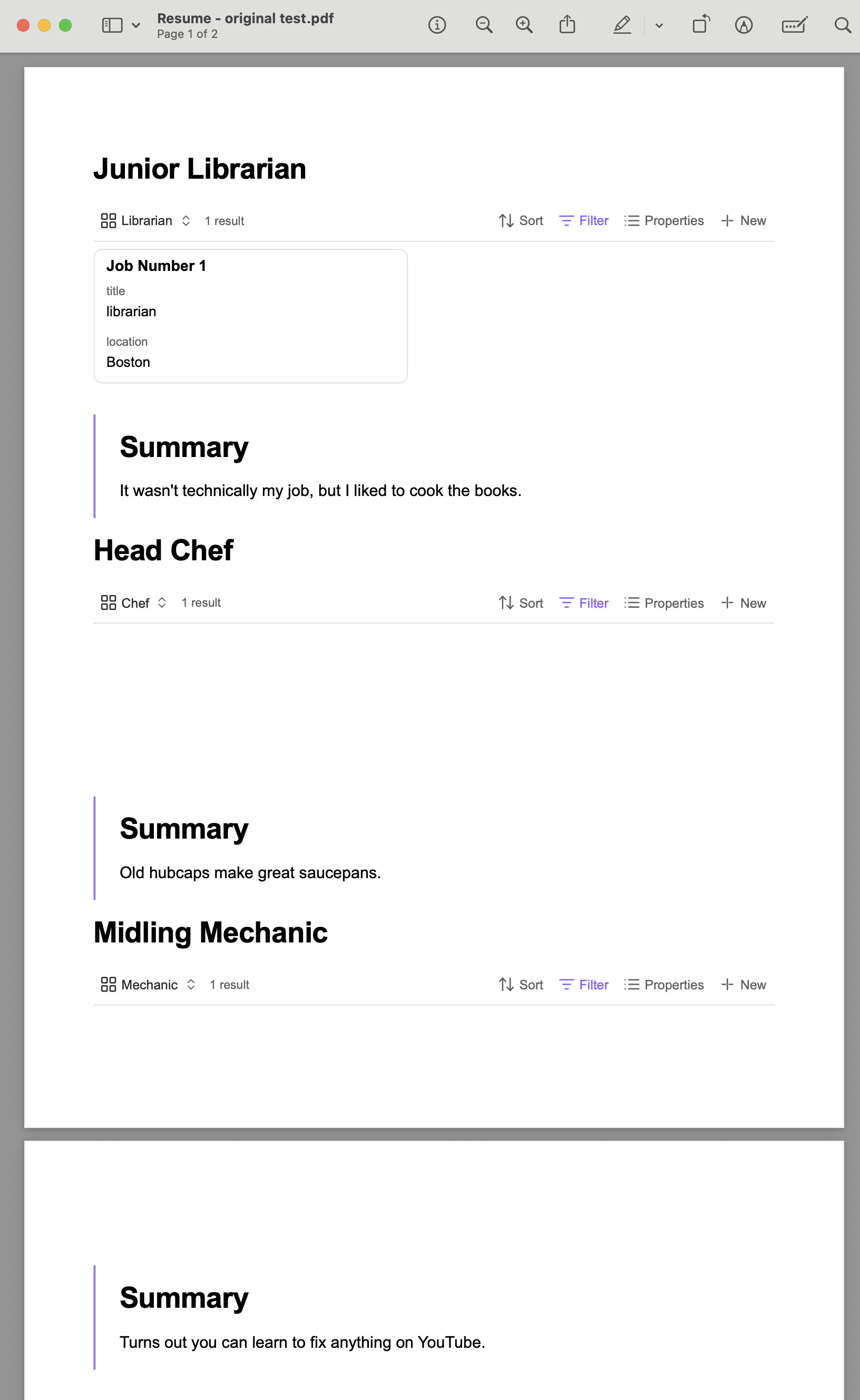
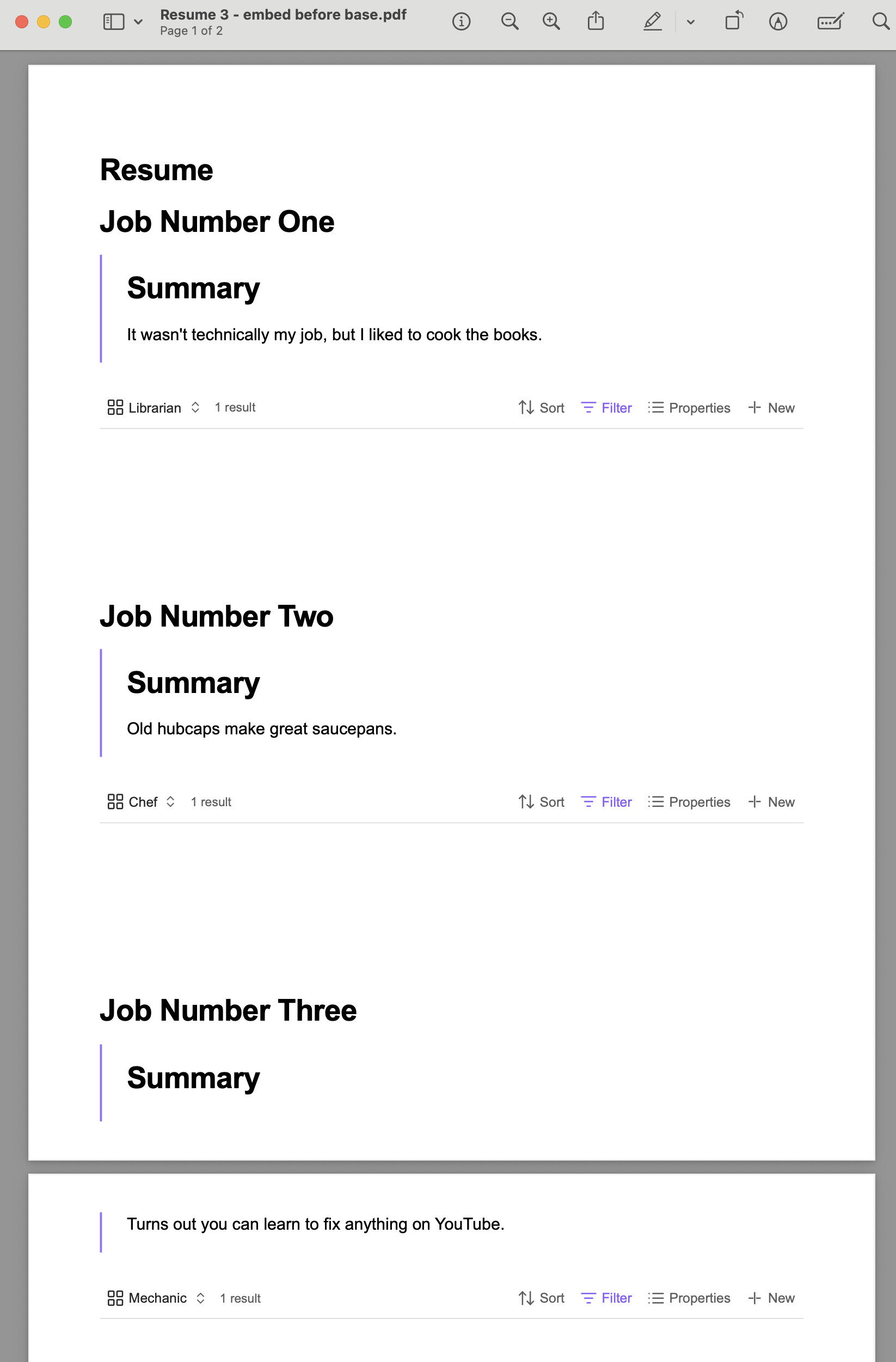
This only displays the first base, subsequent ones are empty (except for the filter/control bar.)
While testing this, I accidentally deleted my sandbox vault and had to recreate it, but I noticed that none of the bases displayed in the PDF if a summary was included first.
It looks like it’s specifically those embeds that break base rendering.
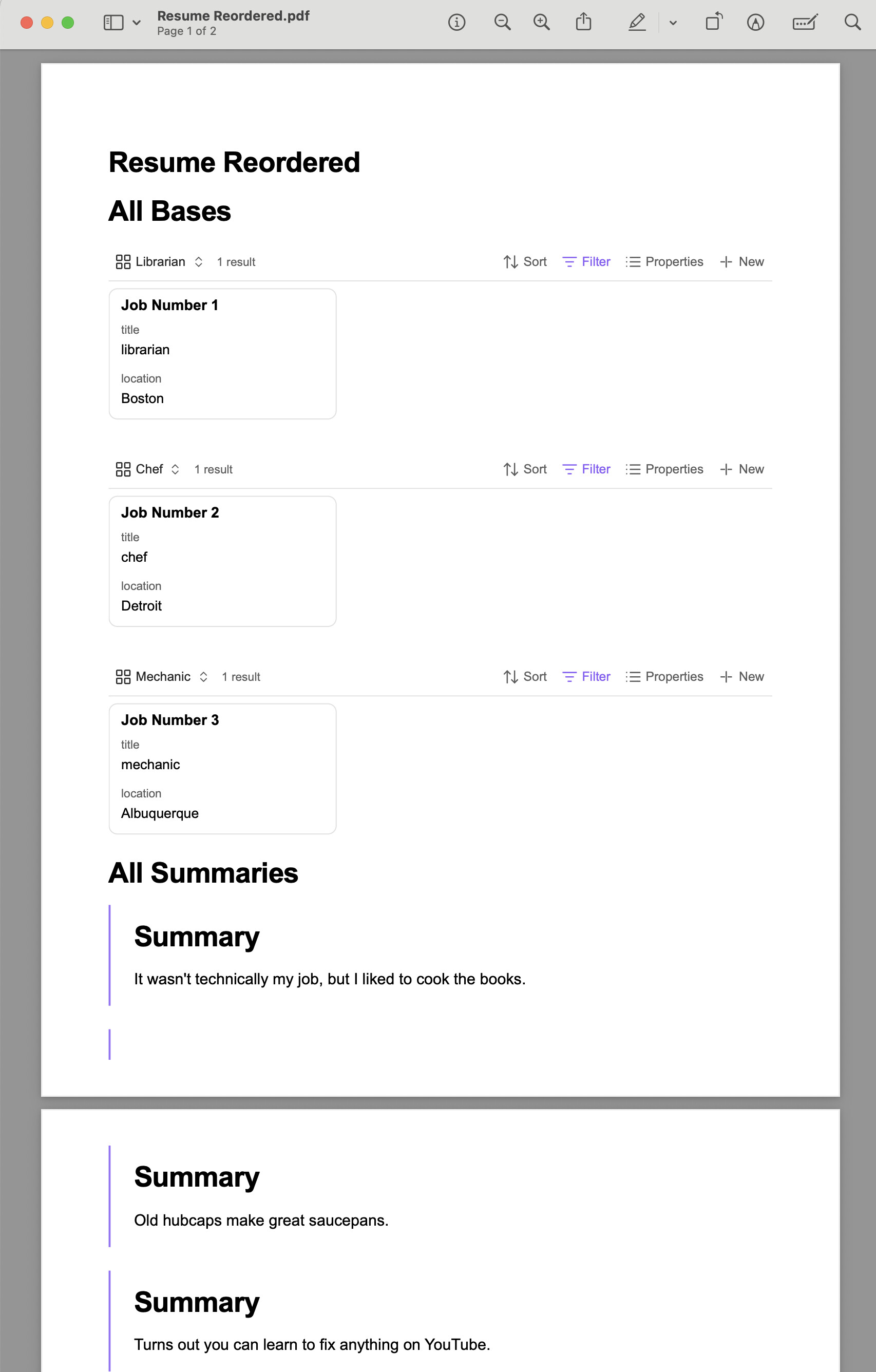
I originally thought the problem was related to having multiple bases on the same page, but if I switch to this ordering, all three bases appear correctly in the PDF:
[!example] Resume Reordered.md
# All Bases
![[ResumeBase.base#Librarian]]
![[ResumeBase.base#Chef]]
![[ResumeBase.base#Mechanic]]

# All Summaries

![[Job Number 1#Summary]]
![[Job Number 2#Summary]]
![[Job Number 3#Summary]]
This should have been my first example since I tried it before creating multiple views, but I wasn’t sure if that sort of embed was supported.
Before trying out bases, I had all the job details as markdown tables under an “Info” header and included them on Resume.md like this:
[!example] Resume.md
# Job Number One

![[Job Number 1#Info]]
![[Job Number 1#Summary]]

# Job Number Two

![[Job Number 2#Info]]
![[Job Number 2#Summary]]

# Job Number Three

![[Job Number 3#Info]]
![[Job Number 3#Summary]]
On each job page, I moved the #Info details into the frontmatter and just included a card view with this filter instead:
[!example] ResumeBase.base
    filters:
      and:
        - file.path == this.file.path
The PDF results look the same as the results from Test Case 1 above.
I’m now guessing that the bug is unrelated to the fact that I was including the same view from multiple pages multiple times, but it would be great to test this case as well since it’s definitely cleaner than the approach in Test Case 1.
Yes
All tests above were done in a sandbox vault.
In Test Cases 1, 2 and 4 I expect to see all three base cards rendered in the PDF output as they are in the Reading View.
As seen in the screenshots above, the base filter bars are included in the PDFs, but the actual cards seem to be blank.
Additionally, this appears in the console:
Uncaught ResizeObserver loop completed with undelivered notifications.
SYSTEM INFO:
	Obsidian version: v1.9.4
	Installer version: v1.8.9
	Operating system: Darwin Kernel Version 24.5.0: Tue Apr 22 19:53:27 PDT 2025; root:xnu-11417.121.6~2/RELEASE_ARM64_T6041 24.5.0
	Login status: logged in
	Language: en
	Catalyst license: insider
	Insider build toggle: on
	Live preview: on
	Base theme: adapt to system
	Community theme: none
	Snippets enabled: 0
	Restricted mode: on

RECOMMENDATIONS:
	none
Sorry that this is so long, but thanks for introducing Bases. I’m somewhat new to Obsidian, but a huge fan and loving this final incentive to become a Catalyst member. It looks like it’s going to make this tool even more amazing!
thanks
On ver 1.10.5, I am having this problem even when there are no other embeds on the page. The first few table row are visible in the pdf; the rest are blank.
Will be implemented in v1.11.3. no ETAs.
Hi,
This bug still exists on me on:
Version 1.11.4 (Installer 1.11.4)
Any ideas for how to get this to work?
thanks