Use case or problem
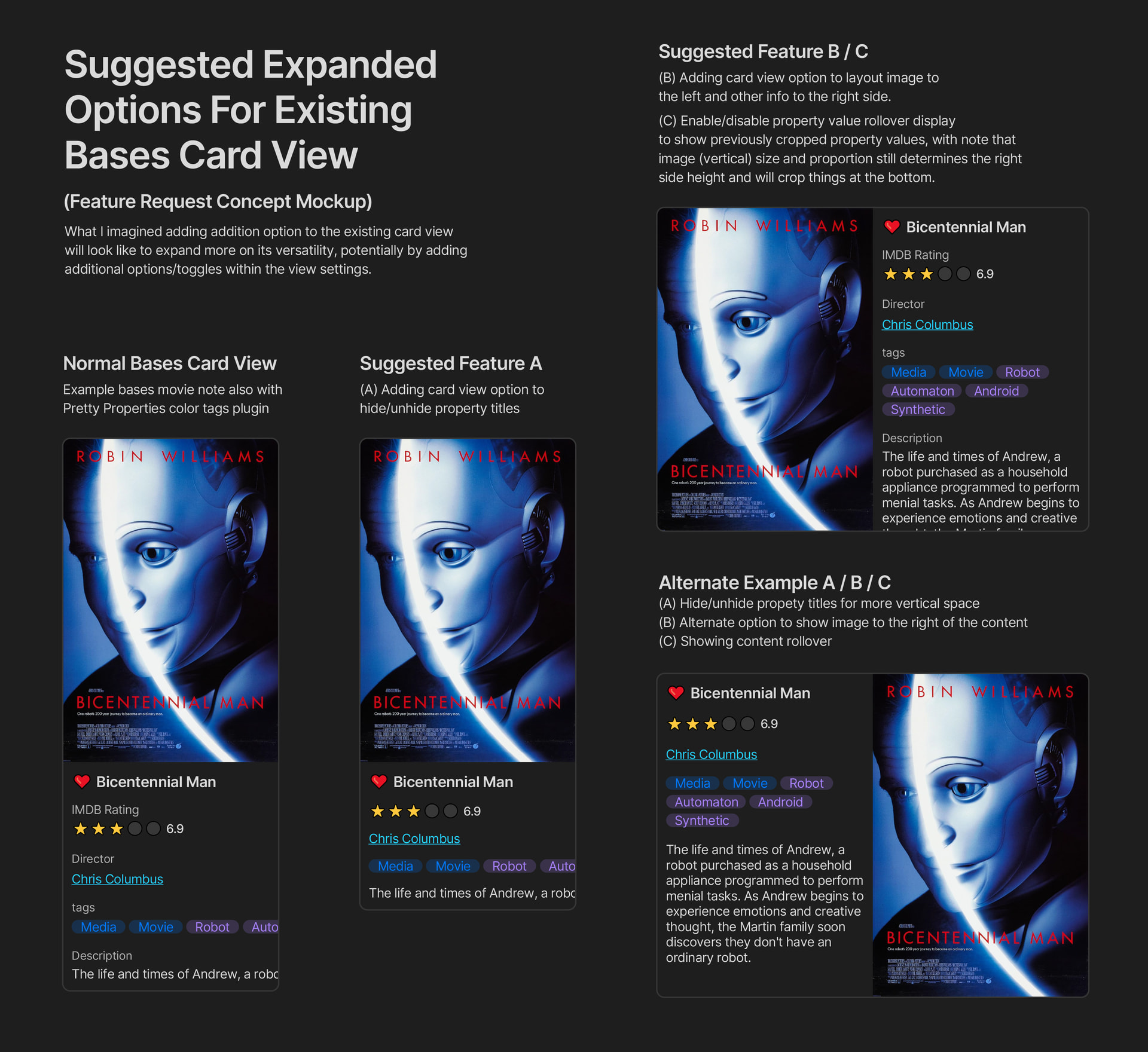
My goal for this visual mockup is to show that adding a bit more feature to the existing bases card view will allow it to be more versatile in showing more info within different layouts. The default bases card view is great but with other options such as Tables / Lists / Maps, they have some way to tweak how it looks within their respective view settings. Doing a similar expanded option in the cards view would be really helpful for certain use cases such as historical character cards, expanded topic with more description text, and other cases.
Proposed solution
The options that are proposed in this concept:
- Option to hide/unhide property titles within the cards
- Option to customize position of image preview from the default Top image layout to left/right/bottom/under title positions (like in maps).
- Option to toggle value rollover so that text and things does not get cutoff. I imagine this will still be limited to image size/proportion settings to keep card height uniform.
- Another potential feature is the ability to recolor the card background so that it can accept bases formula with HTML color codes / names (similar to icon color background in maps)
Current workaround (optional)
There is not really any current workaround other than custom manual CSS or waiting for other plugins to be added that specifically deals with bases card views.
Related feature requests (optional)
Possibly adding more features such as multiple image preview stacks similar to maps view, or maybe something more visual such as image gradient to transparent with title slightly overlapping the bottom half of the gradient. Similar to how multiple plugins deal with banner images as background.