Once you’ve done the above, delete everything above this line.
Steps to reproduce
- Create or open a base
- Open the
Filtertab - Edit or create a new filter
- Switch to the advanced filter by clicking the button to the right of the delete button
- Try typing
this. - Observe the autocomplete being cut off
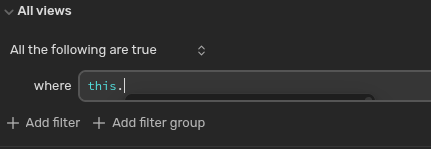
1, Create or open a base
2. Open the Properties tab
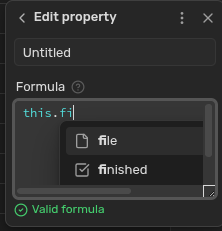
3. Create a new formula
4. Type this. in the Formula field
5. Observe the autocomplete being cut off
Did you follow the troubleshooting guide? [Y/N]
Expected result
The autocomplete “drop down” should extend outside the confines of the field’s size.
Actual result
The autocomplete “drop down” gets cut off/confined to the field’s size.
Environment
SYSTEM INFO:
	Obsidian version: v1.10.3
	Installer version: v1.10.3
	Operating system: #1 SMP PREEMPT_DYNAMIC Fri, 14 Nov 2025 06:54:20 +0000 6.17.8-arch1-1
	Login status: not logged in
	Language: en
	Insider build toggle: off
	Live preview: on
	Base theme: adapt to system
	Community theme: none
	Snippets enabled: 0
	Restricted mode: on

RECOMMENDATIONS:
	none