I have a variety of use cases for conditional formatting.
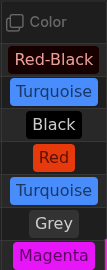
For one I have a list of fountain pen inks and as the number grows it would be nice to be able to color the cell or row with the color of the ink. In the simplest case this is just a list of exact matches along with their text styling.
Here is an example of this in DBFolder:
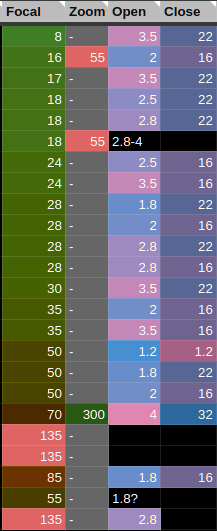
In another I have a list of camera lenses. Lenses have many different attributes and the wall of numbers makes it hard to visually parse. What I like to do is give columns different color ranges. Like red to green for focal length, and pink to blue for aperture, etc. That way, depending on the attribute that matters for the situation (light for aperture, viewing angle for focal distance), it is very quick to pick out the correct lens. This requires a more dynamic approach, with starting ending and possibly midpoint colors and interpolation.
Here is an example of this in Google Sheets:
Any base that has a “rating” or any other mathematically comparable property would also benefit from conditional formatting.
Note that these examples are based on column, not per-cell or per-row. This means it could be stored in the column configuration key.
Possible exact match encoding:
properties:
  status:
    displayName: Status
    conditionalFormattingMatch:
      OnHold:
        fg: #FF0000
Along with basic fg and bg, it could also support cssclasses so that users could customize them however they wish without adding every possible formatting option into the column settings editor.
Possible range encoding:
properties:
  status:
    displayName: Status
    conditionalFormattingRange:
      max:
        style:
          bg: #FF0000
        value: 50
      mid:
        style:
          bg: #FFFF00
        value: 30
      min:
        style:
          bg: #00FF00
        value: 10
Ranges probably wouldn’t be able to use cssclasses, or at least not in a way that interpolates between them. While technically possible, it would probably be infeasible. So I would suggest only supporting basic formatting.
The encoding could be extended with formulas, using the existing formulas key and established syntax, like:
formulas:
  kelvin_max: max(filtered.property("kelvin"))
properties:
  status:
    displayName: Kelvin
    conditionalFormattingMatch:
      formula.kelvin_max:
        fg: #FF0000
The above implies a filtered object which represents the records displayed in the current view which has a property function which returns the list of values assigned to the named property across the files displayed.
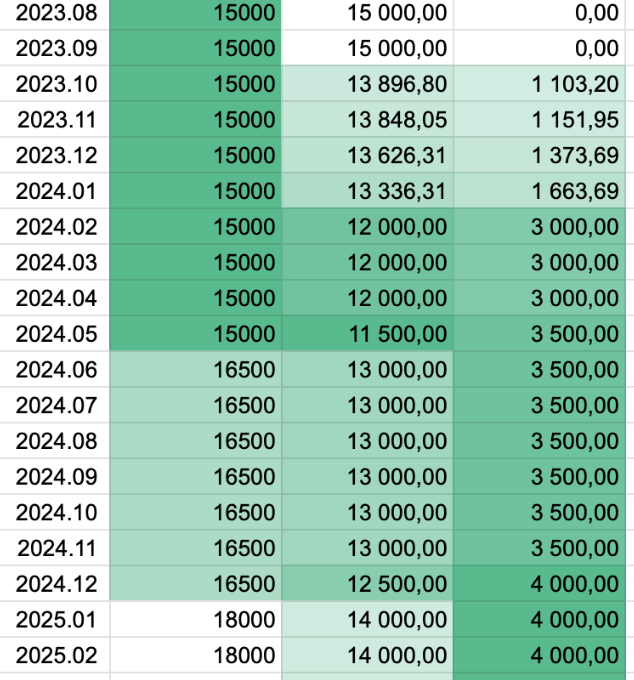
This is actually closer to how I set up my conditional formatting in Sheets. I generally tell it to figure out the value range itself. So as new values are added, the max/min are always the same color.