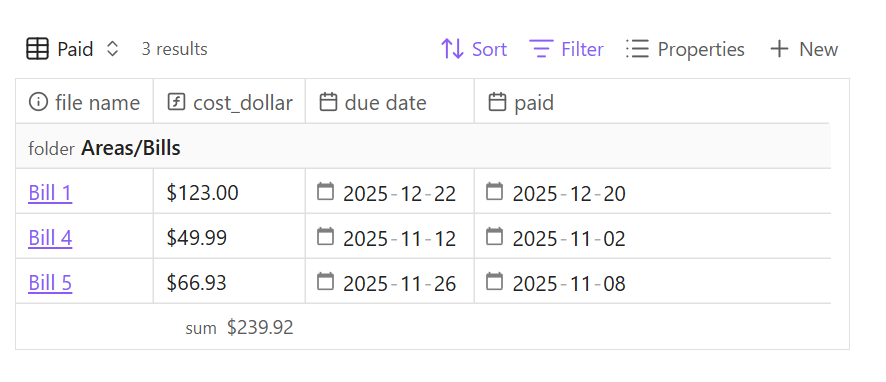
This means that I can not “summarize” my cost_dollar(sum) field easily, the same way a number field is able to sum() totals up/down.
Things I have tried
I looked around on the help site for info, it’s where I got the formula for my cost_dollar function. I also searched a few times for similar results but I’m sure I’m missing some foundational element here, any help would be appreciated.
The reason your “Sum” function doesn’t work is that the “filter” clause, instead of turning “strings which are numbers prefixed by dollar signs” into “the number portions, as numbers”, it just removes from the list any element that isn’t an unadorned number.
Instead of “filter”, try using “map”. Inside the parentheses, you want an expression that takes a string, strips off the dollar sign, and converts the result into a Number property. Then the input to the “reduce” function will be a List of Number values.
There are multiple ways to go about it. A mapped and filtered reduce() could also work.
Or if you’re feeling frisky, you could CSS the dollar sign into the column by the formula name or property name. Then the summary would be a simple values.sum().round(2) with—if necessary—a filter for non-numbers.
If you can’t get it to work for your specific case, then give relevant examples of your YAML and actual base formula(s) in order for people to help out.
Hopefully this helps explain what I’m doing, the field “cost” is a number, the field “cost_dollar” is a function, and for whatever reason every time I plug in anything mentioned so far, I do not have a working result. For instance, this last comment from @dawni resulted in sum() nuking the results and the trailing tofixed being dropped. If I delete both the last two parts of that I see my two numbers with dollar signs in the summaries like so:
So I kept trying to figure out why you reported this as working but it wasn’t working for me, it’s because you’re on the development version, and I was not.
Anyway, after fixing two lines in the base file, namely:
Also, you never mentioned that you changed the cost_dollar formula, which was part of the issue,
AND upgrading to the development version resulted in a solution for me.
Um, that reads to me like you’re blaming me for something? The two lines you said you fixed are the exact lines I gave you in the full base to copy-paste. If you then changed them further to make them work for you, then right on.
But it sounds like with the help of people in this thread, you now have a solution. So that’s good.