<!--
Starting from scratch, what are the steps to make the bug happen?
The fewer the steps, the better.
Type below: -->


1. Create a new note in sandbox vault (or any vault with no plugins/default theme)
2. Add this exact content:

# 프로젝트 계획
## 1. AWS Network Firewall 구축 및 IAM 규칙 학습
## 2. 보안 대시보드 구축
## 3. Terraform Provider
## 4. Golang 백엔드 학습 및 MVC 익히기
## 5. k8s 구성
## 6. MSA를 통한 시냅스 배포 시도

3. Place cursor at the end of line 6 (after "시도")
4. Press up arrow key repeatedly
Did you follow the troubleshooting guide? [Y/N]
<!--
Did you try the above steps in the sandbox vault (or just any vault started in restricted mode, no snippets and default theme)?
It's gonna break our hearts to discard this bug report if you didn't do it! Please!
-->
Y - Tested in sandbox vault with no plugins, no CSS snippets, and default theme. Issue still occurs.
Expected result
<!--
What do you expect to see after carrying out the steps above?
-->
Pressing up arrow key should move cursor to the immediately previous line (line 5, then line 4, etc.)
Actual result
<!-- Instead of the expected result, what happened? -->
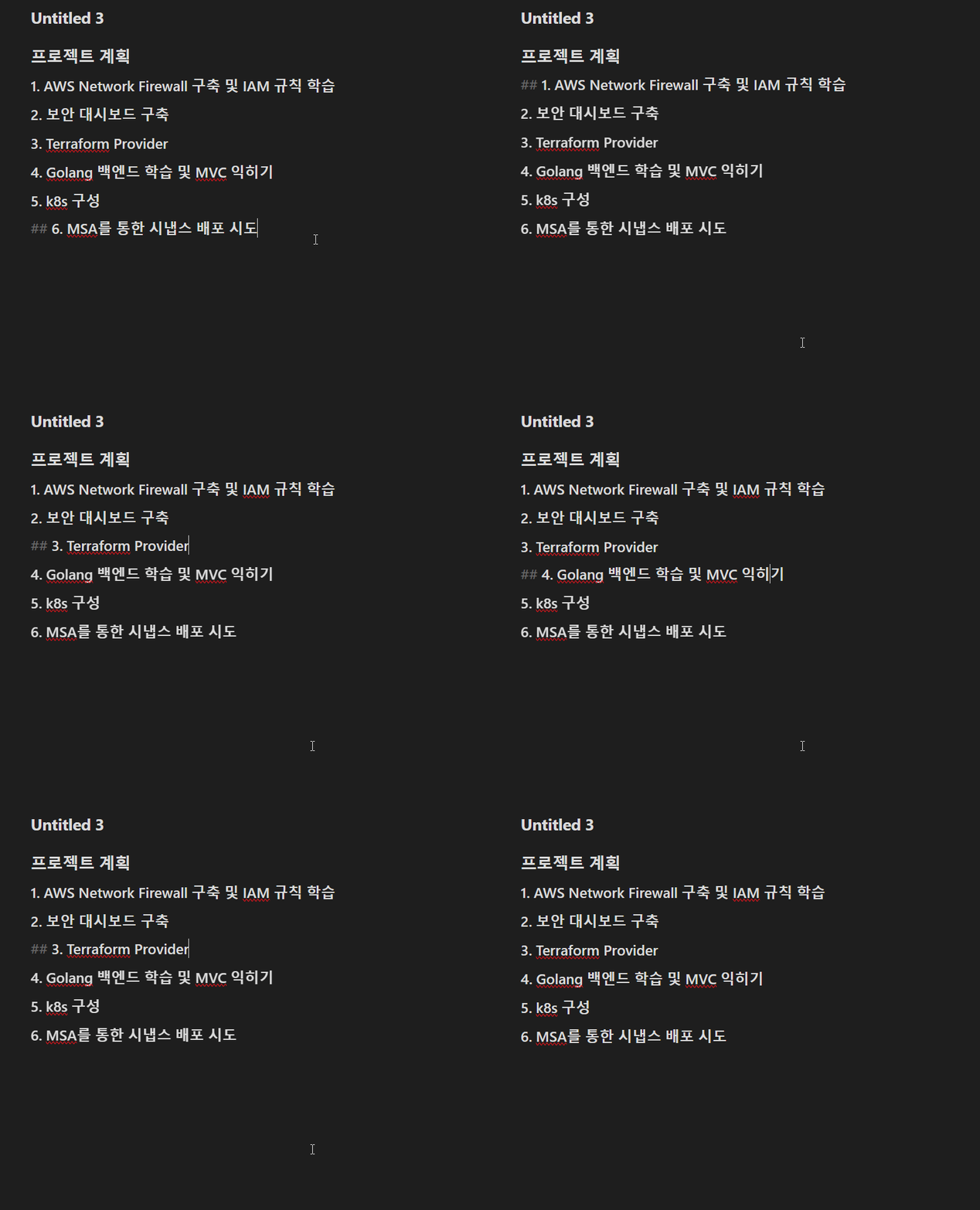
Cursor jumps irregularly:

* From line 6 → jumps to line 2
* From line 2 → jumps to line 1
* From line 1 → jumps to heading marker (`##`)
* From heading marker → jumps to title text
  Additionally, clicking on line 5 (“k8s 구성”) does not respond - cursor does not move to that line.
Environment
<!-- Paste your debug info below, which can be accessed by Command Palette (Ctrl/Cmd-P on Desktop, Swipe down from the top on mobile) enter "Show debug info", and click "Copy to clipboard". -->
SYSTEM INFO:Obsidian version: v1.10.6Installer version: v1.10.3Operating system: Darwin Kernel Version 24.6.0: Mon Jul 14 11:30:29 PDT 2025; root:xnu-11417.140.69~1/RELEASE_ARM64_T6000 24.6.0Login status: logged inLanguage: koCatalyst license: noneInsider build toggle: offLive preview: onBase theme: adapt to systemCommunity theme: Cupertino v3.0.6Snippets enabled: 2Restricted mode: offPlugins installed: 12Plugins enabled: 61: Execute Code v1.12.02: Code Styler v1.1.73: Calendar v1.5.104: Excalidraw v2.17.25: Book Search v0.7.56: Dataview v0.5.68RECOMMENDATIONS:Custom theme and snippets: for cosmetic issues, please first try updating your theme and disabling your snippets. If still not fixed, please try to make the issue happen in the Sandbox Vault or disable community theme and snippets.Community plugins: for bugs, please first try updating all your plugins to latest. If still not fixed, please try to make the issue happen in the Sandbox Vault or disable community plugins.
Additional information
<!--
Anything else you think would help our investigation, like a screenshot or a log file?
You can drag and drop screenshots to this box.
For large amount of text, try putting them into something like Pastebin and add link here as `inline code`.
For videos, upload them somewhere and add link here as `inline code`.
-->