I use a lot of made up names when writing. While I’m ludicrously bad at remembering names.
I have dedicated lookup-documents for characters and places and such, which helps in planning and to decide if a character would say a certain thing, and such.
But my problem here is just the names themselves, when I’m in a writing flow. I scrolled back about fifty times the other day, just to look up “what exactly was his name again” and how it’s spelled, which interrupt the flow immensely.
So I’m searching for a quick hotkey-based lookup-table. Like a personal per-document dictionary/word-bank.
Like when you use tags in Obsidian. Type # and a list of your tags pop up.
Which I’ve tried use for this purpose, but since tags are vault-wide and #-coded it didn’t help.
But basically like tabs, except:
-Isolated to document (or folder) instead of vault wide.
-Not inserting code in the text (like # ).
-Not limited to 1 word without spaces.
-Preferably referencing another document in which the “tags”/names/dictionary are listed.
Worse, but good enough-version: Hotkey that just pops up another document in a compact way.
Anyone know any plug-in that could fit this description?
Or other solutions for the same issue. (I’ve also tried using footnotes and displaying them in the popout-drawer, it works, but it’s very clunky for this purpose)
You could create a Bases query which you keep in the sidebar and assign excalidraw/tag to a headshot or a characteristic of the figure using Visual PKM.
You could even use that for a general plot canvas, chapter by chapter or whatever.
Otherwise a focused tag with spaces in it would be any property like:
characteristics:
  - fatty
  - talks too much
  - vivacious
But tags can be used with hypens to subtitute for spaces. I think tags are more general. A dedicated property is better.
Again, use of Bases should be best. You can combine this approach with headshots/icons you easily identify with visually.
BTW, you need to add auto-export for Excalidraw; Bases cannot show native Exc. images.
If the character/item is in a note title or alias, it will show up when you start typing [[location name]].
From there, you could either insert the link (if that’s what you want), insert the link then remove the brackets (for text only), or simply note the spelling then Esc or Backspace out to type it yourself.
If you keep the links in your notes but need to export without the links, you could add that as a step in a document converter.
Thank you for your suggestions.
Bases I have a hard time understanding, don’t even understand them or their use when looking at explanation videos. Most likely since it’s outside my general use case.
The links seems to search whole vault, so same issue as tags.
It feels like I’ve searched every slightly relevant word I can think of in community plugins and looked at hundreds of plugins last couple of hours hehe.
The ones I’ve landed on, neither perfect, but will have to do is:
Clipboard Manager - Will have to copy relevant names of the chapter/section at every time at the begging of the writing session, then hotkey to get a popup list of them when I forget.
or
Hanko - Hotkey/Right-click register the relevant names into Hanko and get a list of the names with another hotkey or right click I can paste from. No need to re-do every new writing session. But if I want to write another part or story, I will have to clean the database and re-do.
Hanko seems almost exactly what I’m looking for, If it was fledged out to have multiple databases with per-document assignment possibilities.
Looks like you are looking for a text autocomplete solution.
Also this is a good free option
If those don’t work, at least you have something to look up, text expand/autocomplete.
But, I think a better solution is a way to easy see/lookup words in the document.
You can limit Obsidian search to a single document.
file: "Manuscript" %%
Will find comments in the Manuscript document
file: "Manuscript" ==
Shows highlights
Search for whatever. I use special characters to bookmark places in my document.
^ark for character ark moments
^setup
^mark
or just character names
You can also use cntl+f to search the document.
You can also embed searches into a separate document to create a navigation document. With embed searches you can create multiple listings. Show headings, comments, specific names, locations, or anything you may repeat and want to bookmark.
Those are great suggestions. I tried Text Autocomplete, but couldn’t find a way to turn off the base-dictionary.
But found an alternative that seems to work well for my use, at least on surface level testing.
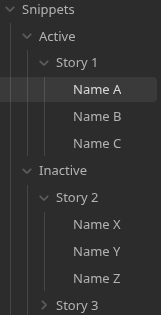
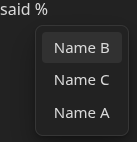
Type / (or change it, % for me) to pop up notes from a dedicated folder and pastes its content.
A little heavy to make a note for each name, but seems quite simple when done since it also works in subfolders of the dedicated folder.
So I just need to move “Story 1” folder from the dedicated “snippet”-folder to a passive one and “Story 2” folder into the active one if I’m gonna write on Story 2 instead.