It’s fascinating to see how lawyers are adopting knowledge management tools like Obsidian for their work. While I don’t have specific insights, it’s clear that these tools can be valuable for legal practitioners.
I use it primarily for maintaining a chron file of case notes. I do have Hookmark links to my Dropbox folders in Obsidian, primarily for easy reference while I’m making a case note. But as someone else noted, most legal files are pdf and Microsoft office docs, which I’ve not really found a way to efficiently manage in Obsidian. I annotate pdf’s in Acrobat, hookmark a URL link to insert into a note in Obsidian, and use it that way.
I miss Casemap still, but not enough to go back to using Windows. I’ve tried DEVONthink but they lost me when they failed to get their database structure modified in time for a major OS X change 2 or 3 years ago, and my database links all broke. I’ll never use any product that uses a proprietary database system again. I am using Obsidian because I know I can always access my files no matter what happens.
Here’s an update 4.5 years after my prior contribution to this thread! 
I’m still working in-house, and have been using Obsidian more and more, both at home and at work (different machines, separate vaults). I did a sprint upgrading my workflow recently, and can share these results. I don’t think much of this is specific to practicing law. Most of it should work for any knowledge worker with a lot of projects, meetings, and tasks!
Key plugins
Note types
- Daily notes
- Matter notes
- Meeting notes
How I use daily notes
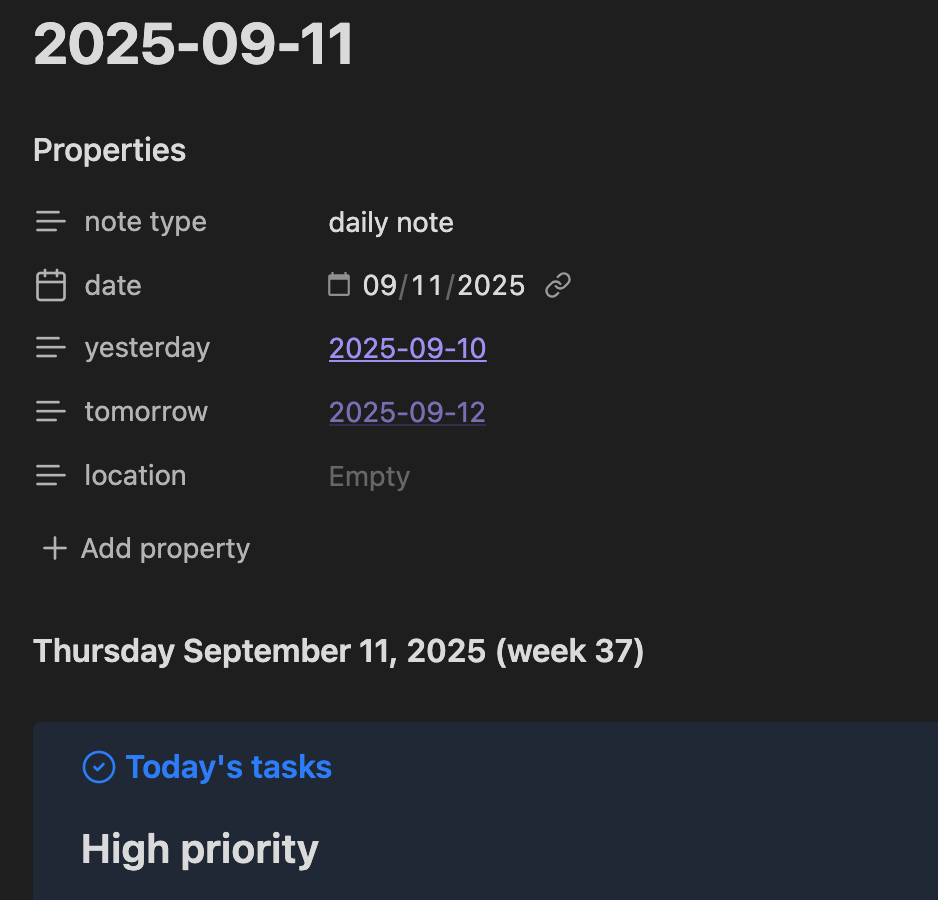
After much fiddling productive experimentation, I’ve settled on a template with these sections that help me stay organized and not overwhelmed:
- “Today’s tasks” is a Tasks plugin query that lists tasks that I need to see today (due date, start date, or scheduled date on or before today, etc.), grouped by priority. This is in a colorful callout box so it’s easy to get back to.
- “Log” is a concise bulleted list. It’s where small notes and stray thoughts go throughout the day, if they don’t clearly belong somewhere else, as well as a rough log of what I worked on during the day. This is actually the only part of the note that’s not automatically populated.
- “Today’s Notes” is a Dataview list of notes that I created that day.
- “Today’s Web Clippings” is the same thing, but for stuff from the Web Clipper.
- “Completed Today” is another Tasks query, but of the tasks that I completed today. Always feels good to see this fill up!
- “Daily tasks” is a short list of tasks that I do every day. These go in the template so they will show up new every day. Helps for remembering to take medications, etc.
- The template also has
yesterdayandtomorrowproperties that automatically link to the prior and next day’s daily notes, so it’s easy to flip through a whole week.
Here’s the top of a note for illustration:
Matter notes and Bases views
I work on a few different kinds of matters, many of which share attributes. I’ve landed on metadata fields for these, and they go into a matter template. With that in place, now I can use Bases to make useful lists of each type of matter, so I can see them all at once, their high-level status, filter by common facts, etc. This is pretty basic, but it’s been super useful. I love how fluent working with Bases is.
The substance of a matter note varies, but I usually write an overview of the facts and legal issues, and then start logging chronological notes as I work on it. I like hotkeys, so Ctrl-2 followed by Ctrl-D gets me a level-2 heading with today’s date. These notes can get long, so I fold sections to hide old stuff I don’t need to see right now.
Meeting notes
I’m in a lot of meetings. Like, really a lot. Each meeting of substance gets its own note, using a simple meeting-note template with properties for who was in the meeting, which matter it was about, etc. If the meeting was matter-specific, I’ll stick a link to this meeting note into the matter’s note. I could probably do something cooler like a Base for these related notes  but the backlinks display does some of this work for me already.
Tasks
The Tasks plugin has been a game changer. I feel like I owe the developers not just a coffee, but a whole cake. I have hundreds of open tasks at any time, so being able to specify due dates, capture them wherever, and know I can actually find them later is huge.
I capture tasks in a few different places:
- Matter notes is the best place to capture matter-specific tasks when I’m doing deeper work.
- I capture tasks live during meetings in the meeting notes.
- Anything else can go into the day’s daily note.
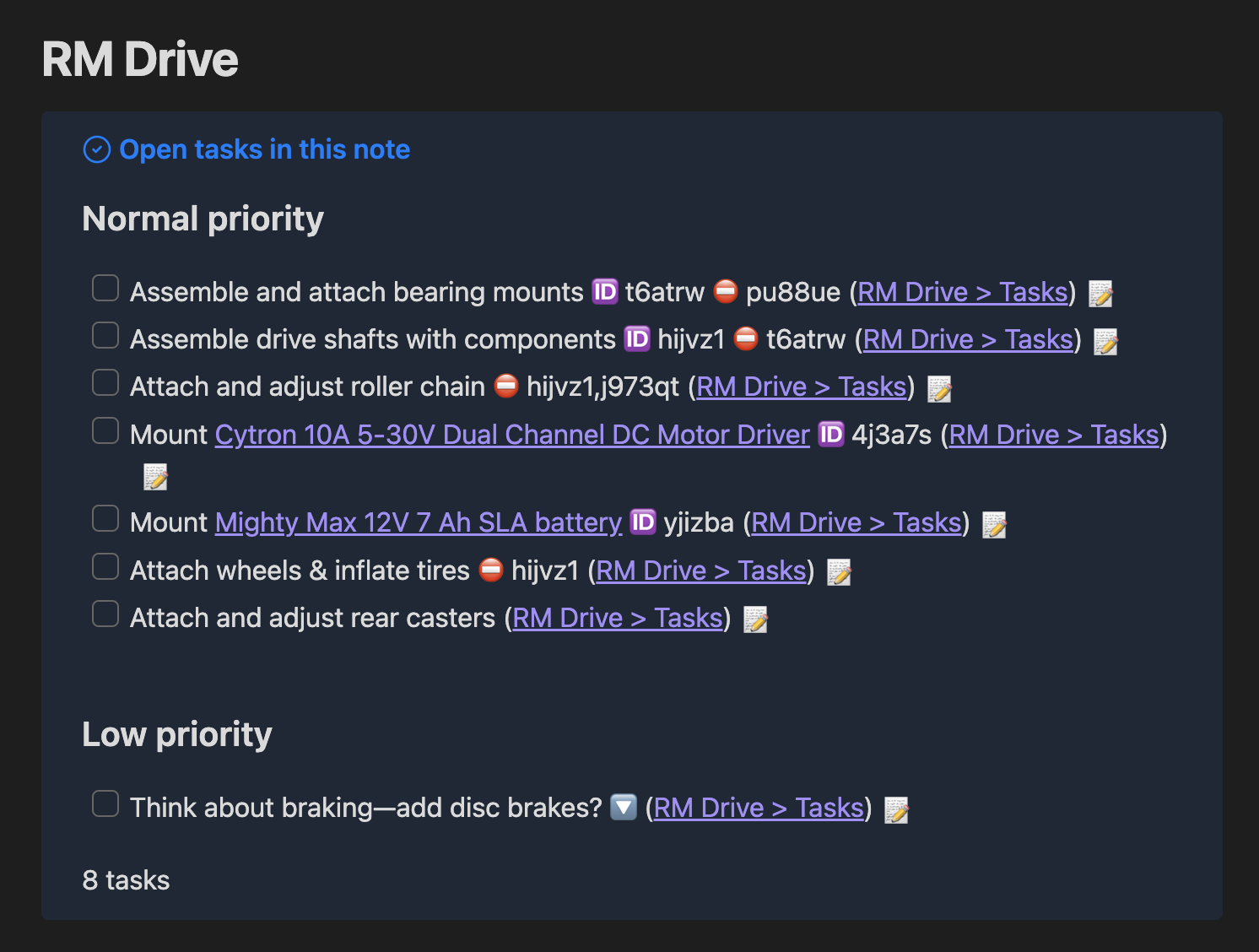
One tremendous thing that I’ve added to the top of my matter and meeting templates is a block called “Open tasks in this note.” As the name suggests, it’s a Dataview list of tasks in that note that are not completed. This helps me stay in the flow of a meeting or writing something up, without having to scroll around and find a list of tasks to add to. I just write the task wherever my cursor is, and it shows up at the top of the note. Again, seems simple, but it’s huge. And if I put a date on the task, I know it will pop up in my daily note at the appropriate time. These are all great mental load reducers and flow promoters!
[!TODO] Open tasks in this note
path includes {{query.file.path}}
not done
group by priority
Example from my personal vault, part of a robotics project:
e-reader hack
I recently got a large e-ink tablet. It’s fantastic for reading cases and journal articles. One nifty hack is if I want to read a longer web page, I’ll use the Web Clipper, and then run the Pandoc plugin on the resulting note to convert it to an ePub file. The plugin is then configured to save the ePub file to a folder that syncs right over to the tablet via Syncthing. Rad.
5 Likes
ISTM, something like that for a bar exam would have a very limited shelf life in a practicing lawyer’s workflow. (E.g., I haven’t read International Shoe, Ships Peerless or Palsgraf since law school and have no reason to now.) As for what I use in my practice now? It’s called Westlaw.
I use Obsidian as a file manager for active cases only. It’s too much work to maintain on an ongoing basis, and most of my legal research is “one off.”
There was a time when I maintained a fairly comprehensive research database of interrelated issues and legal authorities. What I found was I hardly ever returned to it once I created the links. Which is a risk in the use of “second brain” type note applications like Obsidian, Notion, and OneNote. Basically, the amount of work required to maintain the tool far outpaces the amount of work saved in using the tool. While resources like Westlaw and Lexis are not cheap, they are very robust and save me enormous amounts of time and effort.
YMMV.
1 Like
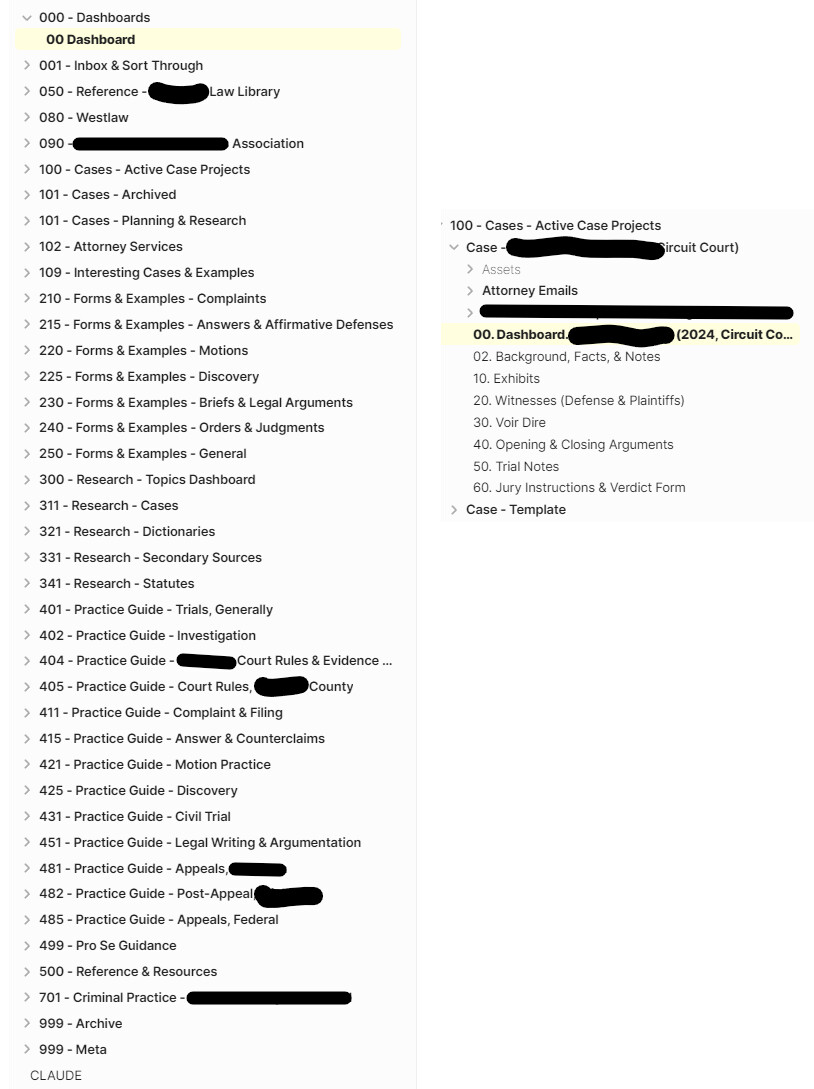
I struggled with how to organize or keep track of my notes, interesting quotes & opinions, my current case data (facts, evidence, motions, etc.), forms & examples, etc that I’ve acquired. Here’s what I’m working with today. It’s a work in progress, and I’m always tweaking and refining things as I go.
I use Dataview and PDF+ heavily. I use Anthropic Claude to help organize things - and lately to create the case brief pages from a downloaded pdf file.
This is a simple example of a case note in my 311 section. The topic/issue front matter is used to generate a “research topic dashboard” under the 300 section. In this case I also use pdf+ to include and annotate the pdf I downloaded on the opinion from westlaw/lexis/state court.
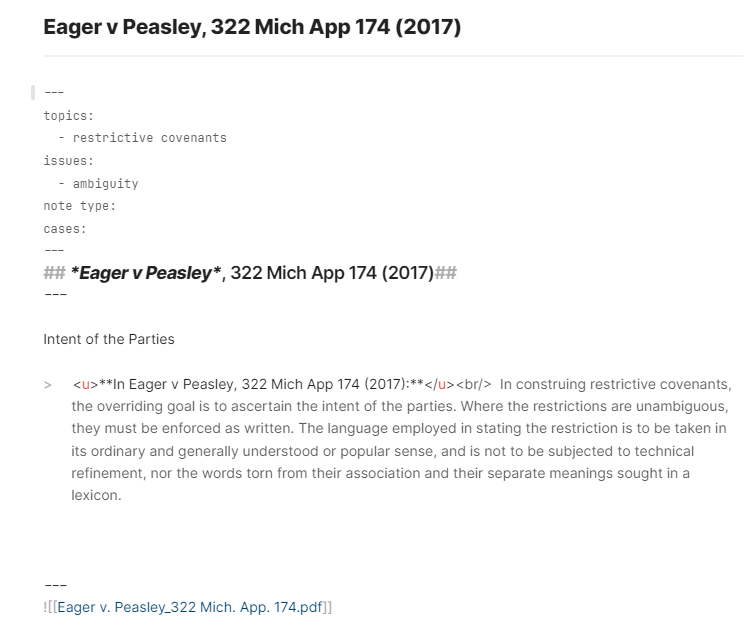
To reiterate what others have said, tracking case law and case briefs doesn’t seem like it’d be helpful for bar exam purposes. Law School tracking didn’t seem to be what people were looking for. For those who have ongoing access to Westlaw/Lexis/Bloomberg, maybe you don’t need to download the PDF files. But I’ve found that there are some foundational cases with great quotes that are worth keeping track of… so I have the pdf file and annotate to pull those quotes.
Professionals also have Clio or Case Map or other tools for tracking these documents. Personally, I found those tools obtuse and clunky. Anything “practice management” focused is too bulky for what my needs are.
Hopefully this helps. I like this discussion and find the organizing of this kind of data interesting. Thanks!
1 Like