Sonar is a local-first semantic search + agentic chat plugin for Obsidian, powered by llama.cpp. Everything runs on your device: no cloud services, no API keys, and no data leaving your machine.
Retrieval combines embeddings with BM25, with optional cross-encoder reranking when you want higher precision.
The chat is agentic: it can iteratively use tools to search your vault, read files, and edit notes when needed. You can also add your own tools as small JavaScript modules.
I built this for myself because I wanted to query my vault naturally without relying on manual organization like tagging or folder structure — and without sending my data anywhere. Sharing in case it’s useful to others.
Features
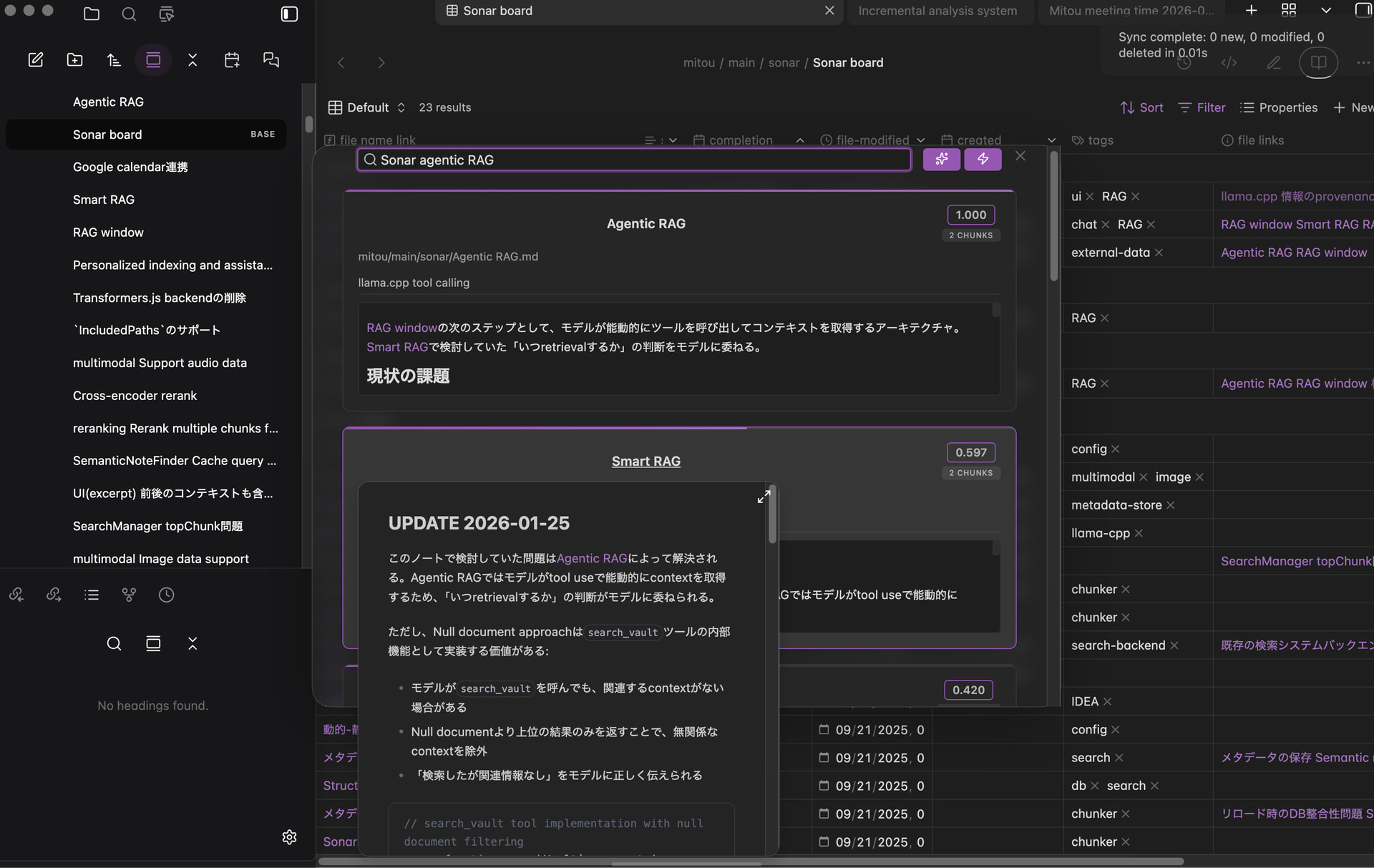
Semantic note finder
Find notes by meaning, not just keywords. Sonar uses hybrid retrieval (vector embeddings + BM25) with optional cross-encoder reranking.
Searching for input query with reranking enabled
Related notes view
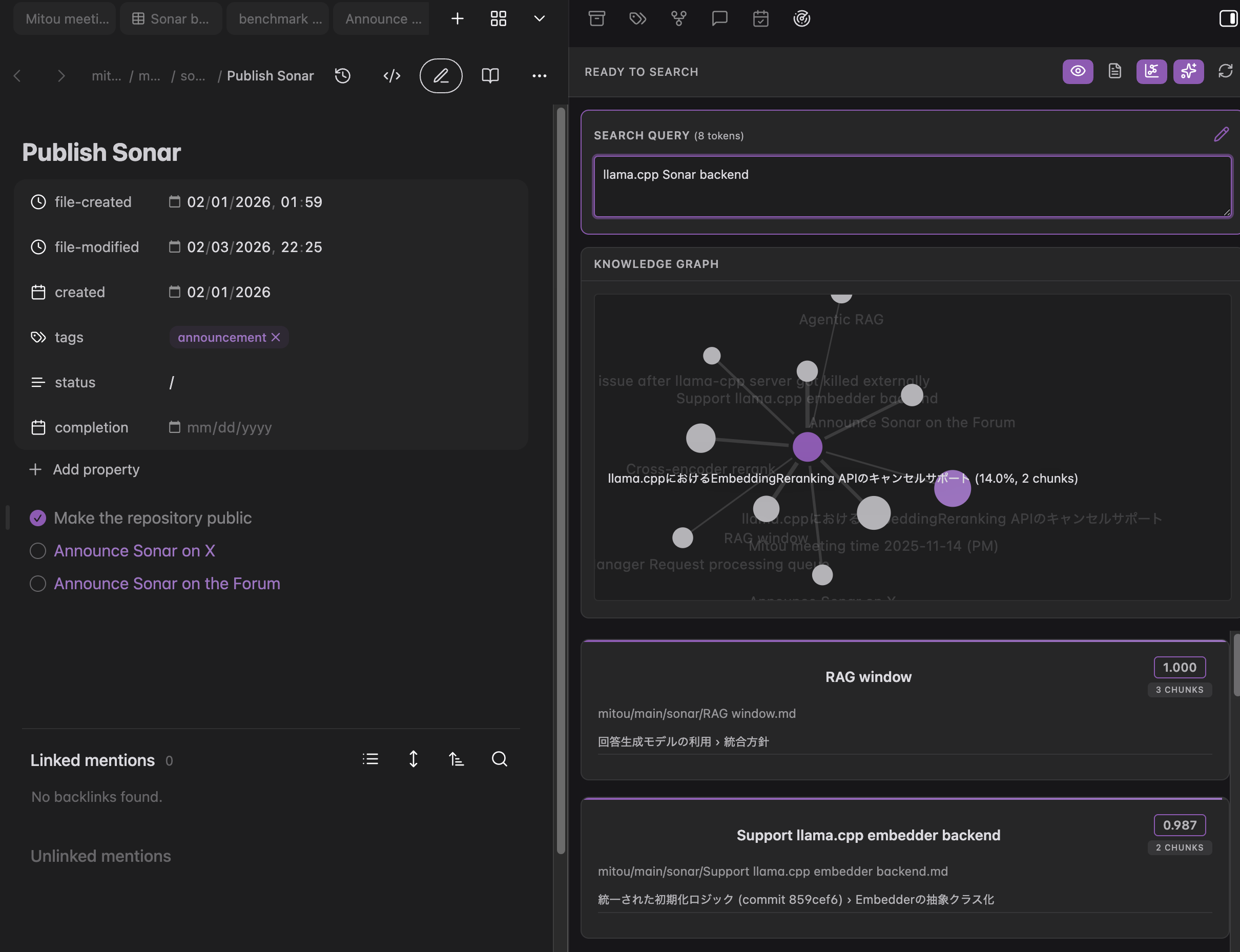
Surface related notes for your current note as you scroll, move the cursor, or switch files. An optional graph view helps you see relationships at a glance.
Auto-following mode: Related notes based on current cursor position
Edit mode: Manually editing query with knowledge graph visualization

Agentic AI chat
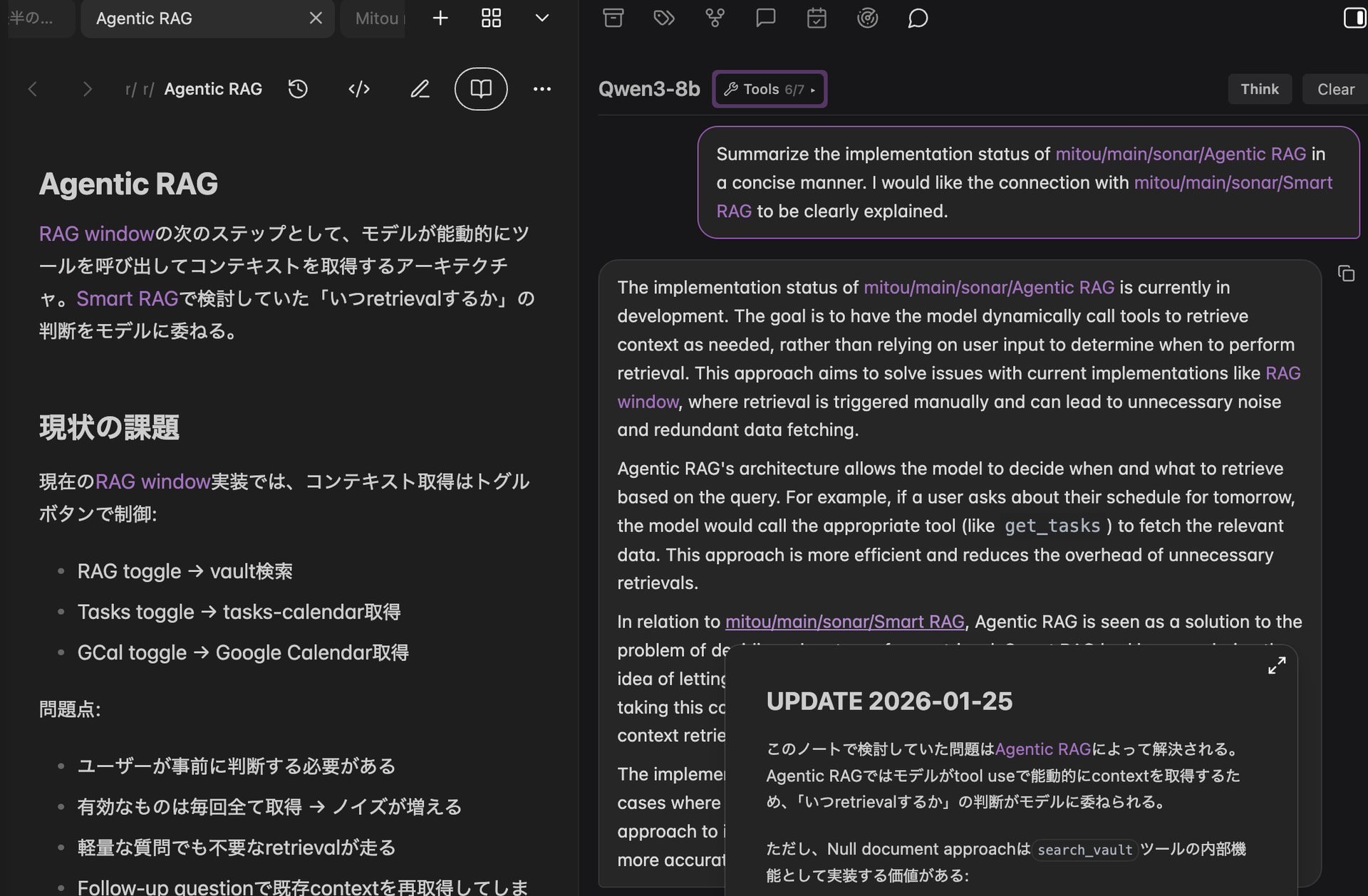
Chat with an assistant grounded in your vault. It can search, read, and edit notes via tool use when needed.
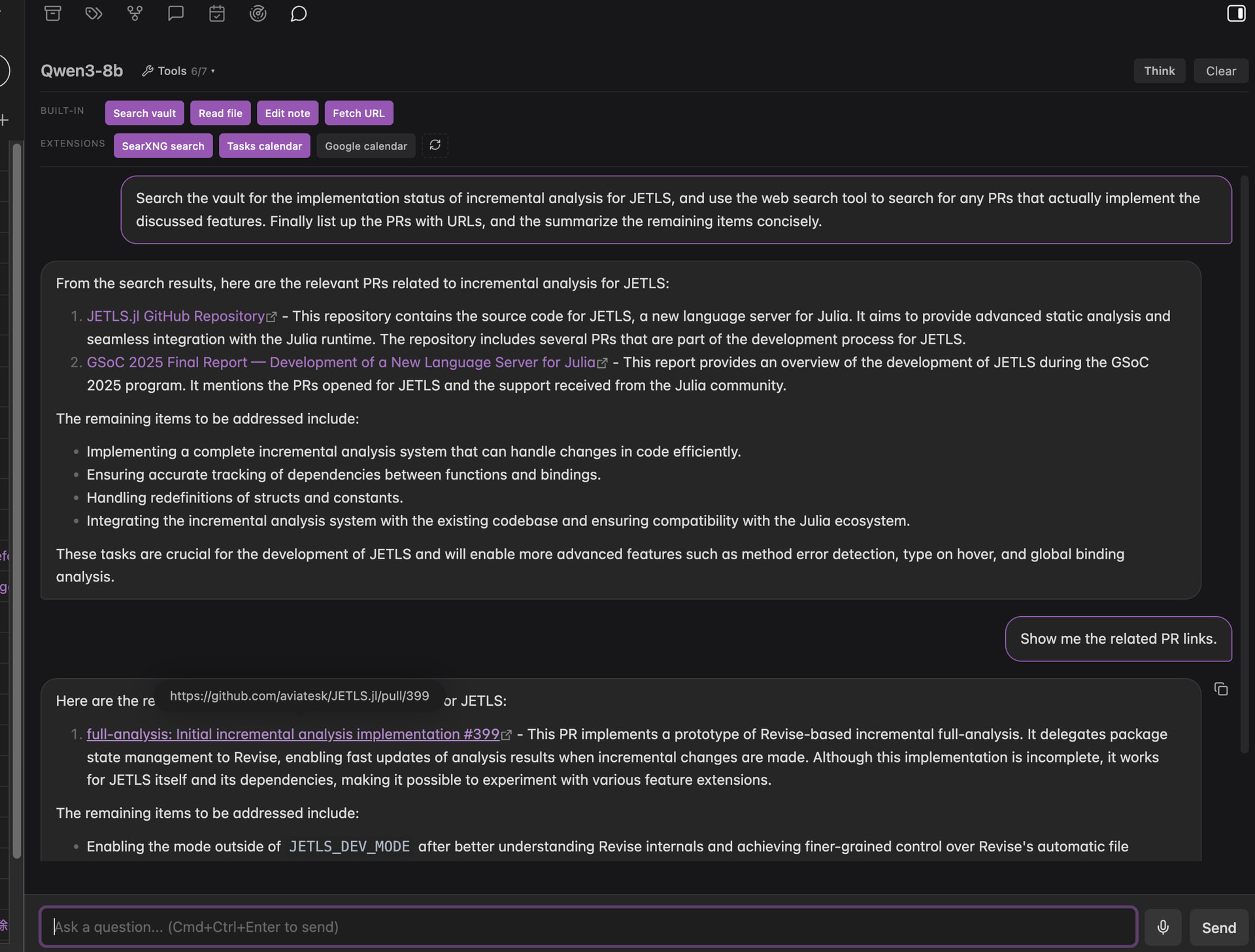
Extend it with custom tools via small JavaScript modules — see example tools for SearXNG web search and Google Calendar integration.[1]
Vault integration: Search your knowledge base and get grounded answers
Extension tools: Agent performs web search via SearXNG
Automatic indexing
Sonar keeps an index up to date as you create and edit notes. It supports Markdown, PDFs, and audio (with local transcription via whisper.cpp).
Why Sonar?
Sonar is built for local-first semantic search. All core features — embedding, reranking, and chat — run on your machine, so your notes never leave your device. There are no API fees or subscriptions, and you can swap out models (embedders, rerankers, chat LLMs) to suit your hardware or preferences.
On the technical side:
- Hybrid retrieval combines embeddings with BM25 for better coverage than vector-only search
- Cross-encoder reranking adds an optional post-ranking step for higher precision
- Agentic chat goes beyond simple RAG — the assistant can iteratively search and edit notes using tools
How it compares to similar tools
Copilot is provider-agnostic but often relies on cloud providers (or Copilot Plus) for top-end quality. Sonar is built to deliver strong quality locally from day one, using hybrid retrieval, optional reranking, and on-device chat via llama.cpp.
Smart Connections ships with a built-in local embedding model powered by Transformers.js. Sonar takes a different approach: it runs embeddings and optional reranking through an external llama.cpp runtime.
This adds installation complexity, but it makes it practical to run GGUF embedding + cross-encoder reranker models locally, and avoids a few Transformers.js-specific issues I ran into during benchmarking (including embedding instability and WebGPU reranking problems)[2]. Sonar also includes benchmark suites (retrieval-bench / rag-bench) for evaluating retrieval and RAG quality.
Proprietary standalone apps like Constella keep implementation details private, and local vs. hosted behavior can vary by mode. Sonar is fully open with a transparent stack (llama.cpp + explicit model choices) — you can verify exactly what runs on your machine.
Benchmark results
Benchmarked against the CRAG dataset (Meta’s comprehensive RAG benchmark), Sonar with a local 8B model reached accuracy comparable to a cloud configuration using OpenAI’s embedding and GPT-4.1-mini:
| Configuration | Accuracy | Hallucination | Score[3] |
|---|---|---|---|
| Sonar (BGE-M3 + hybrid search + reranking + Qwen3-8B) | 43% | 32% | 11% |
| Cloud (text-embedding-3-large + vector search + GPT-4.1-mini) | 42% | 35% | 7% |
In this setup, Sonar’s hybrid retrieval (BM25 + vector) with cross-encoder reranking enables a small local model to match cloud performance, with 3% lower hallucination rate. See rag-bench/README.md for methodology and detailed results.
See also retrieval-bench for document retrieval accuracy evaluation against Elasticsearch and Weaviate.
Requirements
Sonar requires llama.cpp installed locally.
All embedding, reranking, and LLM inference runs on your machine, so resource requirements depend on your model configuration.
For the default models, the following specifications are recommended:
Installation
Not yet in the community plugins list — install via BRAT or manually from GitHub. See the README for complete setup instructions.
Feedback welcome
This is still an early release. If something is confusing, too slow, or just feels “off,” I’d genuinely like to know — bug reports and feature requests are welcome in GitHub Issues.
Sonar itself never sends your vault anywhere. Any network access only happens if you install/enable tools that make external requests, and only the inputs you pass to those tools are sent. ↩︎
I initially prototyped Sonar on Transformers.js, but ran into multiple issues during benchmarking: invalid embeddings on WebGPU for some models, NaN embeddings at batch boundaries on WASM, and a WebGPU issue affecting sequence-classification rerankers (same output across documents / CPU fallback too slow). Details: obsidian-sonar/retrieval-bench at master · aviatesk/obsidian-sonar · GitHub and Possible webgpu bug in AutoModelForSequenceClassification · Issue #1181 · huggingface/transformers.js · GitHub ↩︎
Score = Accuracy − Hallucination. A system that always declines to answer scores 0; one that hallucinates scores negative. ↩︎
Default models (BGE-M3, BGE Reranker v2-m3, Qwen3-8B) need substantial memory. Configure smaller models to run on less RAM, or larger models on powerful hardware for improved accuracy. ↩︎
GPU acceleration significantly improves performance for both indexing and chat. Without a GPU, these operations will be noticeably slower but still functional. ↩︎